News
This constantly updated list features the latest and most important news articles, ranked in order of significance. The top stories highlight major developments, breaking news, and critical updates across various topics, ensuring you stay informed about the most pressing issues. As new articles are added, the list adapts to reflect the latest priorities, keeping the most impactful stories at the forefront. Whether it’s global events, technology breakthroughs, or industry trends, this dynamic list ensures you always have access to the most relevant and timely information.
-

Picture from ichef.bbci.co.uk
Rank 11101 -

Picture from ichef.bbci.co.uk
Rank 11102 -

Picture from ichef.bbci.co.uk
Rank 11103 -

Picture from ichef.bbci.co.uk
Rank 11104 -

Picture from ichef.bbci.co.uk
Rank 11105 -
Picture from cdn.mos.cms.futurecdn.net
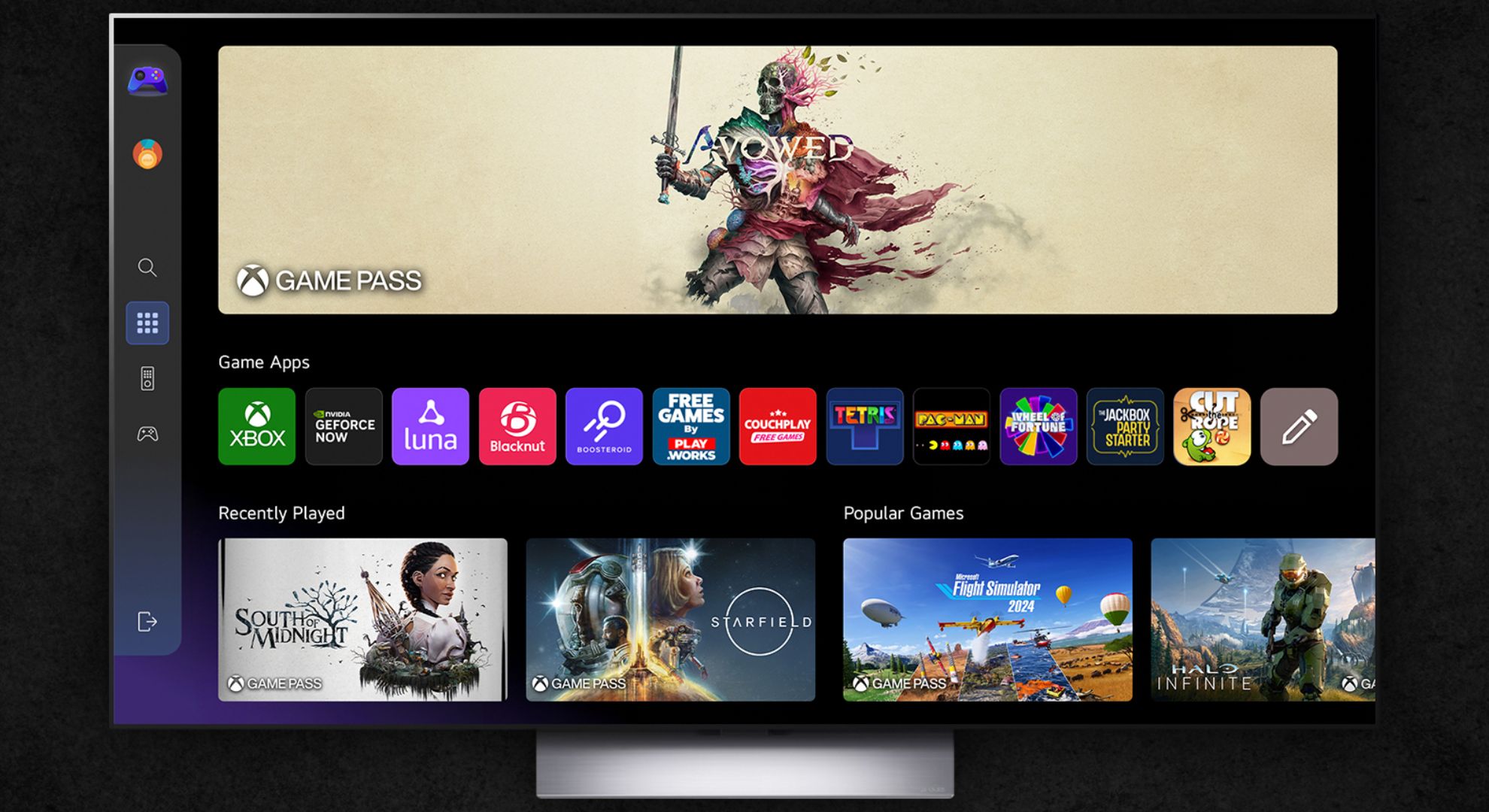
Rank 11106LG TVs are getting Xbox cloud gamingThe app is coming to WebOS 24-compatible TVsAll you’ll need is Xbox Game Pass Ultimate and a controller
Microsoft has been on a mission as of late to brand everything from here to there an Xbox, mostly off the back of the company’s cloud streaming efforts. The latest Xbox? Why that’s your LG TV of course.LG’s latest update to its TV operating system (first teased back in January) brings with it the Xbox app, albeit currently in a beta version. The result means that you can now play any cloud-streamed game on your display without a console. All you’ll need is an Xbox controller and a Game Pass Ultimate subscription to enable cloud streaming.
If you have a WebOS 24 or WebOS 25-compatible TV (to make it easier, if your LG TV launched in 2022 or after, or if it’s a 2021 StanbyME display), you’ll be able to install the Xbox app right away. There won’t be any downloads required except for the app itself. The update will roll out to StanByMe TVs after other WebOS 24-compatible models.This isn’t a first for game streaming mind you: Samsung TVs have supported the Xbox cloud gaming app since 2022 and Amazon Fire TV devices have supported it since 2024.With your Xbox controller in hand and Game Pass Ultimate subscription active, you’ll be able to play games like The Elder Scrolls IV: Oblivion Remastered, Minecraft, Call of Duty: Black Ops 6 and more from just your TV – just head to the Gaming Portal on your LG display and launch the Xbox app to get started.Though be prepared for some quality issues. A fast internet connection will improve your cloud gaming experience massively, improving streaming quality and latency alike.Here in Australia, I’ve personally had a lot of issues with cloud streaming Xbox games on my PC and Samsung projector with my 100Mbps-capable internet plan, but obviously this might be a non-issue for your household.LG’s TVs are mighty impressive. The LG C4 is currently the top model on TechRadar’s list of the best TVs and the incoming flagship LG G5 scored a whopping five stars in our review. The mid-range LG C5 also scored an impressive five stars, remaining a top pick for folks craving a high-end screen without a gigantic price (the C5 will likely replace the C4 soon on our list).If you care about having fast and responsive gameplay in the lounge room, you may be better off buying an Xbox console, such as the affordable Series S or powerful Series X, or alternatively you could pick up a PlayStation 5.But for casual gaming where you might only play a handful of titles, if you’re looking for something to entertain the kids, or if you simply don’t want to pay the full price for a game, Xbox cloud gaming might be worth considering.
You might also like...
The Elder Scrolls 4: Oblivion Remastered is available right now on PC, PS5, Xbox Series X, and Series SBest Xbox Game Pass games to play in 2025The best LG TVs 2025, all tested by our reviewers
-

Picture from ichef.bbci.co.uk
Rank 11107 -

Picture from ichef.bbci.co.uk
Rank 11108 -

Picture from ichef.bbci.co.uk
Rank 11109 -
Picture from o.aolcdn.com
Rank 11110The day has arrived — Nintendo Switch 2 pre-orders are now open in North America. The new console will be widely available on June 5, but if you signed up on Nintendo’s site in anticipate of pre-orders opening on April 24, you should have received (or will receive) an email that will give you access to place your order via Nintendo. In addition to direct from Nintendo, participating retailers will also have the $450 console and the $500 Mario Kart World bundle for pre-order. Those include GameStop, Walmart, Best Buy, Target and others.
How to pre-order the Nintendo Switch 2
Along with Nintendo, third-party retailers like Best Buy, GameStop, Walmart and Target have confirmed their pre-orders open on April 24. GameStop said it will be accepting pre-orders both in stores and online, the latter starting at 11AM ET that day. Best Buy, Walmart and Target pre-orders will open at midnight. We also expect it to be available from Amazon, but links are not live on the site yet.
Pre-order Nintendo Switch 2
Amazon*
Walmart
GameStop
Best Buy
Target
Nintendo
Pre-order Nintendo Switch 2 + Mario Kart World bundle
Amazon*
Walmart
GameStop
Best Buy
Target
Nintendo
*As of midnight ET on Thursday April 24, Amazon has not listed either Switch 2 console package for sale. We will update this article with direct links when they arrive, until then we're linking to the site's Nintendo-focused hub.
How to pre-order Switch 2 accessories
The Switch 2 has a number of accessories that you can buy separately. While the console didn't get a price adjustment when Nintendo announced the new pre-order date, many of these accessories did. The new Switch 2 camera now costs $55 instead of the original $50 price tag; the new Switch 2 Pro controller costs $85 instead of $80; an extra pair of Joy-Con 2 controllers will set you back $95 instead of $90 and a Joy-Con charging grip is going for $40 instead of $35. Check out Nintendo's official statement for all of the accessory price adjustments. You can pre-order most of them at the same time that you can pre-order the Switch 2 console.
Joy-Con 2 bundle for $95
Nintendo
Amazon*
Walmart
GameStop
Best Buy
Target
Switch 2 Pro Controller for $85
Nintendo
Amazon*
Walmart
GameStop
Best Buy
Target
Switch 2 camera for $55
Nintendo
Amazon*
Walmart
GameStop
Best Buy
Target
Samsung microSD Express Card – 256GB for Nintendo Switch 2 for $60
Nintendo
Amazon*
Walmart
GameStop
Best Buy
Target
Joy-Con 2 charging grip for $40
Nintendo
Amazon*
Walmart
GameStop
Best Buy
Target
Joy-Con 2 Wheels (set of 2) for $25
Nintendo
Amazon*
Walmart
GameStop
Best Buy
Target
Switch 2 all-in-one carrying case for $85
Nintendo
Amazon*
Walmart
GameStop
Best Buy
Target
*As of midnight ET on Thursday April 24, Amazon has not listed any first-party Switch 2 accessories for sale. We will update this article with direct links when they arrive, until then we're linking to the site's Nintendo-focused hub.
More Switch 2 details
We knew from the teaser trailer for the Switch 2 that Nintendo's new hardware would be bigger and would have a new approach to the detachable Joy-Cons. The new Joy-Con 2 have a new C button, mouse controls and a built in gyroscope for tilt control. The console has a built-in mic to support a new feature called Game Chat that will let you communicate with friends in-game. The device is indeed a bit larger, with a 7.9-inch LCD screen that supports a 120Hz refresh rate, HDR and a 1080p resolution.
When docked, you'll be able to play at up to 4K on your TV, and Nintendo says it improved the consoles internal speakers as well. The new dock also has a built-in fan to keep the console cool and help maintain performance during long play sessions. The Switch 2 has dual USB-C ports for charging, and the base storage amount has increased to 256GB. The Switch 2's storage can be expanded like the previous model, but it will only work with newer microSD Express cards.
Tariffs and the Nintendo Switch 2
During its most recent Direct presentation at the start of April, Nintendo showed off more of the Switch 2 than it ever had before. That included the reveal of the April 9 pre-order opening date, in addition to the original $450 starting price. Shortly after, President Trump announced sweeping tariffs on China and other countries, prompting Nintendo to delay pre-orders in the US and Canada.
In a reversal, President Trump then announced a 90-day pause on steep “reciprocal” tariffs affecting 75 countries, but also announced that the tariff imposed on China will go up even further (currently, it's up to 245 percent for that country).
We now know that the original $450 price for the Switch 2 will remain the same in the US and Canada, but based on its official statement, it appears Nintendo is leaving the door open for potential future price increases.
We also know that Nintendo started moving some of its Switch console manufacturing to Vietnam in 2019. The reciprocal tariff for Vietnam was set to be 46 percent, but that appears to be on hold for now in favor of a 10 percent reciprocal tariff that’s now in effect for the 90-day pause period.
It has been speculated that Nintendo will boost production of Switch 2 consoles in Vietnam so it can stay on schedule, even if it sells the console at a loss in the short term. It appears the company will have to seriously ramp up production to keep up with Switch 2 demand: according to Nintendo, 2.2 million people entered the pre-order lottery in Japan alone, which is far more devices than it is expected to deliver in that region on launch day.This article originally appeared on Engadget at https://www.engadget.com/gaming/nintendo/nintendo-switch-2-pre-orders-are-available-now-at-walmart-gamestop-best-buy-and-others-starting-at-450-140931291.html?src=rss
-

Picture from ichef.bbci.co.uk
Rank 11111 -

Picture from ichef.bbci.co.uk
Rank 11112 -

Picture from ichef.bbci.co.uk
Rank 11113 -

Picture from ichef.bbci.co.uk
Rank 11114 -

Picture from ichef.bbci.co.uk
Rank 11115 -

Picture from ichef.bbci.co.uk
Rank 11116 -

Picture from ichef.bbci.co.uk
Rank 11117 -

Picture from ichef.bbci.co.uk
Rank 11118 -

Picture from ichef.bbci.co.uk
Rank 11119 -

Picture from ichef.bbci.co.uk
Rank 11120 -

Picture from ichef.bbci.co.uk
Rank 11121 -

Picture from ichef.bbci.co.uk
Rank 11122 -

Picture from ichef.bbci.co.uk
Rank 11123 -

Picture from ichef.bbci.co.uk
Rank 11124 -

Picture from ichef.bbci.co.uk
Rank 11125 -

Picture from cdn.mos.cms.futurecdn.net
Rank 11126Across the globe, 70% of data center facility leaders say their national power grid is being stretched to its limits. Now, the sustainability warning bells aren’t just ringing, they’re deafening.Behind much of this growing concern is the surging energy demand driven by artificial intelligence (AI) in data centers. To quantify the use of AI, McKinsey’s latest survey highlights that 78% of respondents say their organizations already use AI tools in at least one business function. From workplace productivity gains to life-saving capabilities such as detecting illnesses, AI innovations are second to none.Data centers, which house the computing power for AI, must now focus on supporting its growth sustainably, ensuring national grids are protected. If not, we might run out of power, leading to data center outages that affect communities and livelihoods. However, according to Cadence’s Innovation Imperative, while 88% of data center operators say they’re actively working to enhance energy efficiency, only three in ten (31%) believe that they’re doing enough.The good news is that data centers can reduce their energy impact by harnessing AI in smarter ways. AI-powered digital twins—virtual replicas of facilities—help operators shrink their environmental footprint, prevent costly outages, and finally, boost sustainability.Ultimately, the research shows that data center operators want to make a difference. The challenge is knowing where to start. The first step is uncovering where the real problems lie and what’s truly driving excess energy use.
Apprehension on Energy
Before beginning to invest in efficiency tactics, data centers must assess the challenges in their facilities.Our latest research shows that almost two-thirds (60%) of facility leaders overprovision, which is allocating more resources to a system than necessary. This is due to concerns that scaling back will cause outages. While it’s understandable that facility leaders want reliable systems, it also wastes energy, drives up their footprint, and increases operational costs.As energy needs rise to power AI, they lead to excessive overprovisioning, with immense energy waste.Another challenge that Cadence uncovered is that many data centers struggle with stranded capacity. This is another unsustainable practice, where installed capacity in the data center cannot be used, and 29% of leaders reported stranded capacity as a constraint.Picture stranded capacity like a game of Tetris, where data centers are playing five levels at the same time, trying to fit all the systems (blocks) into the data center. Operators are often unaware of doing this and can’t spot the available capacity. Thus, the facility fails to meet its design goals and has a costly impact on the planet.Furthermore, while high-density servers are great for holding immense power, their high energy requirements can create several challenges for data centers. Currently, 59% of data center operators are using high-density servers, so it is important to make sure they run properly and effectively, with as little stranded capacity and over-provisioning as possible.This is especially true with rack densities exceeding 100kW, and as high as 600kW, with the latest Rubin architecture that Nvidia presented at GTC.
Addressing These Matters is Not a “Nice-to-Have”
Tackling data center energy challenges is now critical, especially as regulatory factors come into play. This includes stricter reporting requirements, such as the EU’s Energy Efficiency Directive, which requires carbon emission reporting.Local communities are increasingly opposing data center facilities. This is primarily due to claims that such facilities consume large quantities of energy, competing for energy resources and water with the population. Recently, this has become a concern in Virginia, where some residents will soon be neighbors to a 466,000-square-foot data center.Addressing these issues requires a nuanced, multi-faceted approach. From energy reporting and thermal modeling to capacity planning and workload optimization, digital twins will play a critical role in tackling stranded capacity, reducing excessive energy use in data centers, and allowing them to trial renewable energies.
Reducing Inefficient Resource Allocation
By simulating real-time operations, digital twins enable operators to fully utilize available capacity, optimize energy consumption, and minimize the environmental impact on surrounding areas.Minimizing overprovisioning is a good place to start to reduce energy consumption. Digital twins, enhanced by AI, offer a powerful solution. Through real-time data and historical trends, operators can create a virtual environment that mirrors the physical facility. This allows them to test different scenarios, evaluate the impact of resource allocation decisions, and identify potential areas of over-provisioning.It also provides an excellent stranded capacity solution. By integrating sensors and data collection mechanisms, operators can continuously monitor the performance of various components, such as power consumption, cooling efficiency, and overprovisioning. This data can then be analyzed using predictive analytics to identify potential bottlenecks or areas of underutilization.By proactively addressing these issues, operators can optimize resource allocation and reduce stranded capacity.
Reduce, Reuse, Recycle
The transformative capabilities of digital twins do not end here. Using these tools, data centers can capture and repurpose waste heat from cooling systems for other applications, such as heating buildings or industrial processes. To do so, digital twins can replicate the physical facility and help manage the implementation of technology. This will reduce energy waste and lower overall carbon emissions.Repurposing wasted heat is important because the EU Energy Efficiency Directive mandates that data centers with a high level of energy input utilize waste heat or implement other waste heat recovery measures.In addition, the increasing heat caused by growing server density puts cooling systems under significant strain. Digital twins allow operators to model the effectiveness of alternative cooling methods and explore how these systems interact with the entire infrastructure.
Evaluating Cooling Effectiveness
Re-evaluating data center cooling is an important strategy for reducing energy consumption. Cooling is one of the most energy-intensive elements of data center operations, particularly as AI workloads increase power demands. Digital twins are making it more feasible for data centers to adopt liquid cooling, which is gathering momentum.At present, 45% of decision-makers use liquid cooling, and a further 19% plan to introduce it in the next year. This is largely because high-density server racks, intensive workloads, and increasing power densities are surpassing the capabilities of traditional air cooling. While air cooling can manage heat loads up to 20kW per rack, loads beyond 20–25kW are more efficiently and cost-effectively handled by a mix of liquid cooling and precision air cooling.Using digital twins to implement liquid cooling, data center operators can examine factors that are otherwise difficult to detect or measure, such as overall cooling efficiency. They can assess the pros and cons of various liquid cooling options before investing in technology. The result is a customized solution tailored to the facility’s specific heat load requirements.
Transforming the Data Center Trajectory
Clearly, data centers are serious about improving their environmental impact. However, implementation remains the biggest hurdle. Digital twins are proving to be the sustainability game-changer the industry needs, helping operators move from ambition to action.Even the process of deploying digital twins drives immediate value, forcing facilities to gather their data, surface blind spots, and build a clear picture of their operations. This alone creates the foundation for smarter, more sustainable decision-making.Those that turn to digital twins won’t just optimize data center performance, they’ll unlock a roadmap to a greener, more efficient, and future-proofed data center industry.
We rate the best web hosting services.
This article was produced as part of TechRadarPro's Expert Insights channel where we feature the best and brightest minds in the technology industry today. The views expressed here are those of the author and are not necessarily those of TechRadarPro or Future plc. If you are interested in contributing find out more here: https://www.techradar.com/news/submit-your-story-to-techradar-pro
-
Picture from cdn.mos.cms.futurecdn.net
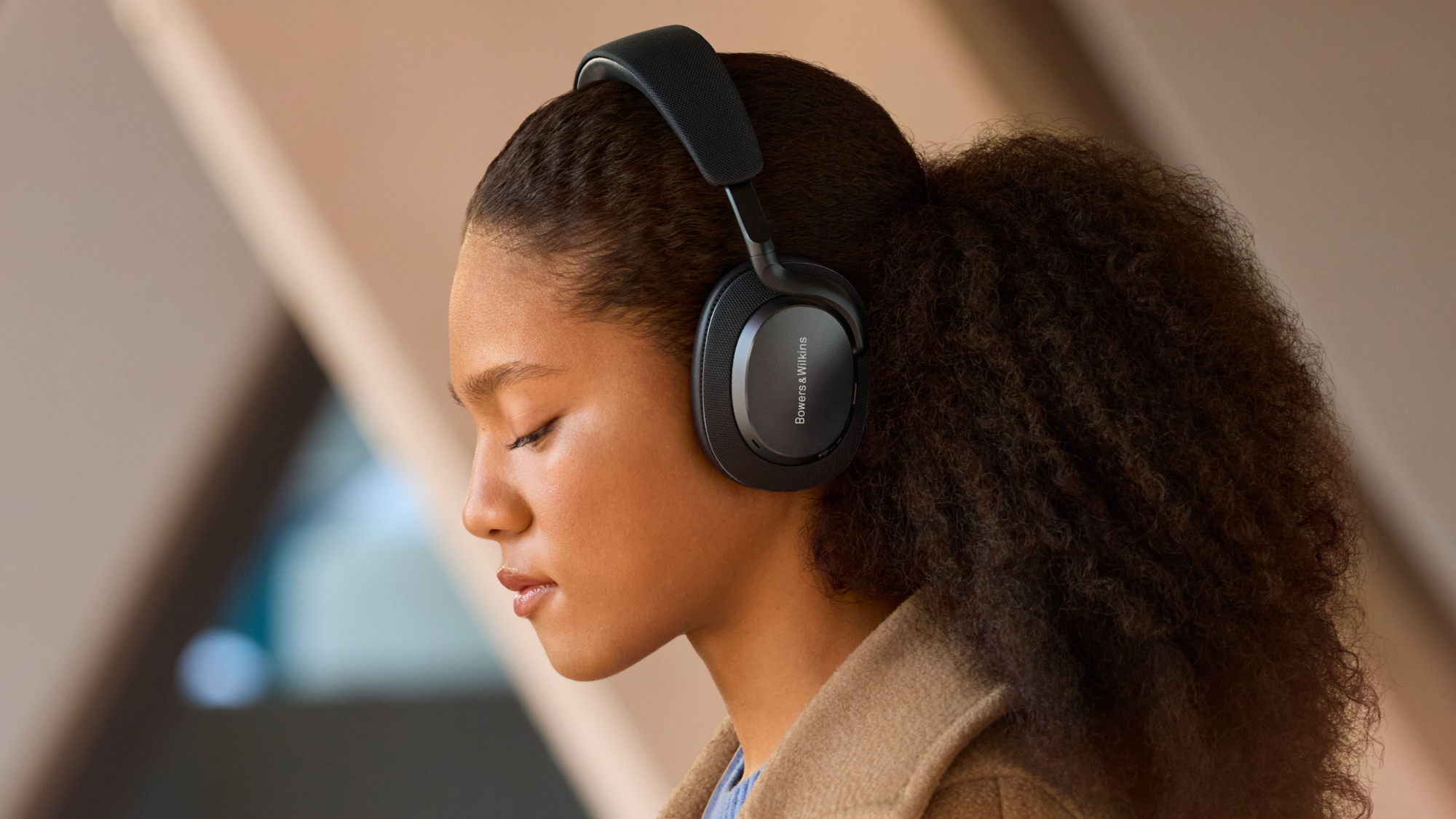
Rank 11127The B&W Px7 S3 launch today, for $429 / £399 (about £830)Built-in amp, redesigned drivers and dramatically improved ANCSpatial audio, Auracast and lossless audio too
Bowers & Wilkins has launched, in its own words, "the most advanced and capable wireless headphone the brand has yet made", the Px7 S3.Based on the very impressive PX7 S2 and PX7 S2e, the new headphones have re-engineered drive units, aptX adaptive and lossless audio, "greatly upgraded" ANC and an all-new design. And they have their own dedicated headphone amp inside, rather than the amp integrated into the chip platform, used by most headphones.Let's start with that design. They're visibly slimmer than the PX7 S2e, and the carry case is more compact too. There's a redesigned arm mechanism and a new headband for a closer fit, and Bowers & Wilkins says it's improved the memory foam in the ear cups too. That means more comfort for longer listening, and the spec suggests you're going to want to spend a lot of time inside these over-ears.We've been testing these headphones, so you don't need to wait for the full-fat, in-depth verdict: our Bowers & Wilkins Px7 S3 review is right there. Spoiler alert: it's five stars. But if you just want the low-down on what's inside, keep reading.
You can customize controls and personalize your headphones via the Music app. (Image credit: Bowers & Wilkins)
Bowers & Wilkins Px7 S3: key features and pricing
The Px7 S3 are a first for the brand: their 40mm biocellulose drivers are powered by a discrete headphone amp (though still built into the unit) that the firm says delivers more scale and energy than you get from the average setup in the best wireless headphones, where the amp isn't cutomized for the particular driver design.Speaking of, the drivers have a redesigned chassis, voice coil, suspension and magnet that delivers lower coloration and distortion, improved resolution and "superior dynamics". As with previous models the drivers are slightly angled to ensure a consistent distance from each point of the drivers' surface to your ears and deliver a spacious stereo image.In addition to spacious audio, the Px7 S3 also deliver spatial audio for the first time in a B&W headphone – or at least they will soon. The feature is coming as an over-the-air update later in 2025.The Px7 SE have aptX Adaptive 24/96 and aptX Lossless for higher quality audio over Bluetooth, and their DSP delivers 24-bit / 96kHz sound quality. You can also use the headphones with wired connections: 3.5mm analogue and USB-C cables are included.Bluetooth LE Audio and Bluetooth Auracast will come this year too, again as an over-the-air update.The other big improvement here is in the active noise cancellation. According to the firm, "Bowers & Wilkins engineers are confident that Px7 S3 features the most powerful and effective active noise cancelling technology the brand has ever developed."That's a big claim, but there are eight microphones located around the periphery of each earcup with two measuring the output of each drive unit, four monitoring the ambient noise around you, and two more for "outstanding" vocal clarity.With ANC on you can expect 30 hours of battery, and a 15-minute quick charge will give you up to 7 hours of playback.The Px7 S3 are available in most countries from today, 24 April, in a choice of Anthracite Black, Indigo Blue and Canvas White. They are $429 / £399 (we're waiting on Australian pricing, but the UK price translates to around AU$830).However, the list of countries where it's launching today doesn't include the US. Due to "evolving market conditions" the North and Latin America date will be announced shortly.
You might also like
The B&W Px7 2Se are the complete audio packageOur guide to the best headphonesThe best wireless headphones, tested by us
-
Picture from o.aolcdn.com
Rank 11128Not everyone needs a super-expensive, top-of-the-line laptop, and the good news is you don’t have to break the bank to get a solid machine. Whether you're a student, a casual user or just looking for an affordable device for everyday tasks, there are plenty of great options out there. The trick is finding the best cheap Windows laptop that balances performance, build quality and battery life without making too many compromises.
Table of contents
What to look for in a budget-friendly Windows laptop
Best cheap Windows laptops for 2025
What to know about the budget Windows laptop market
What about Chromebooks and tablets?
What Windows laptops do well
What to look for in a budget-friendly Windows laptop
While you can do a lot even when spending little on a Windows laptop, you must set your expectations accordingly. The biggest downside when purchasing a budget laptop (of any kind, really) is limited power. You’ll want to carefully consider a few specs, the most important among them being the processor (CPU). Many Windows laptops under $500 run on Intel Celeron or Pentium chipsets, but you can find some with Core i3/i5 and AMD Ryzen 3/5 CPUs at the higher end of the price spectrum.
We recommend getting the most powerful CPU you can afford because it will dictate how fast the computer will feel overall. Memory (RAM) is also important because, the more you have, the easier it will be for the laptop to manage things like a dozen browser tabs while you edit a Word document and stream music in the background.
When it comes to storage, consider how much you want to save locally. If you primarily work in Google Docs or save most things in the cloud, you may not need a machine with a ton of onboard storage. Just remember that your digital space will also be taken up by apps, so it may be worth getting a little extra storage than you think you need if you know you’ll be downloading big programs. A final side note: solid state drives (SSDs) are ubiquitous at this point, not to mention faster and more efficient than hard drives (HDDs), so we recommend getting a laptop with that type of storage.
As for screens, there’s a healthy mix of HD (720p resolution) and FHD (1080p) options in this price range and we recommend springing for a notebook with a 1080p display if you can. Touchscreens aren’t as common in the budget space as standard panels, but you’ll only really miss one if you get a 2-in-1 laptop.
Before we get to our recommended specs for a cheap Windows laptop, it’s worth mentioning that Microsoft clearly lays out the true minimum requirements for any Windows 11 machine. Those include a 1GHz or faster processor that includes two or more cores, at least 4GB of RAM and 64GB of available storage space. That’s the bare minimum to run Windows 11; we recommend giving yourself some wiggle room by choosing a machine that will perform well now and for years to come.
Specs to look for in an affordable Windows laptop
CPU: Intel Core i3 or AMD Ryzen 3 processors, at minimum
RAM: At least 8GB
Storage: At least 128GB SSD
Screen: At least 1080p FHD
It’s essential to prioritize what’s important to you. But at the lower end of the budget, a good laptop may not offer everything you need, whereas a great one might. Although most machines come with features like Bluetooth, built-in Wi-Fi and additional ports, you might find not all of them come with the specifics you require, like an SD card slot, webcam, charger, and so on. Be sure to check the spec list of any laptop you’re considering before you buy, especially if you need specific connectors and capabilities.
See Also:
Best Laptops for 2025
Best Gaming Laptops
Best 2-in-1 Laptops for 2025
Best Chromebooks
Best Laptops for College Students
As for Copilot+, don’t expect to see much of it on truly affordable Windows laptops just yet. Microsoft’s AI features and Copilot assistant require certain specs to run, namely a powerful neural processing unit (NPU), 16GB of RAM and 256GB of storage. Currently, the cheapest Copilot+ AI PCs will run you about $700, so if you’re willing to pay more for those perks, check out our best laptops guide for more options.
If you’re looking for either a gaming laptop or a “Windows on Arm” laptop, both categories will require you to spend more money than we’re discussing here.
Best cheap Windows laptops for 2025
The cheap Windows laptop market moves fast, and — unlike nearly all of our other buying guides — we haven't necessarily tested each specific configuration listed below. However, the combination of these technical specifications and familiar brands represent exactly the sort of entry-level laptops we'd recommend to shoppers in this price range based on our thorough research and expert knowledge.
What to know about the budget Windows laptop market
The best cheap laptop models change all the time. Unlike more expensive, flagship machines, these notebooks can be updated a couple times each year. That can make it hard to track down a specific model at Amazon, Best Buy, Walmart or any other retailer. Also, we’ve seen prices vary widely depending on the configuration and retailer you’re looking at.
You can ensure you’re getting a quality laptop by doing a few things. First and foremost, make sure you get a machine that follows the recommended specs we list above. Also, make sure you’re buying from a reputable retailer, including big-box stores like Walmart, Best Buy and Costco, online shops like Amazon or direct manufacturers like Dell, HP, Lenovo and others. If you have a physical store near you (likely a Best Buy in the US), it’s never a bad idea to go play around with some laptops in person before choosing one.
If you decide to shop online from the likes of Amazon or Walmart, double check the seller of the laptop you’re considering. For example, many items on Amazon are “shipped and sold” by Amazon and those are typically the best options. You’ll see that information on Amazon on the right sidebar on a product page, under the Add to Cart and Buy Now buttons. Third-party sellers are common in the affordable laptop space. Amazon sometimes classifies laptop manufacturers as third-party sellers, so you may see a laptop shipped and sold by HP or Dell — that’s a good thing, since it’s coming directly from the manufacturer.
However, there are other third-party electronics sellers out there. We recommend clicking on the third-party seller’s name on Amazon or Walmart (yes, Walmart has them, too) to see how much positive feedback and how many five-star ratings they’ve received from buyers.
What about Chromebooks and tablets?
You may be inclined to recommend a Chromebook or a tablet to anyone considering a budget Windows laptop computer. Those instincts aren’t wrong, but Chromebooks and tablets aren’t the best buy for everyone. Tablets have the most portability, but they will only work for the most mobile-competent users like kids who have been grabbing smartphones out of their parents’ hands since they’ve been dexterous enough to do so. Tablets can also be just as expensive as some of the cheapest Windows laptops, and that’s without a mouse or keyboard.
Chromebooks are a good alternative for those that basically live in a browser, the trade-off being you must give up the “traditional desktop.” And Chrome OS is a more limited operating system than Windows when it comes to the programs you can install and run.
What Windows laptops do well
What can you realistically accomplish on a cheap Windows laptop? Quite a bit, especially if you’re doing one thing (or a limited number of things) at a time. They’re great for everyday tasks like web browsing, checking email, video streaming and more. All of those things can be done on Chromebooks as well, but Windows laptops have a big advantage in Microsoft Office. While yes, there is a browser based version, the native, desktop apps are considered a must have for many and will run smoothly on even the most bare-bones budget laptop. The only caveat is that you may run into some slowdown on low-powered devices if you’re multitasking or working with large data sets in Excel or a lot of photos and graphics in Powerpoint.
When it comes to specs, a bright spot for Windows laptops is storage. Even the most affordable devices tend to have at least a 128GB solid state drive. That will come in handy if you prefer to keep your most important files saved locally on your laptop's hard drive. In contrast, cheaper Chromebooks often have less storage because they’re built on the assumption that you’ll save all of your documents in the cloud. Not only is that less convenient when you need to work offline, but it also limits the size of programs and files that you can download. So, Chromebooks aren't the best for hoarding Netflix shows before a long trip or for use as a gaming laptop.
Windows also has thousands of apps that you can download from its app store. Chromebooks have some Chrome apps, numerous browser extensions and the ability to download Android apps, but quality control is… inconsistent. Android apps, in particular, often haven’t been optimized for Chrome OS, which makes for a wonky user experience. Windows may not have as many apps as Android, but at least the experience is fairly standard across the board.
Windows also gives you the ability to download and use programs from other sources, like direct from the developer. You can run things like Adobe Creative Suite, certain VPNs and programs like GIMP, Audacity and ClipMate on a Windows device, which just isn’t possible on Chrome OS. Chromebooks limit you to the apps and programs in The Play Store and the Chrome Extensions store, reducing any others to unusable, space-sucking icons in your Downloads folderThis article originally appeared on Engadget at https://www.engadget.com/computing/laptops/best-affordable-windows-laptops-123000512.html?src=rss
-

Picture from ichef.bbci.co.uk
Rank 11129 -

Picture from ichef.bbci.co.uk
Rank 11130 -

Picture from ichef.bbci.co.uk
Rank 11131 -

Picture from ichef.bbci.co.uk
Rank 11132 -

Picture from ichef.bbci.co.uk
Rank 11133 -

Picture from ichef.bbci.co.uk
Rank 11134 -

Picture from ichef.bbci.co.uk
Rank 11135 -

Picture from ichef.bbci.co.uk
Rank 11136 -

Picture from ichef.bbci.co.uk
Rank 11137 -
Picture from cdn.mos.cms.futurecdn.net
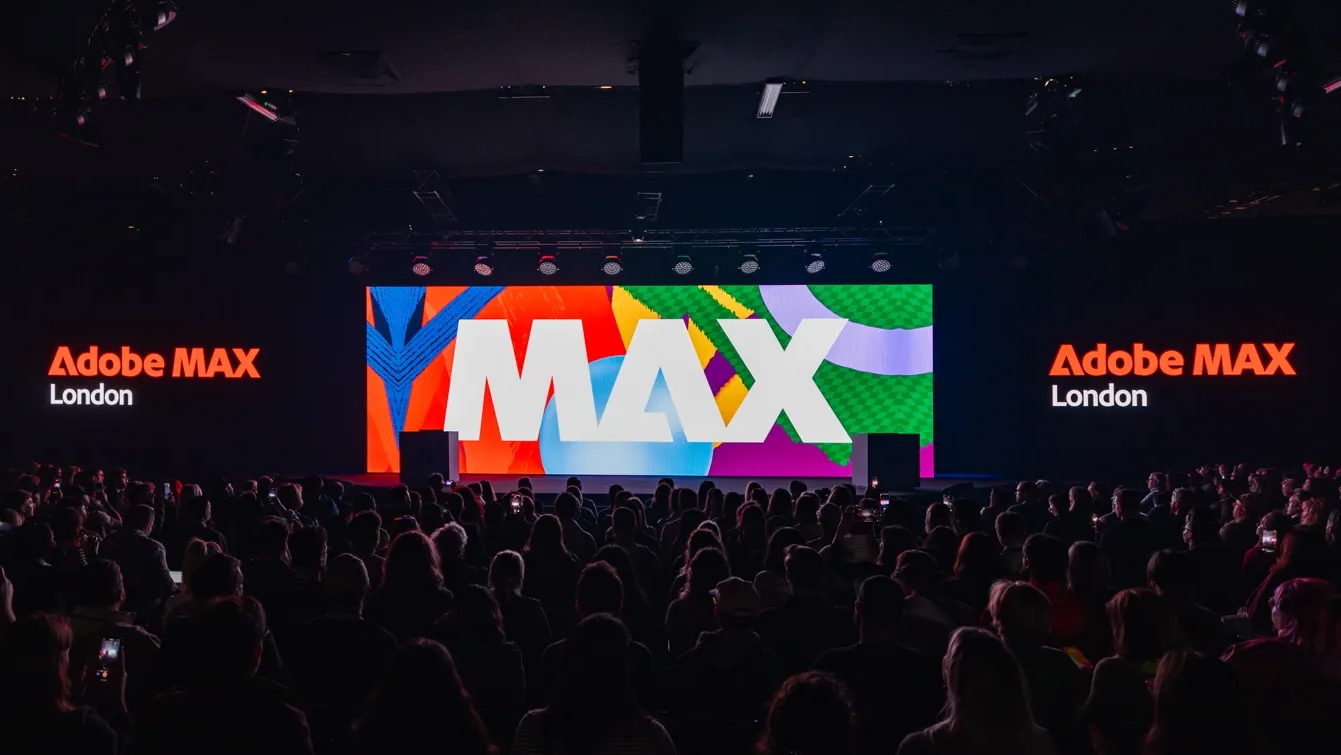
Rank 11138Welcome to our liveblog for Adobe Max London 2025. The 'creativity conference', as Adobe calls it, is where top designers and photographers show us how they're using the company's latest tools. But it's also where Adobe reveals the new features it's bringing to the likes of Photoshop, Firefly, Lightroom and more – and that's what we'll be focusing on in this live report direct from the show.The Adobe Max London 2025 keynote kicks off at 5am ET / 10am BST / 7pm ACT. You can tune onto the livestream on Adobe's websiteand also see demos from the show floor on the Adobe Live YouTube channel.But we're also at the show in London and will be bringing you all of the news as it happens here.Given Adobe has been racing to add AI features to its apps to compete with the likes of ChatGPT, Midjourney and others, we're expecting that to be a big theme of the London edition of Adobe Max – which is a forerunner of the main Max show in LA that kicks off on October 28.But there will also likely be a sprinkling on non-AI features and tools for everything from Photoshop to Illustrator – so whichever Creative Cloud app you use, you can follow all of the announcements here with us live from Adobe Max London 2025...
Welcome to Adobe Max London 2025
(Image credit: Future)
Good morning from London, where it's a classic grey April start. We're outside the Adobe Max London 2025 venue in Greenwich where there'll be a bit more color in the keynote that kicks off in about 15 minutes.It's going to be fascinating to see how Adobe bakes more AI-powered tools into apps like Photoshop, Lightroom, Premiere Pro and Firefly, without incurring the wrath of traditional fans who feel their skills are being sidelined by some of these new tricks.So if, like me, you're a longtime Creative Cloud user, it's going to be essential viewing...
-

Picture from cdn.mos.cms.futurecdn.net
Rank 11139Apple sees €500m EU fine for forcing users to use its own App StoreGoogle accused of not collecting genuine user consent, receives €200m fineThe US has already imposed tariffs on EU goods, but the fines could make things worse
The European Union has issued €700 million in fines to Apple and Meta under the Digital Markets Act (DMA), making them the first two companies to receive fines under the legislation.Both firms must comply within 60 days or they risk facing further penalties. Apple received €500 million in fines, while Meta was hit with a €200 million penalty.Besides aiming to squash the dominance of big tech in the region, the EU's DMA fines may also cause further tensions between Europe and the US amid ongoing trade wars.
EU fines
In the case of Apple, the European Union has criticized the iPhone maker for restricting alternative app marketplaces on iOS, accusing it of reinforcing the dependence on the Apple Store for both app developers and consumers.The EU says Apple must allow third-party app stores and sideloading on iOS, and naturally, Tim Cook's company isn't happy about the news, arguing that the EU is asking Apple to "give away our technology for free."It has acknowledged that Apple has, "made it easier for users to change default settings for calling, messaging, call filtering, keyboards, password managers and translation services on iPhones."For Meta, the European Union is accusing it of lacking genuine user consent in its 'consent or pay' model, violating DMA rules. In this business model, users had to allow data merging or pay a subscription to use Facebook/Instagram. Meta has accused the EU of "attempting to handicap successful American businesses," effectively imposing a multibillion-dollar tariff on the company and forcing it to offer an "inferior service."More broadly, the US has already imposed tariffs on EU goods, citing unfair tech regulation. Europe's fines, totalling €700 million for just these two companies, is almost certainly going to ruffle some feathers.TechRadar Pro has asked both companies to comment on the fines, but we didn't receive immediate responses.
You might also like
We've listed all of the best iPhones you can buy this yearTrying to reach new audiences? These are the best social media management toolsThe first third-party iOS app store is live in the EU – and another Nintendo emulator just showed up
-

Picture from cdn.mos.cms.futurecdn.net
Rank 11140Microsoft claims "Frontier Firms" are leading the way with business AIWork Trend Index 2025 shows AI effects on productivity, trainingBut AI skills can also help boost job progression, Microsoft says
Microsoft has revealed new research extolling the virtues of utilizing AI tools in the workplace, but admitted major progress may still be some way off.The company's annual Work Trend Index report, which interviewed around 31,000 people across 31 different countries, highlighted the work being done by "Frontier Firms" - essentially those businesses fully embracing AI in the workplace.It claimed 82% of industry leaders said AI is already revolutionizing work in their organization - leading them to have to rethink strategy and ways of doing business.
Frontier Firms leading the way on AI
"We are entering a new reality — one in which AI can reason and solve problems in remarkable ways," Microsoft's Jared Spataro - CMO, AI at Work, said in a blog post accompanying the report."This intelligence on tap will rewrite the rules of business and transform knowledge work as we know it. Like the Industrial Revolution and the internet era, this transformation will take decades to show its full promise — and will bring broad technological, societal and economic change.""Frontier Firms" are understandably leading the way with the promise of AI, with the report claiming 71% of workers at these firms say their employer is "thriving" - compared to just 37% globally.Also understandably, AI is set to play a major role in improving various roles across the business, offering "a new lever for growth", Spataro noted.To satisfy the growing need for productivity increases, 82% of leaders expect to use digital labor to expand their workforce in the next 12 to 18 months, as human workers become overwhelmed with other tasks.This change is already in play, the report found, as nearly half (46%) of leaders said their organization is using agents to fully automate workstreams or business processes — with customer service, marketing and product development as the top AI investment priorities.And as companies of all sizes trim workforces, AI itself seems to be a safe bet for employment, with over three-quarters 78% of bosses saying they are considering hiring for new AI roles - and 83% believing AI will enable employees to take on more complex and strategic work earlier in their careers."2025 will be remembered as the year the Frontier Firm was born — the moment companies moved beyond experimenting with AI and began rebuilding around it," Spataro concluded."Like the digital native companies of a generation ago, they understand the power of pairing irreplaceable human insight with AI and agents to unlock outsized value. We’re giving customers the insight to anticipate what’s next — and the technology to help shape it."
You might also like
New Microsoft 365 AI offering means all your workers can use Copilot for freeThese are the best online collaboration tools around todayWe've also featured the best task management apps
-

Picture from cdn.mos.cms.futurecdn.net
Rank 11141We are at the threshold of a groundbreaking new era – the Era of Intelligence – where technology is no longer just a tool but a catalyst for human potential. This is more than the rise of artificial intelligence; it is the beginning of a future where human ingenuity and machine intelligence merge to unlock unprecedented levels of creativity, efficiency, and innovation.The way we work is being redefined, shifting from routine tasks to high-impact contributions fueled by AI-driven insights and automation. Enterprise that embraces this transformation will create more dynamic, empowering, and purpose-driven workplaces where people can be more fulfilled and thrive like never before.As AI-powered experiences—voice interactions, real-time collaboration, automated workflows—become the foundation of modern work, our relationship with technology is evolving. The workplace is no longer confined to desks and screens; it is becoming an intelligent ecosystem that adapts to individual needs.To fully unlock this potential, organizations need the right infrastructure. Modernizing PC fleets is no longer an option but a strategic imperative. Upgrading to Windows 11 and AI-optimized hardware is not just about keeping up with technology—it is about staying ahead in an era where AI-driven efficiency and innovation define success.
The Future of Work is Intelligent—Your Hardware Must Keep Up
The digital tools we rely on daily, from browsers and productivity suites to collaboration platforms, are evolving to integrate AI. These applications are becoming more adaptive, more intuitive, and more capable of optimizing workflows. However, legacy hardware was never designed to support these intelligent functions, making performance sluggish and limiting AI’s transformative power.This is where the Neural Processing Unit (NPU) changes the equation. Just as GPUs revolutionized graphics, NPUs are specialized processors designed to handle AI workloads locally, reducing reliance on cloud computing. This shift enables real-time transcription, instant email drafting, and rapid data analysis, cutting hours from routine tasks. Recent Harvard Business School studies indicate that employees using AI tools complete tasks significantly faster and with higher-quality output, transforming the very nature of productivity.This isn’t just about convenience—it’s about redefining work itself. Developers using AI-powered coding assistants see dramatic efficiency gains, consultants leveraging AI analytics produce more accurate insights, and creative professionals unlock new levels of expression. Without modern hardware, organizations risk missing out on these innovations, leaving employees to struggle with slow processing, frequent crashes, and diminished efficiency.
Security and Stability Built for the Modern Era’s Enterprise
Despite the excitement surrounding AI PCs, misconceptions persist—particularly around security. Many enterprise IT leaders are unaware that AI PCs are inherently more secure than their traditional counterparts. This lack of understanding has created hesitation, even though AI PCs offer some of the most advanced security protections available today.One of the biggest advantages of AI PCs is their ability to process sensitive workloads locally, reducing reliance on cloud-based computing and minimizing exposure to cyber threats. When coupled with Windows 11’s advanced security features, such as TPM 2.0 and Secure Boot, AI PCs provide a robust defense against evolving cyber risks. At the same time, AI-driven IT management tools automate security monitoring, reducing the workload on IT teams and strengthening enterprise resilience.The pressure on IT decision-makers is immense. Studies show that nearly 90% of IT leaders cite the rapid pace of technological change as a major source of stress. AI PCs are designed to alleviate this burden by streamlining security protocols, automating routine maintenance, and enhancing overall system stability. Rather than adding complexity, AI PCs simplify IT operations while making organizations more secure and adaptable.
The AI PC Adoption Curve: From Skepticism to Standard
Like any transformative technology, AI PCs are following a predictable adoption curve, though at an accelerated pace. Early adopters—primarily enterprises with well-developed AI strategies—began experimenting with AI PCs in 2024. These organizations, driven by the need for enhanced security and speed, accounted for roughly 8-13% of enterprise IT customers evaluating AI PCs.As AI-driven enterprise applications mature, the benefits of AI PCs are becoming more apparent. Over the next two years, organizations will begin rolling out AI PCs to power users—developers, analysts, and executives—who rely on AI for advanced workloads. By 2026, AI-driven workflows will be deeply integrated into business operations, and AI PCs will transition from niche adoption to mainstream deployment, making up at least half of all enterprise PC purchases.However, enterprises are not resisting AI PCs—they are looking for clarity. Many IT leaders need better insights into the tangible ROI of AI investments, while others are working through concerns about implementation costs and security risks. But as AI’s impact becomes undeniable, enterprises will transition from evaluation to action, incorporating AI PCs as a fundamental part of their IT strategy.
From Features to Experiences: Shaping the Future of Work
When IT leaders evaluate AI PCs, they often focus on specifications and features. However, the real transformation lies in the experiences these devices enable. AI PCs are not just about faster processing or better battery life—they are about fundamentally reimagining how people work.Imagine a world where meetings are automatically summarized, emails are drafted based on conversational context, and data insights are generated proactively. AI PCs enable these seamless experiences, ensuring that workers spend less time on administrative tasks and more time on meaningful, high-value work. Despite this potential, research shows a disconnect: while nearly three-quarters of workers believe that having the right technology is critical to productivity, only 23% feel their company provides it. Bridging this gap is essential.AI PCs are not just tools; they are catalysts for a new way of working. This shift goes beyond individual productivity—it is about reshaping entire industries, enhancing collaboration, and enabling a more adaptive workforce.
The Time is Now
Upgrading to AI PCs is more than a refresh—it is an investment in the future of work. Enterprises must think beyond the immediate need to replace outdated hardware and recognize the long-term impact of AI-enabled computing. Companies that embrace this shift today will be at the forefront of the intelligent workplace, leading the charge in efficiency, innovation, and security.Rather than upgrading an entire fleet at once, organizations can take a phased approach, prioritizing power users and high-impact roles for early adoption. A well-planned transition strategy—supported by employee training, clear communication, and the right technology partners—will ensure that businesses maximize the benefits of AI PCs without disrupting operations.The AI revolution is not a distant future; it is happening now. The question is no longer whether businesses will adopt AI PCs—it is how quickly they will move. Those that take action today will define the next era of work.
We've reviewed the best business computers.
This article was produced as part of TechRadarPro's Expert Insights channel where we feature the best and brightest minds in the technology industry today. The views expressed here are those of the author and are not necessarily those of TechRadarPro or Future plc. If you are interested in contributing find out more here: https://www.techradar.com/news/submit-your-story-to-techradar-pro
-
Picture from cdn.mos.cms.futurecdn.net
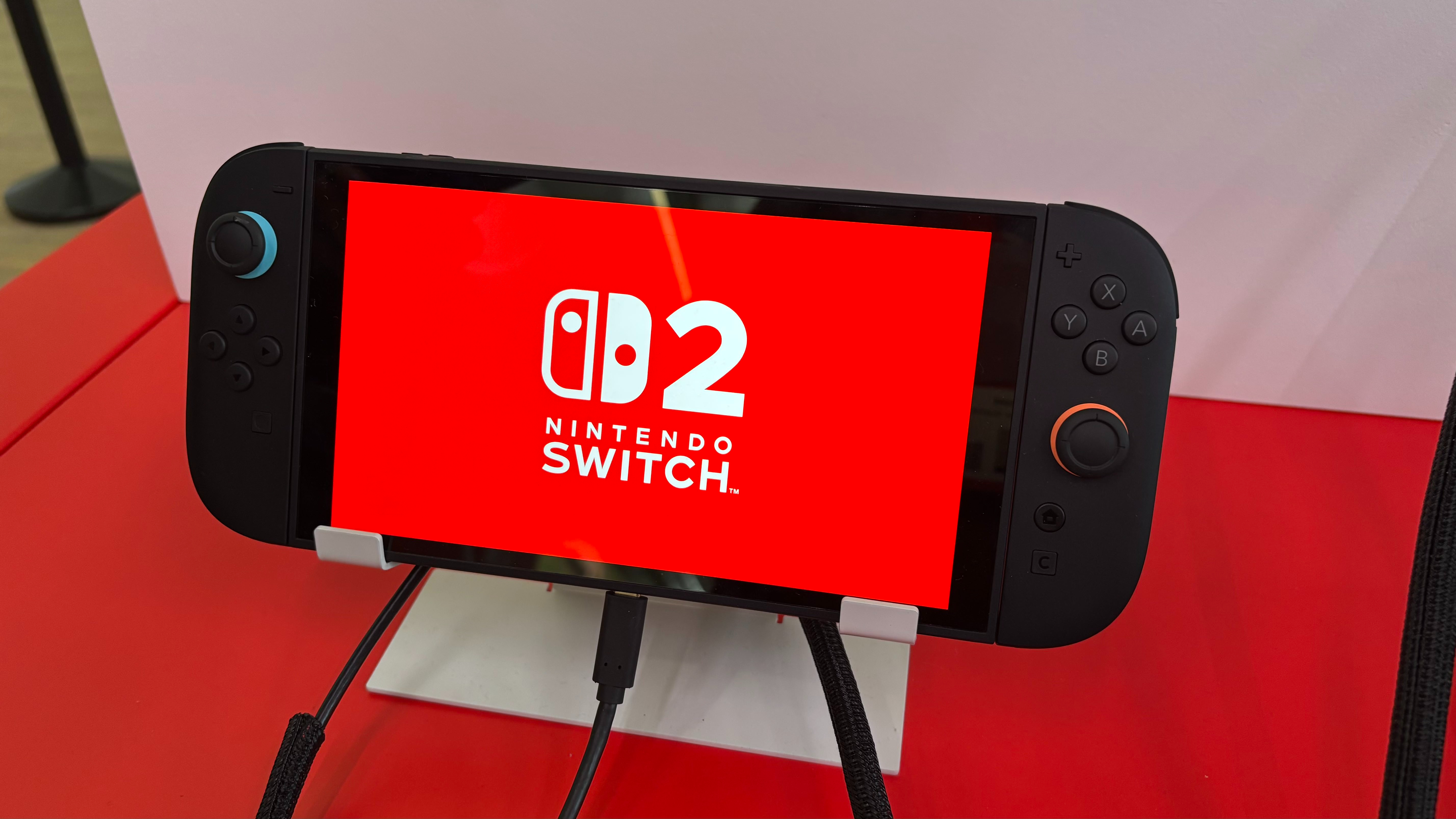
Rank 11142GameStop has launched its Switch 2 pre-order offersYou can save up to $175 by trading in your old Switch consoleRates differ depending on which system you trade in
US pre-orders for Nintendo Switch 2 have gone live today (April 24), and retailer GameStop is ready with a seriously tempting Switch 2 trade-in offer.If you pre-order a Nintendo Switch 2 at GameStop, you can save up to $175 off the price of the console when you trade in your old Switch, Switch OLED, or Switch Lite console. That's a pretty chunky saving, and one you may want to keep in mind if you're not all too keen on paying $449.99 for the new system - or indeed $499.99 for the Mario Kart World bundle.Rates will differ depending on which console you trade in, and GameStop will reportedly offer less for systems whose Joy-Con controllers are suffering from stick drift. In better news, though, it seems you won't have to worry about losing your save data, as GameStop's 'Transfer and Trade' program seems to be in effect here, according to its socials.Here's a quick breakdown of what you can potentially save with GameStop's Switch 2 trade-in offers:
Nintendo Switch 2 trade-in deals: save up to $175 at GameStopThe good news is that Nintendo hasn't raised the price of the Nintendo Switch 2 console in the States. The better news is that you can save up to $175 when trading in your old Switch at GameStop. You'll get the full rate for a Switch OLED, $125 for the standard Switch, and lastly $100 for a Switch Lite.View Deal
After a Switch 2 pre-order delay that came as a result of the ongoing tariff situation uncertainty, Nintendo has thankfully not raised the price of the Switch 2 console in the US. Better yet, you stand to save even more if you choose to trade in your original Switch system at GameStop.Of course, the elephant in the room is that such an offer won't necessarily make the stock situation any easier. But you can at least save cash ahead of time by trading in your Switch console early.Be sure to read my Nintendo Switch 2 pre-order tips guide to put yourself in the best position when it comes to securing a console for yourself. And of course, you can bookmark and keep an eye on our Nintendo Switch 2 pre-orders live coverage for all the latest stock updates as they happen.
You might also like...
The Switch 2 Pro Controller will have the same colossal battery life as the original, with a significantly shorter charge time, according to NintendoCyberpunk 2077 on the Nintendo Switch 2 will offer Nvidia's DLSS techNintendo of America president Doug Bowser says 'stay tuned' when asked about the absence of a mainline Mario game for the Switch 2
-
Picture from o.aolcdn.com
Rank 11143If you're a frequent Photoshop user, there's a good chance you've run into this scenario. You open the program after a long break to edit an image, but this being Photoshop we're talking about, there are about five different ways to complete the task before you and you can't quite remember the way you learned to do it. Adobe is trying to make it easier to use its flagship app with the introduction of a built-in AI agent that can navigate Photoshop and complete tasks for users. At its Adobe Max London event today, the company demoed this agent, showing how it can automate multi-step workflows.
Users can access the tool from the redesigned Actions panel. If you've used an AI chat bot before, the interface will be familiar. There's a text box for users to input what they want the agent to do for them, with a list of suggested prompts above. Once you hit enter, the tool will display all the steps needed to complete your request, allowing you to follow along as it does the work for you. Judging by the demos Adobe shared with press before the event, the agent can complete nearly any task you might turn to Photoshop to do. In one example, the tool first applies a color gradient to text, and then does the same for the background behind it.
Adobe
At the same event, Adobe showed off a new version of its Firefly app, which brings together all of the company's AI image, video, audio and vector generation tools in one easy to find place. The redesigned Firefly is available to use on the web today, with Android and iOS apps coming soon. Additionally, each part of the app is powered by new underlying models that offer better performance.
With image generation, for instance, Adobe is offering two new in-house systems, the imaginatively named Firefly Image Model 4 and Firefly Image Model 4 Ultra. Of the former, the company says it can produce 2K resolution images, making it possible to print what the model generates. Adobe claims both systems offer best-in-class human rendering. All of Adobe's own models are commercially safe, meaning they weren't trained on copyrighted material, and creative professionals can feel safe using them.
"By unifying image, video, audio and vector generation and providing unmatched creative control, Firefly empowers creative professionals to work more productively and with an unmatched degree of precision," Adobe said. "Seamlessly integrated with Photoshop, Premiere Pro, Express and Adobe’s other creative applications, it offers AI-powered assistance throughout every stage of the content creation process – from ideation through production."
Adobe
If Adobe's models aren't thing, the company is also — for the first time — offering third-party models directly within the Firefly app. With today's announcement, some of the more notable options include Google's Imagen 3 and Veo 2 models, as well as ChatGPT image generation, with more to come later. As part of Adobe's agreements with Google, OpenAI and other model providers, those companies have agreed to not use data from Adobe users for training their future AI systems. This article originally appeared on Engadget at https://www.engadget.com/ai/adobes-new-ai-agent-can-show-you-how-to-use-photoshop-090049772.html?src=rss
-

Picture from techcrunch.com
Rank 11144 -

Picture from techcrunch.com
Rank 11145 -

Picture from ichef.bbci.co.uk
Rank 11146 -

Picture from ichef.bbci.co.uk
Rank 11147 -
Picture from cdn.mos.cms.futurecdn.net
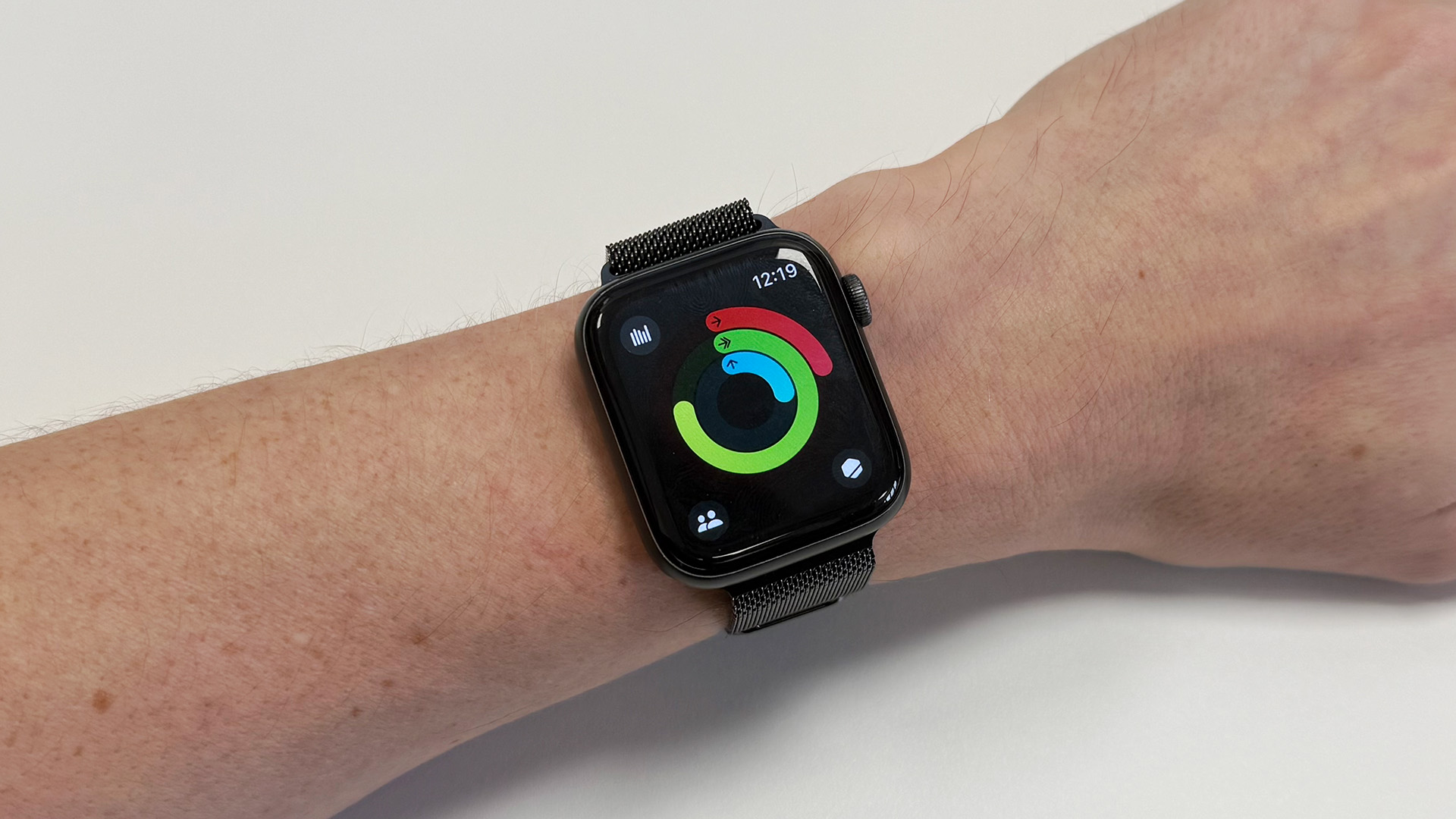
Rank 11148To celebrate 10 years of Apple Watch, Apple has dubbed today (April 24) Global Close Your Rings DayApple Watch users who close their rings get a host of limited-edition prizesThese include an exclusive badge and stickers for their Messages app
On this day (April 24), 10 years ago, the Apple Watch arrived and changed the smartwatch landscape forever. To this day, the best Apple Watches in their many forms are the most popular smartwatches by a very large margin.Apple is celebrating this anniversary by making it Global Close Your Rings Day, offering digital (and even physical) rewards for getting active. For today only, if you hit your movement, exercise and standing goals for the day, thereby closing all three of the activity rings on your Apple Watch, you'll be rewarded with a limited-edition badge.Badges are used by Apple in its Fitness app as markers of your achievements. Some users enjoy badge collecting, which can be awarded for activities like running a 10K or trying a new activity for the first time, as well as streaks such as closing your rings every day for a week (after which you get the 'Perfect Week' badge). A badge only available for one day is enticing for exercise-addicted badge collectors.In addition to the limited Global Close Your Rings Day badge, closing your rings today will net you a selection of 10 stickers and an animated badge to send to your contacts in the Messages app. Once it hits midnight tonight, you're out of luck, so make sure you get out there and get your steps in.You can also get a physical pin to mark Global Close Your Rings Day by visiting your local Apple store while stocks last.
How to close your rings
Check your goals by tapping on the Activity Rings on your Apple Watch, or heading to the Fitness app on your iPhone, tapping the ring of choice and selectiong Adjust goal for today or Adjust goal schedule.Fill your Movement ring, which combines exercise with the movement and steps you take throughout the day.Fill your Exercise ring by starting a Workout on your Apple Watch and exercising for the required amount of time.Fill your Stand ring by regularly standing up and moving around. You can toggle prompts on or off by tapping the Stand ring and tapping Stand reminders.
Lord of the Rings
(Image credit: Apple)
It sounds like a simple step forward from the then-modern pedometers incorporated into smartwatches and the best fitness trackers, such as Fitbit and Pebble, but using an easy-to-see progress bar to track daily exercise has been a powerful tool for Apple, offering an easy gamification of fitness. Research from Apple claims Watch users who frequently close their rings are 73% less likely to experience elevated resting heart rate levels and 57% less likely to report elevated stress, among other benefits.Jeff Williams, Apple’s chief operating officer, said: “Apple Watch has changed the way people think about, monitor, and engage with their fitness and health. A decade ago, we introduced Activity rings — and since then, Apple Watch has grown to offer an extensive set of features designed to empower every user.”Since then, it's been emulated by its competitors such as Samsung, which offers heart-shaped 'rings' of its own, but Apple is the dominant force in the smartwatch industry and, as such, owns the language of 'closing your rings'.We're expecting to see the Apple Watch Series 11 drop in September, alongside the Apple Watch Ultra 3 and Apple Watch SE 3.
You might also like...
New Motorola leak suggests it's planning an affordable Apple Watch rivalThese are the best smartwatches you can buy right now3 Apple Watch features I want to see if the rumored visionOS-style interface is true
-
Picture from o.aolcdn.com
Rank 11149If you're serious about capturing clean, professional-sounding audio while you're out and about, your phone’s built-in mic probably isn’t cutting it. Whether you’re shooting quick videos, recording interviews on the go or want your voiceovers to sound crisp, investing in a dedicated phone mic can make a huge difference in your content quality.These days, there’s no shortage of compact and capable microphones made specifically for mobile devices. From solo creators filming on their smartphones to roving interviewers working on tight setups, a portable mic can be a game-changer. Some plug directly into your phone, while others use a wireless microphone system to give you more freedom to move — especially handy for things like vlogging or walk-and-talk shoots.For content creators who want to elevate their sound without hauling around a full recording rig, today’s mobile mics offer plenty of smart features. You’ll find models with multiple transmitters for two-person setups, stereo capture modes for immersive sound and even a charging case that keeps everything powered on the go. Just make sure to check compatibility with your device before buying — not every mic works seamlessly across Android and iPhone.Whether you're after something simple and compact or need a high-quality microphone for more polished productions, we’ve rounded up the best mobile microphones you can buy right now.
Best phone mics for 2025
Lavalier mics
James Trew / Engadget
The obvious benefit of a lapel microphone is size. Their small profile makes them perfect for presenting to the camera with the flexibility to move around while maintaining consistent audio quality. If you’re a budding TikTok or vlogger it’s definitely worth having one of these mini microphones in your bag. And if you don’t want to be tied down to cables, there are plenty of great wireless lavalier microphone options with convenient adapters.
The main trade-off, however, is that they’re only good for recording the person they’re attached to. If you have two people talking and only one is wearing the mic, you’ll only get good audio for one half of the conversation, so for multi-person recordings you’ll need a mic for each guest and a way to record them at the same time, so costs can go up quickly.
Fortunately, lapel mics have become a very competitive market with good, viable options costing as little as $14.95. For an absolute bargain with a long cord and some connectivity accessories, the Boya BY M1 is hard to argue with. But, while these budget choices are great value, if you want something that should either last longer, is more versatile or just sounds better it’s worth paying a little bit more.
A word on wireless mic
Recently there has been an explosion in cell phone microphone systems, but there's one wireless mic we really like. DJI's Mic 2 system provides some important upgrades from its predecessor. Notably, it can connect directly to your smartphone via Bluetooth, and it sports improved AI noise reduction and a bigger touchscreen.
Adapters
So we’ve already touched on this with the AI Micro, which is an adapter of sorts. One of the first things you might bump up against when dealing with mobile audio accessories is TRRS vs TRS connectors. Simply put, 3.5mm TRS is what you might know as the age-old classic headphone jack while TRRS became common for its support for headsets and inline mics. You can easily tell them apart as TRS connectors have two black bands on them while a TRRS has three.
For you, the budding creator, it can be a bit of an annoyance as many 3.5mm lavaliers are going to be TRS and won’t work when plugged into your phone’s headphone adapter. Sometimes your lavalier might include what you need in the box, but otherwise, you’ll want to pick up a TRS to TRRS adapter like this. Of course, some smartphone-specific mics have TRRS connectors already – for those, you’ll want a cable that goes the other way should you want to use it with other devices like a DSLR.
Shotgun mics
James Trew / Engadget
You may be more familiar with shotgun microphones when it comes to video recording. It’s the style of microphone most often found atop a DSLR or mirrorless camera, but they make great companions for other portable devices too, your cell phone included.
The benefit of a shotgun is that they tend to be highly directional, which makes them perfect for podcasts, recording instruments, foley sounds and much, much more. For us mobile recordists, another benefit is that they tend to be light and portable, perfect for slipping into a backpack or even a laptop bag. Even better, there are some great mobile-specific options.
Desktop and USB mics go mobile
James Trew / Engadget
Mobile-specific mics are great, but there’s nothing stopping you from using your cell phone microphone or another you might already have (if it’s somewhat portable). You’ll definitely need to do a little dance with some adapters, but that’s half the fun. Below are a couple of recommendations for “regular” microphones that pair well with a phone and then the cables and adapters that you’ll need to get setup. There are even some wireless systems that make it easy to record on the go.
A word on cables
James Trew / Engadget
Connecting USB microphones directly to phones is rarely as simple as just one cable, although that’s starting to become more common. In general, Android makes this simpler, but also, thanks to the wide range of manufacturers and software versions you can’t always guarantee things will work smoothly.
The iPhone is a whole other situation. USB microphones have a good chance of working via the USB camera kit we mentioned earlier, but that’s still inelegant sometimes. Frustratingly, some USB-C to Lightning cables will play nice with microphones, but sadly most will not – including Apple’s own. One confirmed option is this cable from Fiio or this generic alternative. These are inexpensive enough that it’s worth having a couple around if you work with audio a lot (they of course can also be used to charge your phone as a bonus).
Other mobile microphones to consider
This article originally appeared on Engadget at https://www.engadget.com/computing/accessories/best-mobile-microphones-for-recording-with-a-phone-154536629.html?src=rss
-

Picture from techcrunch.com
Rank 11150


