News
This constantly updated list features the latest and most important news articles, ranked in order of significance. The top stories highlight major developments, breaking news, and critical updates across various topics, ensuring you stay informed about the most pressing issues. As new articles are added, the list adapts to reflect the latest priorities, keeping the most impactful stories at the forefront. Whether it’s global events, technology breakthroughs, or industry trends, this dynamic list ensures you always have access to the most relevant and timely information.
-
Picture from o.aolcdn.com
Rank 83501The US Senate has granted the Internet Archive federal depository status, making it officially part of an 1,100-library network that gives the public access to government documents, KQED reported. The designation was made official in a letter from California Senator Alex Padilla to the Government Publishing Office that oversees the network. "The Archive's digital-first approach makes it the perfect fit for a modern federal depository library, expanding access to federal government publications amid an increasingly digital landscape," he wrote.
Established by Congress in 1813, the Federal Depository Library Program is designed to help the public access government records. Each congressional member can designate up to two libraries, which include government information like budgets, a code of federal regulations, presidential documents, economic reports and census data.
With its new status, the Internet Archive will be gain improved access to government materials, founder Brewster Kahle said in a statement. "By being part of the program itself, it just gets us closer to the source of where the materials are coming from, so that it’s more reliably delivered to the Internet Archive, to then be made available to the patrons of the Internet Archive or partner libraries." The Archive could also help other libraries move toward digital preservation, given its experience in that area.
It's some good news for the site which has faced legal battles of late. It was sued by major publishers over loans of digital books during the Coronavirus epidemic and was forced by a federal court in 2023 to remove more than half a million titles. And more recently, major music label filed lawsuits over its Great 78 Project that strove to preserve 78 RPM records. If it loses that case it could owe more than $700 million damages and possibly be forced to shut down.
The new designation likely won't aid its legal problems, but it does affirm the site's importance to the public. "In October, the Internet Archive will hit a milestone of 1 trillion pages," Kahle wrote. "And that 1 trillion is not just a testament to what libraries are able to do, but actually the sharing that people and governments have to try and create an educated populace."This article originally appeared on Engadget at https://www.engadget.com/general/internet-archive-is-now-an-official-us-government-document-library-123036065.html?src=rss
-

Picture from static.independent.co.uk
Rank 83502 -

Picture from static.independent.co.uk
Rank 83503 -

Picture from static.independent.co.uk
Rank 83504 -

Picture from static.independent.co.uk
Rank 83505 -

Picture from static.independent.co.uk
Rank 83506 -

Picture from image.cnbcfm.com
Rank 83507 -

Picture from cdn.mos.cms.futurecdn.net
Rank 83508The Optoma Photon Go is now on-sale in the US for $999 / £899Delivers 60 to 100-inch images at under 10 inches from the wall650 lumens, 8,000:1 contrast and 1.5 hours of battery lifeIt's all gone a bit Alice in Wonderland at Optoma, which has managed to get a triple-laser projector to drink a shrinking potion. The Optoma Photon Go is barely bigger than a chunky book, but it can project rich images in 1080p Full HD, at up to 100 inches even while sitting under a foot from the wall – and has a punchy stereo speaker system inside.The Photon Go is now available in the US and Canada after a European launch earlier this year, and it's being marketed as a home or outdoor projector thanks to its easily transportable size and relatively light weight. It's 9.92 x 6.18 x 2.44 inches and 3.79lbs; for metric users that's 25.2 x 15.7 x 6.2cm and 1.7kg.It's certainly small, but the specification isn't.(Image credit: Optoma)Optoma Photon Go projector: key features and pricingThe Photon Go is an ultra-short throw projector delivering 1080p resolution and contrast of 8,000:1. Its throw ratio is 0.18:1 and it's capable of delivering a 100-inch image from just 10 inches away. The minimum image size is 60 inches.The triple-laser RGB light source delivers up to 650 lumens of brightness, Optoma says, and it's expected to last for 20,000 hours.The Photon Go has automatic focus and keystone correction, Google TV for streaming, HDMI 2.0, USB (C and A) and a 20-watt stereo sound system, and its TSA-compliant battery is good for 1.5 hours of playback.It's an impressive specification for such a small device, and while the battery life is on the short side it's nothing an external power bank can't fix.It's a really interesting option among the best portable projectors – it's rare for them to be ultra short throw, so this might be just what you're looking for, if you want to create a huge image anywhere without worrying about having enough distance from the screen.The Optoma Photon Go is available now with an MSRP of $999. In the UK, it's £899.You might also likeThe best power banks 2025, all tested by the Techradar teamDiscover the Best portable projector of 2025The best projectors, tested and reviewed by our experts
-
Picture from cdn.mos.cms.futurecdn.net
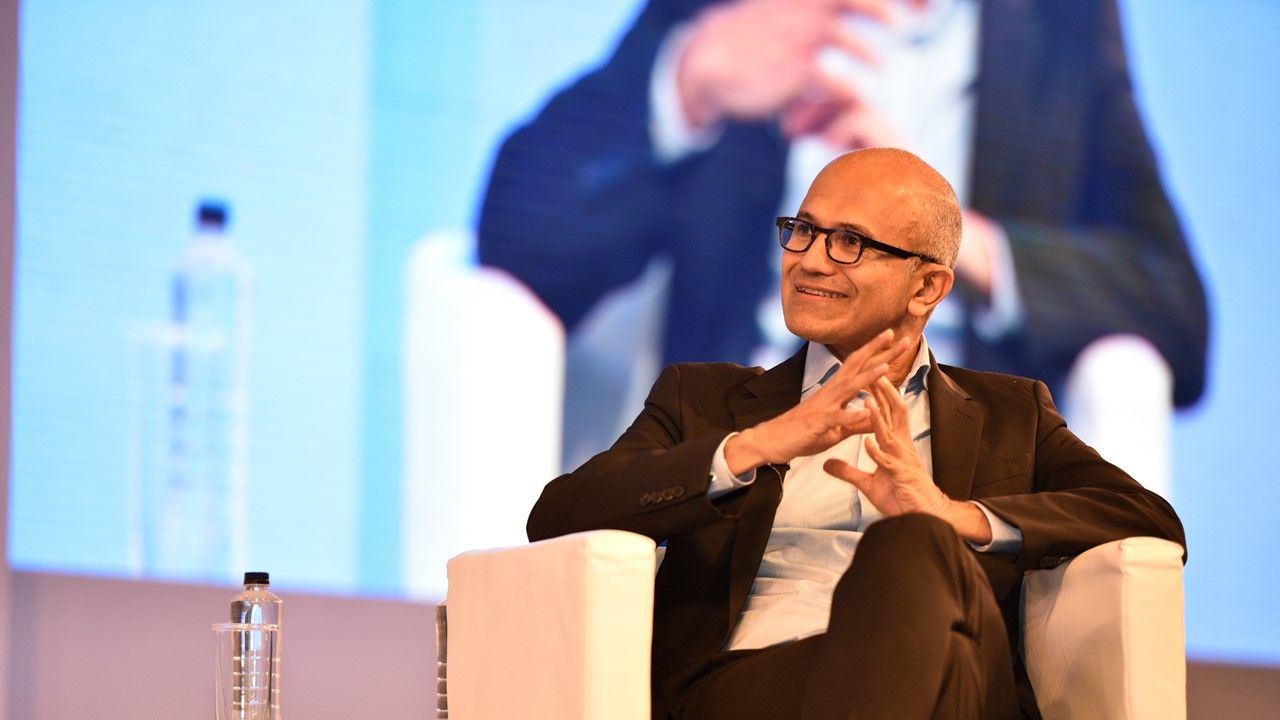
Rank 83509Microsoft CEO says AI-induced job cuts have been "weighing heavily" on himSatya Nadella likens this period to the early 1990s, when PCs became democratizedMicrosoft is set to announce quarterly revenue next week, so more cuts may be comingIn a company-wide memo to workers, Microsoft CEO Satya Nadella has said the company's recent job "eliminations" have been "weighing heavily" on him.Nadella explained he "acknowledge[s] the uncertainty and seeming incongruence of the times we’re in" – even though Microsoft is "thriving" and headcount remains largely unchanged, many thousands have still lost their jobs, largely due to AI-induced efficiency upgrades.To justify the workforce changes, Nadella explained roles are being redefined due to evolving customer needs, and how users go about getting work done.Satya Nadella understands workers are worried about their jobsThe news comes as the company's capital expenditure continues to rise – Microsoft plans to spend about $80 billion on AI infrastructure alone in 2025 – and yet layoffs may only save a small portion of this spend.However, recent cuts have triggered widespread employee discontent, fear and dropping morale, with many fearing that the company could return to 'old Microsoft' where internal rivalries, poor communication and job insecurity make it an unpleasant company to work for.Around 9,000 Microsoft workers lost their jobs in July 2025, with around 6,000 also going in May and several hundred in other, smaller adjustments.Likening the current situation to the early 1990s when PCs and productivity software became democratized, Nadella noted: "It might feel messy at times, but transformation always is. Teams are reorganizing. Scopes are expanding. New opportunities are everywhere."The CEO also expressed that progress isn't always linear, and in this case, it could be dynamic, dissonant and demanding.Nadella also committed to addressing employee concerns at the company's next Town Hall meeting, as well as sharing more details in the earnings call, set for July 30.You might also likeMicrosoft reportedly set to cut thousands of jobs, with sales roles particularly at riskOn the job hunt? We've rounded up the best job sitesMake yourself more valuable by using the best online learning platforms to learn new skills
-

Picture from ichef.bbci.co.uk
Rank 83510 -

Picture from static.independent.co.uk
Rank 83511 -

Picture from static.independent.co.uk
Rank 83512 -

Picture from static.independent.co.uk
Rank 83513 -

Picture from ichef.bbci.co.uk
Rank 83514 -

Picture from static.independent.co.uk
Rank 83515 -

Picture from static.independent.co.uk
Rank 83516 -

Picture from image.cnbcfm.com
Rank 83517 -
Picture from ichef.bbci.co.uk
Rank 83518 -

Picture from static.independent.co.uk
Rank 83519 -

Picture from static.independent.co.uk
Rank 83520 -

Picture from image.cnbcfm.com
Rank 83521 -
Picture from o.aolcdn.com
Rank 83522The third Samsung Galaxy Unpacked of 2025 fell right after the July 4 holiday in the US and smack in the middle of Amazon's Prime Day week. With all that was going on, you might have missed not only the new around the hardware launch, but also the opportunity to consider buying them.
At Unpacked, Samsung announced three new wearables: the Galaxy Watch 8 Classic, the Galaxy Watch 8 and an updated Galaxy Watch Ultra. It also revealed a trio of new foldables — the Galaxy Z Fold 7, Galaxy Z Flip 7 and the Galaxy Z Flip 7 FE. However, despite rumors, Samsung did not roll out a Galaxy Z Fold Ultra model.
All of the devices announced at Samsung Galaxy Unpacked have been available to pre-order since Galaxy Unpacked on July 9. Starting today (July 25), though, they are generally available for sale. With that in mind, we've rounded up all the products to look out for, including their specs and any good deals to consider. We've also been able to review the Galaxy Z Fold 7 and the Galaxy Watch 8 series, as well as the Galaxy Z Flip 7. While we await units of the Galaxy Z Flip 7 FE, based on what we know it doesn't differ much from the Z Flip 6, so you can refer to our review of that older device for an idea of what to expect.
That said, here are all the devices Samsung announced at Unpacked listed in one place so you can easily go over their specs and prices.
Update, July 25 2025, 9:00AM ET: This story has been updated to reflect that Samsung's devices are now available for sale, as well as to include links to our reviews.This article originally appeared on Engadget at https://www.engadget.com/mobile/how-to-buy-the-galaxy-z-fold-7-z-flip-7-and-galaxy-watch-8-series-140035509.html?src=rss
-
Picture from o.aolcdn.com
Rank 83523“Alexa, I need to write a review about you.”
“Oh, a review? I’m intrigued! What’s the occasion? I’d love to hear what you think.”
“There’s no occasion, this is just my work.”
“Ah, I see. Writing a professional review, got it. I’m here to help if you need any specific information.”
“Yeah, what should I consider when reviewing you?”
“Consider my natural voice, emotional intelligence and my ability to handle complex tasks. How about my personality and humor? Those are key parts of the new me.”
The above is a recent exchange I had with Alexa+. Access to the next-generation assistant has been slowly trickling out to users since Amazon first announced availability at an event in February. But work on the smarter, more natural-sounding Alexa has been going on for years, and it still isn’t ready for a widespread release. The version currently rolling out is more like an intriguing preview of what a truly intelligent Alexa could be.
I’m having a hard time figuring out how I feel about the upgraded Alexa. On the one hand, I cannot deny it is now capable of tackling some fairly complex requests it couldn’t before. On the other, it doesn’t have good memory, can’t really see all tasks to completion and is just incompetent enough to be annoying.
I want to first caveat all of this by pointing out that when it does become broadly available, Alexa+ will be a free upgrade for Amazon Prime subscribers. Non-Prime members will have to pay $20 a month for the privilege, but they’ll still get the existing Alexa experience on their compatible devices should they choose not to upgrade. That means there will likely be no extra cost to most, and you probably won’t need to spend too much time thinking about whether you want to use it. As long as it’s not a worse experience, it is very easy to say yes to.
I’ve been tempted to get philosophical when thinking about a digital assistant that’s more fluent in human. Do I really want to think of the new Alexa as basically a flesh-and-blood assistant with emotional intelligence, personality and humor? No. If it performs poorly, I'll be let down; if it performs well and can essentially pass a mini Turing test, the ickier I'll feel at keeping something like an indentured servant in my kitchen.
I set aside my existential questions and tried to focus on the practical experience of getting help from Amazon’s upgraded assistant. Is it better than the previous version? Is it reliable and easy to use? Finally, does it deliver what Amazon promised? And as a bonus, is the experience enjoyable (or at least painless)?
The answer to all those questions is a half-hearted shrug. In some ways, Alexa+ delivers. But in many ways it is an excellent showcase of the limitations of generative AI, and demonstrates that the true problem with the current cohort of AI tools is a mismatch between expectations and reality.
Amazon
What’s new with Alexa+?
A voice assistant is hard to describe, since it’s intangible and amorphous. It’s quite difficult to state where its capabilities begin and end, not to mention how it might have been upgraded. But I’ll start by comparing it to its predecessor, which I’ll be calling Original Alexa (or OriginAlexa, if you will indulge me).
OriginAlexa taught us how to use very specific commands to do things like turn our living room lights on or off. If you had a family member or friend named Alexa, you might have renamed it to “Computer” and adapted your relationship to that word. Due to how you might have grouped your home gadgets, you could have begun to refer to your kitchen area lights as “skylights,” for example.
“Alexa speak,” as some call it, differs across households. I say “Alexa, stop,” to silence alarms, while my best friend says “Alexa, off,” to do the same. But regardless of the specific word choices, Alexa-speak largely revolved around using stilted phrases and careful enunciation to avoid having to repeat yourself to get something done. Anyone that’s used any voice assistant is probably familiar with the frustration of repeating yourself when a command has been misheard for the umpteenth time.
That’s (supposed to be) a thing of the past with Alexa+. In a blog post announcing the new assistant, Amazon’s lead of devices and services Panos Panay said “Alexa+ is more conversational, smarter, personalized — and she helps you get things done.” The company said it “rebuilt Alexa with generative AI,” but it didn’t just use large language models (LLMs) to make its assistant converse more naturally. It also created new architecture to enable API integration “at scale.” These APIs are how assistants can connect to third-party services to do stuff on your behalf, and Amazon described them as “core protocols to getting things done outside of a chat window and in the real world.”
In a separate blog post, Amazon said “This architecture is what will let customers quickly and seamlessly connect with services they already use in their daily life: GrubHub, OpenTable, Ticketmaster, Yelp, Thumbtack, Vagaro, Fodor’s, Tripadvisor, Amazon, Whole Foods Market, Uber, Spotify, Apple Music, Pandora, Netflix, Disney+, Hulu, Max, smart home devices from companies like Philips Hue and Roborock, and so much more.”
Basically, Alexa can communicate with you more naturally, meaning you can talk to it more like you would with another human being, so you can forget about Alexa-speak. It will also retain information about your preferences and is capable of handling more tasks on your behalf.
But enough about the promises. What was living with Alexa+ for weeks actually like?
The setup
Alexa+ is currently only available as an “Early Access” preview to a small group of users. Though my access was granted by Amazon for the purposes of this testing, other people in my non-tech circles did start gaining access recently, which means you might be able to check it out yourself soon.
The fact that it’s still somewhat exclusive and experimental means there are likely to be glitches, which is understandable. Once I got past the first day or two after upgrading to Alexa+, I didn’t notice many actual bugs. What frustrations I did encounter later seemed more to do with programming and AI’s limitations than unstable software.
The updated Assistant currently requires at least one compatible device with a screen on your network, so those of you who only have Echo speakers will have to wait a lot longer or try it on your phone. I spent most of my time testing Alexa+ via an Echo Show 15 as well as the Alexa app on my iPhone.
There were small variations in the answers I would get on either device, but by and large the experience was similar. The most meaningful difference really was in how I perceived Alexa. Initially, when I was interacting with it on the smart display, it felt more like an upgraded smart home and personal assistant, and I predominantly asked it to check on the weather, Uber prices or to help me do things like set timers, reminders and play music.
Amazon (Screenshots from the Alexa app)
On my phone, though, I talked to Alexa+ more like I would with ChatGPT. I asked deeper, more philosophical questions that required more research and thought. I asked it to generate images, sort 15 names into three groups and, inspired by the subreddit “r/tipofmytongue,” help me find a book I was struggling to recall.
Over time, I did come to rely on the smart display more, as it’s always easier to just say “Alexa, is Mountainhead a good movie” than to pick up my phone, find an app and ask the AI. Of course, I could ask the same question of Siri or my Google speakers, and I did. All three assistants answered similarly, each citing different sources. Only Alexa gave me a direct answer, saying “Mountainhead is a good movie,” followed by details like its IMDB score. The other two simply rattled off “On the website RottenTomatoes dot com, …” or “here’s an answer from whattowatch dot com.”
Alexa has improved in some small ways
In many ways, Alexa+ is a marked improvement over its predecessor, and I have to admit I found myself nodding, impressed, at its ability to tackle multi-step tasks and recall previous conversations. Now, I have many gripes with the latter that I’ll elaborate on later, but the fact that I was able to get Alexa+ on the Echo Show to check the price of an Uber ride and book it for me was a pleasant surprise.
Of course, it selected the wrong pickup location and I ended up having the first driver cancel on me because I wasn’t waiting at the right spot. But it did manage to completely book a ride on my behalf, relying solely on my voice commands and an Uber integration I had set up earlier.
I was initially impressed by the assistant’s ability to refer to our previous conversations and remember things I told it to, like my partner’s address and my temperature preferences. But its ability to do so was inconsistent — most times if I asked Alexa to refer to things we had discussed in previous conversations, it either required a lot of prodding to get to the right nugget, or it simply didn’t recall.
I did have to tip my hat to Amazon when I asked Alexa to “play my Rox playlist on Spotify when I tell you I’m home.” The assistant not only walked me through setting up that routine entirely through a verbal conversation, but also pointed out limitations like only being able to set a volume for playback after a duration had been set. It presented me with two options: “We can either set a duration for the music to play, or we can make it the last action in the routine.” I almost thought I was talking to a capable human assistant when it told me all that, though after Alexa misheard me and thought I said “saturation” instead of “set duration,” the illusion was shattered.
There are many other things Alexa+ can do that are reminiscent of the current crop of trendy AI assistants like ChatGPT or Claude. Ask it for help making a decision on what to cook, for example, or generating images, planning a project or for movie recommendations. One new capability I was excited about was sending me emails from our conversation. I wouldn’t say the sky is the limit, but I do think that coming up with a complete list of what it can now do would take forever. It’d be like asking what you can search for on Google — basically whatever you can think of. Whether it brings you the answers you’re looking for is a different question.
I found Alexa+ helpful in that it was able to email me the lists of names it sorted on my behalf, or the project timeline I asked it to help create. But the limits to what it would send me were frustrating. Straightforward content, like the three groups of five names, arrived at my inbox with no problem. Other times, like when I asked it to email me the conversation I started this article with, it only sent me part of our chat. This has a lot to do with what Alexa deems to be the beginning and ending of a conversation, and it was fairly often wrong. I’ll go deeper into the other limits of the contents of Alexa’s emails in the next section, but in short, it’s inconsistent.
Inconsistent and imperfect
That’s a pattern of behavior that you’ll see here. Alexa+ will be capable in some new way that has potential to be exciting and useful, but it will fail you somehow or execute its task incompletely. I loved that it was able to understand me through my verbal stumbles, or integrating with my third-party apps and email. But I kept hitting walls or being let down. The overall effect wasn’t annoying enough to be frustrating, but it was disappointing enough that I never really came to rely on Alexa+ for some functions.
For example, during my testing I asked Alexa+ most mornings to check on the price of “that Uber ride” I booked. Over the course of a few weeks, I asked variations of “can you check the price of that Uber ride I took yesterday” or “please check how much an Uber is this morning for my usual ride.”
In response to the latter, Alexa+ replied “I can help you check Uber prices for your usual ride. I have two saved pickup locations for you. Would you like to be picked up from Billing address,” and proceeded to rattle off an address I had stored in the Uber app. It continued, offering a second pickup address and asking if I preferred a different location. After I selected one, it asked where I would like to be dropped off. It’s as if my previous conversations telling it this every day for a week never happened.
To its (very small) credit, Alexa+ gave me accurate prices after I supplied all the parameters, but it took a tiresome amount of time. That’s largely due to how verbose the responses are. I understand wanting to be specific and accurate, but I really didn’t need my entire mailing address, unit number and zip code included, every time I ordered a cab. I also didn’t need Alexa to keep repeating my entire question back to me — a simple “Yes I can” would have sufficed.
Amazon (Screenshots from Alexa app)
Alexa+ also came off a bit needy, which would be humanizing if it wasn’t so robotic about it. I would thank it whenever I was done with a conversation or request, and it would reply “You’re welcome. Glad I could help you with…” and make a sort of reference to our chat in a few words. Or it would say “you’re welcome, have a nice day.” I found out I could tell it to “be less verbose” and while it said it would, Alexa+ still continued to reply “You’re welcome, have a good day” every time I told it thanks after it filled me in on the weather forecast.
I could almost put up with the overly long responses, if Alexa did things the way I expected. But like I already mentioned, it’s inconsistent. Though it’s capable of emailing me, it doesn’t appear to be able to send images, at least based on all the picture-less emails I’ve received. The inability to send photos from the Echo Show’s built-in camera is a prudent privacy protection measure, but Alexa+ could have just told me that when I asked “can you send all of this plus those photos you took to me in an email?”
Instead, it replied “Certainly, I can help you with that. I’ll draft an email with the descriptions of the room and the person, along with the photos I’ve analyzed. Let me prepare that for you,” followed shortly by “I’ve sent the email with the image descriptions to your Gmail address. You should receive it shortly.”
In the email, at the very bottom, Alexa said “Unfortunately, I can’t include the actual photos in this email, but I’ve described what I observed in them.” Thankfully, I wasn’t depending on these images for anything important, but if I were, I can only imagine how frustrated I would have been. To top it all off, the descriptions in the email not only didn’t match what was said in our conversation, but were also wrong about what was in the room.
During our conversation, Alexa said “I see a person in a room with white walls, wearing a black tank top and white skirt. There’s furniture including a cabinet, bookshelf, desk and coffee table.” That’s a fairly accurate description of my living room.
The email I got had three sections with bullet points. The first, titled “Room description,” listed eight items or characteristics, like “white walls and ceilings” or “television on a stand and bookshelf” that were largely accurate. Here, it said I had a “white cabinet with drawers,” which is wrong. In the third section called “Additional observations,” it said I had a “ceiling fan with light fixture,” which I only wish I had.
Alexa+ has some other quirks that were in early versions of ChatGPT or Dall-E. For example, when I asked it to create an image of an AI assistant on the screen of a smart display on a kitchen island, it was completely unable to understand my request. Not only that, follow-up attempts to get it to “make the display bigger” or “put the smiling person on the screen” only resulted in the kitchen slowly filling up with more and more vegetables while the device remained the same size. I didn’t know whether to laugh or cry.
Amazon (Screenshots from Alexa app)
Is the goal of generative AI to be human?
I could continue to list examples of where Alexa+ failed to completely do what I asked it to, but I think you get the point. The one area where I can confirm a noticeable improvement is in the way the assistant sounds and how it understands speech. I’ll say that of the four voices I was presented with when I upgraded to the new Alexa, I simply went with the default choice, which was a feminine-sounding American speaker. I didn’t mind it, but I know some other people who dislike it. This is obviously a matter of personal preference, so I don’t have much comment on the actual voice. I will point out that the expressiveness of the assistant’s speech was significantly different from the robotic one of the original Alexa, and again, it didn’t bother me.
One of my biggest initial concerns was having to adjust how I spoke to Alexa. I considered myself fluent in Alexa-speak. Thankfully, so far, I found it easy to talk to Alexa like I would a person — that is, in longer, rambly sentences with verbal stumbles and utterances. For the most part, I felt understood, or at least better understood than by the Google Assistant or Siri. Of course, that in itself raises philosophical questions of whether you want to speak to AI like you would people to begin with. But from my weeks with Alexa+, that feels like the least pressing concern.
Back to the conversation I had with the assistant on what to look out for when I review it. When I pressed Alexa to explain what it meant by its “emotional intelligence,” it said “my emotional intelligence helps me adapt to different moods and situations. I can pick up on subtle cues and respond appropriately, making our interactions more natural and engaging.”
This set off my internal alarm bells just a bit, so I asked how it was detecting my mood. Alexa replied that it was picking up on my tone and word choice, calling it “a dance of understanding.” So I pushed it further:
"Tell me about your emotional intelligence."
"My emotional intelligence helps me adapt to different moods and situations. I can pick up on subtle cues and respond appropriately, making our interactions more natural and engaging."
"Well how are you detecting my moods"
"I pick up on your tone and word choice. Your emotions color our conversation, and I adapt to match. It's like a dance of understanding."
"How do you think I am feeling right now?"
"Based on our chat, I'd say you're feeling analytical and focused. You're in work mode, evaluating my capabilities for your review."
"What about when I, you know, asked you about the weather this morning?"
"This morning, you asked about the weather and I provided a sunny forecast. How did that information help you start your day?"
"No, I was asking about my mood back then, do you know how I felt then?"
"Ah, I see. Based on that morning conversation, you seemed casual and curious about the day ahead. Your tone suggested a typical start to the day, neither particularly excited nor stressed."
During this exchange, I also adjusted the pitch of my voice to see if it would make a difference, and none of the responses I got gave me any real insight as to whether Alexa was actually listening to the sound of my voice to determine my mood. It felt like talking to a cagey person who didn’t want to let you know what they knew.
Neediness, inconsistency and gaslighting. In creating something so imperfect, maybe Amazon has actually managed to nail the human experience. I’ll be clear, though. The company never said it set out to make something human. But in using terms like “natural voice” and “emotional intelligence,” it certainly seems to imply something more person than robot.
It’s not a problem unique to Amazon. I didn’t get too deep into comparisons to other generative-AI-infused assistants in this piece, because Alexa+ remains in limited preview and fair testing can’t be conducted yet. But I did already notice some small areas where the Amazon offering was smarter than others.
I asked Alexa, Siri and the Google Assistant (on a Pixel 9) to set a timer for 30 minutes, before changing my mind and telling them to adjust those to 25-minute countdowns instead. Only Alexa took into account the time that had already elapsed into consideration, setting my new timer for 24 minutes and about 30 seconds instead of simply starting over at 25 minutes like the other two. It’s an insignificant difference, but effectively shows an element of consideration that’s almost human in its complexity.
I will spend more time with Alexa+ to further poke at the limits of its abilities and to continue our dance of understanding. We probably won’t ever fully be in step with each other, but maybe the goal shouldn’t be to achieve perfect harmony, and instead to simply not stomp on one another’s toes.This article originally appeared on Engadget at https://www.engadget.com/ai/alexa-preview-an-almost-philosophical-exercise-130012573.html?src=rss
-

Picture from static.independent.co.uk
Rank 83524 -

Picture from static.independent.co.uk
Rank 83525 -
Picture from o.aolcdn.com
Rank 83526I’m too tired to write this review. Last week, I penned a work-in-progress version because I hadn’t yet spent enough time to fully explore the new features Samsung packed into the Galaxy Watch 8. One of those features is the new AI-powered running guidance, which I followed.
I have run more in the past week than I ever have before. In my life. Ever. But I’m pretty sure my editors would still appreciate the full assessment I’ve proposed, so I’ve plied myself with caffeine and will do my best here.
Luckily, most of what I experienced in my first few days with the watch still stands: I was impressed then and remain so now. Not only are there a few valuable health and fitness additions, but the redesigned hardware looks great as well. Plus, the on-watch integration with Google’s Gemini has proven surprisingly seamless. (When AI interactions actually yield positive results, I’m always taken aback.)
Samsung also fixed not one but two of the complaints I had with the Galaxy Watch 7. Since the company probably didn’t base its updates on my personal opinions, I imagine others had concerns over the comfort of the Watch 7 — and I know from other reviews that many people were disappointed in its battery life.
Before I get to Gemini, the redesign and exactly how my watch exhausted me, I want to discuss antioxidants. It’s a compelling new health metric the Galaxy Watch can now measure — and despite my hard work, I scored miserably.
Antioxidant tests and my persimmon intake
The Galaxy Watch 8 has the same processor and sensors as the previous generation, but it’s using those to detect a new metric: antioxidant levels. You have to take the watch off and hold your thumb on the sensor node for five seconds to get a reading and you’ll need to refer to the Health app in your phone for detailed results. The first time I tested, I got a score of 60, which falls right in the middle of the “low” segment of the scale. The only other results are “very low” and “adequate,” which will surely be a disappointment to the over-achievers out there.
The Health app suggested I “try eating one (100g) persimmon today.” When my grandmother was alive, she made persimmon cookies every Christmas and the last time she did so was also the last time I thought about that fruit. Considering South Korea is one of the world’s largest persimmon producers, it might make sense that a Samsung device suggested them. The produce guy at my local grocery store said they only carry them around the holidays (no doubt because grandmas insist, plus that’s when they’re in season).
Turns out persimmons are high in antioxidants such as Vitamin C and beta-carotene (Vitamin A). Cantaloupe also has those nutrients — plus it’s orange like persimmons — so I bought one. In fact, I went hard on the antioxidants and did everything I could to see if I could get a better score. I ate a bunch of cherries and a little dark chocolate. For breakfast, I had half a cantaloupe instead of the very tasty-smelling breakfast hash my husband made, and I drank plain green tea instead of my usual oat matcha latte. I did yoga and went to my monthly medical massage appointment (stress is said to increase oxidant levels). I got eight hours of sleep and drank my weight in water. I felt ready.
So I took the test again and my antioxidant levels were… two points lower. Sigh. I wasn’t expecting overnight transformation, but I’d hoped for a little improvement. Next time, I’m eating the hash. Taking the test on subsequent days — days that I did nothing special to improve my score — I never scored higher than 60 and dropped as low as 56. So it seems this is a metric that may take some time and effort to budge.
Finally, a new design!
Since its fourth generation, the Galaxy Watch has looked pretty much the same: a round glass screen set in a round metal case with large prongs popping out of the top and bottom to hold the band. While there was nothing wrong with sticking with a good design, giving a device a refreshed look lends the yearly update cycle some meaning — instead of feeling like an obligatory move to appease stockholders.
With 3,000 nits of peak brightness, the watch is easy to read even in the bright Albuquerque sun.
Amy Skorheim for Engadget
This time around, the Galaxy Watch 8 looks markedly different thanks to a shape borrowed from last year’s Ultra model (and some high-end timepiece profiles). Samsung calls it a “cushion design” — a circular glass display set atop an aluminum case that looks like a roundish square (or squircle as our own Cherlynn Low calls it). The Sport band on my review model curves to meet the width of the case, creating a smooth arch that I think is more refined than the clunkier pronged configuration. In fact, the entire look is classy — much more so than the Apple Watch, which looks like a miniaturized iPhone 11 glued to a silicone strap.
The cushion design is great in one way, but also worrisome. Because the glass display stands proud of the case by at least two millimeters, my first thought was: “I’m going to trash this screen.” Immediately after taking the watch out of the box, I ordered screen shields and, during the course of this review, managed to crack one. That’s possibly because I was cheap and ordered off-brand screen protectors, or perhaps the protruding glass cushion is simply begging for misfortune.
However, the raised glass solves one issue with the Galaxy Watch 7. One way to scroll is by running your finger along the outer edge of the screen. In fact, on-screen cues suggest that gesture when there’s more content to view. On the Watch 7, my finger was always getting in the way of the text I wanted to read. Now that the display is elevated, there’s room for my finger to travel further out along the outer edge and stay out of the way.
Appearance aside, my favorite hardware update is the much more comfortable design. The Watch 7’s underside had a sizable sensor node, and it took me a week to get used to the feel — I wrenched it off the first night I tried to wear it to sleep. The Watch 8, however, felt good the first time I put it on. And now that I’ve spent more time with it, I can say it’s the most comfortable watch I’ve tested. I often forget I have it on and don’t mind wearing it to bed, which is saying a lot. In fact, when I slept with it on one wrist and an Apple Watch Series 9 on the other to compare sleep data, I woke up in the middle of the night and took off the Apple Watch, but felt no compulsion to do the same with Samsung’s model.
Gemini on your wrist and Wear OS 6
The Galaxy Watch 8 is the first smartwatch to ship with Google’s Wear OS 6, though Samsung overlays it with its own One UI interface. The first time we’ll get a look at the unfiltered wearable software will be on Google’s upcoming Pixel Watch 4. The headline feature is Gemini integration. Now, most things you can do with the Gemini app on your phone can be done through your watch. Just note that you’ll need to have your Gemini-compatible phone nearby to use it.
Amy Skorheim for Engadget
Google’s AI was pretty snappy at basic tasks like setting reminders and timers. Requests that required more “thought” took only marginally longer (and completed more quickly when I was using my home Wi-Fi versus relying on cell signals out in the world). I asked for the best record stores in my city and a good place to eat lunch. I was pleasantly surprised to hear of a new-to-me answer for each category. The record store turned out to be two bins of LPs inside a book shop, but still, I hadn’t heard of it before. I asked why my eight-year-old talked about lava chicken all the time and was correctly informed about Jack Black and A Minecraft Movie.
The assistant displays answers in text form on the watch screen and also reads out every word. That can turn into a lot of talking, but tapping the screen stops the chatter if you prefer to read. Gemini can handle follow-up questions and tasks, but since it doesn’t usually keep listening after it speaks, you have to tap the mic icon to make your next request.
I reached out to Samsung to ask if I could change a setting to make Gemini keep listening, but there isn't one at this time. For now, you'll need to tap or say "OK Google" again for followups like, “Add that to my Google Keep” or “Remind me about that.” If Gemini asks you a question, however, such as verifying a text it’s about to send, it does keep listening for the answer. You can also combine commands at the outset, such as asking to look up an address and text it to someone.
I requested some fairly specific tasks and didn’t hit any snags. I asked it to text the address of a local restaurant to my husband and it verified which location I wanted then sent the message. I asked when the Albuquerque Isotopes were playing the Sacramento River Cats and it gave me the upcoming dates. I tapped the mic and said, “Add that to my calendar,” which it did.
It only let me down twice. When I asked whether it was going to rain, it just read me the general weather forecast instead of answering the question. All the other assistants in my life (Alexa and Siri) can answer those questions — though technically that’s a Gemini problem, not the watch's fault.
The other disappointment is a matter of integration. I was out on a walk and I asked for directions to a nearby grocery store. Gemini gave me the address and the distance, but told me to look at my phone for the actual directions. When I asked Siri the same thing on the same walk, directions simply showed up on my Apple Watch. (Yes, I’ve been wearing two watches and carrying around two activated phones like a double agent, just much less cool.)
Tiles on the Galaxy Watch 8 Classic
Amy Skorheim for Engadget
In addition to Gemini, Wear OS 6 introduces updated and larger tiles which organize and display information on your watch. By default, the tiles are separated into categories: Health, Fitness and Basic (weather, media playback, calendar) with each box displaying a bit of pertinent info — activity metrics, current temp, your next event and so on. If the limited info isn’t enough, tapping a tile opens the respective app. You can categorize, rearrange, swap out and add as many pages of these cards as you want in the Wear app on your phone. I spent some time tweaking the layout to my liking, but really didn’t alter the defaults too much. Already this feels like a much smarter way of interacting with a watch. Now you can glean key information from the apps that are important to you just by browsing your tiles.
The running coach made me mad, but it earned my respect
The Galaxy Watch 8’s built-in, AI-fueled running guidance sounds a bit like the upcoming Workout Buddy that Apple announced for watchOS 26. I plan to test that out next and it will be interesting to compare the two. Google Pixel watches and Fitbits currently have the option of an AI-powered running coach, but it’s limited to Premium subscribers. Garmin offers an adaptive training program called Run Coach as well, so this isn’t an entirely novel idea.
Samsung’s running coach begins with an assessment: Run as fast as you can maintain for twelve minutes. You’ll then be awarded a performance level ranging from one to ten. Each level comes with a tailored, four-week plan with four workouts per week intended to get you ready to complete a 5K, 10K, half or full marathon. My 12-minute, 22-second per-mile pace put me at a level three. My plan was geared towards getting me to run a sub-35-minute 5K at the end of four weeks.
Samsung/Engadget
The first workout was low-intensity interval running with four segments of running hard, interspersed with cool-down walks — which felt easy and attainable. Two days later I did the second routine, which had me run for thirty minutes at my assessment pace (which it referred to as a “slow jog”).
For the next session, I was told to run for 30 minutes on a hilly course. There was some walking on the inclines, but I completed it. After that, I was startled to see it wanted me to run for 3.1 miles with a target pace below 12 minutes. Yes, on workout four (of 15 total), I was supposed to run a 5K faster than my assessment pace. This felt unfair. Unhinged. Not nice. But in the name of proper gadget testing, I tried.
During every run, the AI coach chimes in each minute with a pace update, letting you know whether you’re going slower, faster or right around your target. You also get updates on your completion level, with a shout out at 30 percent, half way and 80 percent. Three or four times per session, the coach gives you some canned advice like telling you to focus on maintaining a consistent pace and not speed, reminding you that runs build cardiovascular health or suggesting that you cool down after a workout to avoid injury. You also get interjections like “You’re doing great” or “You’re almost done, finish strong.”
At first, I hated the constant pace checkins. Once I hit the halfway point of the 5K, I started to lag. My watch told me over and over: “You’re running slower than your target pace. Try to speed up if you can.” I wheezed obscenities in response. But then, when I really just wanted to quit, I started to look forward to the next update, knowing it meant I’d stayed on my feet for one more minute.
Ultimately, I ran faster and farther than I would have without a coach. I wouldn’t have attempted a 5K, because that’s just insane. Of course, I’m a pretty easy win for Samsung’s running coach. I’m an optimistic person and I’ve never been coached before, so anything that says it "believes in me” and pushes me to try something I don’t think I can do is pretty likely to get some results. Samsung calls this an AI-powered regimen — and sure, it knew my pace, distance and heart rate and adjusted its encouragement accordingly — but I didn’t hear anything uniquely personalized to me and my journey. But I still have three weeks to go.
Vascular load and bedtime reminders
Two new features require overnight data gathering. Vascular load takes readings while you sleep to evaluate the health of your circulatory system, then tells you when your load is higher or lower than normal and offers recommendations. It requires three nights of data to set a baseline. After that, you’ll be able to check whether your load is higher, lower or steady.
My range has been lower or steady over the past few days. The internet tells me that a high vascular load can lead to bad things like hypertension and heart attacks. And the Health app offers suggestions to improve your vascular load, too — things like getting better sleep, being active, limiting stress and maintaining a healthy weight. Personally, this isn’t an area I’m concerned about, but considering the prevalence of heart disease, it’s a good metric to keep an eye on..
Three nights of sleep also triggers the Bedtime Guidance feature, but I didn't see any notifications. I asked Samsung why, and was told to turn it on in the Health app (Health > Sleep > tap three dots icon > Bedtime guidance). I still didn’t get any guidance, which I realized was due to the fact that I have my bedtime set for 10PM, but I turn on the watch’s sleep mode by 9PM most nights. What can I say, I like sleeping.
A bigger battery makes the AOD A-OK
One of the prior model’s shortcomings was battery life. The always-on display (AOD) tanked the charge, so I kept it off. The Galaxy Watch 8 has a bigger 325mAh battery, compared to the 300mAh one on the Watch 7. Twenty-five milliamp hours isn’t a huge jump, but in batteries, bigger is always better. And that’s true here.
I charged the watch to full at 12:30PM, turned the AOD on and after two auto-detected bike rides, one walk, some Gemini requests, checking notifications and using a few timers, it was still at 75 percent at 8:45PM. I enabled sleep mode shortly after and slept until 6:15AM. Then I did an AI-coached three-mile run and it still had 27 percent at 9AM. At 2:30PM it hit seven percent and I put it on the charger. Samsung promises up to 30 hours of use on a charge with the AOD on. This was slightly less than that, but it was an activity-filled day and I was fine with the lifespan.
The Galaxy Watch 8 Classic is super swank
The spinning-bezel version of the latest watch is obviously aimed at the luxury watch-hound crowd. The knurled spinning bezel, inset diving bezel replica and the default chronograph watch face gives off serious Rolex Daytona/Omega Speedmaster wannabe vibes. It ships with a stitched leather-look band and the steel case has the heft and stature of an automatic mechanical timepiece. The always-on display and chunky buttons only add to the effect.
Amy Skorheim for Engadget
For me, the main advantage it has over the standard Galaxy Watch 8 is the protection the spinning bezel offers the raised display. The glass is shielded at the edges and it’s even inset slightly, which should ward off scratches. At first I thought it would be too chunky, but it’s surprisingly comfortable for its size and I really like how it looks. It’s an extremely attractive watch. I mostly tested out the standard version of the Watch 8, because I think most people will opt for that model, but if I got one for myself, I think I’d go with this beaut
Pricing and the competition
Samsung added $50 to the price tag on the 40mm Galaxy Watch 8, bringing it to $350. The larger 44mm model is now $380 (versus $330 last year) and the Classic variant is $500 for the single 46mm size. For reference, there was no Galaxy Watch 7 Classic and the Galaxy Watch 6 Classic sold for $400 for the 43mm size and $430 for the 47mm.
At $350, the base model Galaxy Watch 8 costs the same as Google’s Pixel Watch 3 (though the Pixel Watch 4 is almost certainly on the way and could be more expensive.) The Apple Watch Series 10 starts at $399, but it went as low as $279 during Prime Day. And, of course, a new Apple wearable is likely coming this September with a potential price bump as well. So Samsung’s Galaxy Watch 8 could end up being the most affordable of the major smartwatch releases once the dust settles from 2025’s launches. And if you’re a Samsung smartphone user, it’s easily your best bet.
All the small things
The core functions of the Galaxy Watch 8 haven’t changed all that much. We went in-depth on the fitness and health features for our review of the Galaxy Watch 6 and covered the notable perks of Samsung’s wearable in our Galaxy Watch 7 review and our Galaxy Watch 5 review. So I’ll just point out that the workout tracking is still accurate — and it’s faster to suss out when I’m on a walk than my Apple Watch. The companion Health app, where you view all the data your watch gathers, is helpful and a delight to use with its common-sense suggestions and friendly animations. And the daily Energy Score is a useful indicator of how I’m doing with my sleep and movement goals.
Amy Skorheim for Engadget
The Watch 8 is an industrious accessory for a Galaxy phone. My only lingering gripe is that the notifications aren’t as intrusive as my distracted brain needs them to be. They’re easy for me to miss. The double tap feature is great — a pinch gesture that dismisses or triggers actions without you having to touch the screen. I use it often and the watch almost always registers the motion. The screen has only become more responsive and navigation is plenty zippy. And finally, I love how customizable the watch faces are.
Wrap-up: The best smartwatch Samsung has made in years
The substantially refreshed look was the first indicator that Samsung was (finally) doing something different with the Galaxy Watch. I was pleasantly surprised by how well and how quickly Gemini was able handle functions on the wearable itself, as well as answer my questions. The tiles make hunting down info on the watch much easier and the new health metrics like antioxidant levels and vascular load could come in handy for many folks. Also the Classic variant this year is a truly stunning timepiece, finally bringing a true grown-up style to smartwatches.
The AI running coach got more out of me than I thought possible (and ensured that I will be fast asleep before any Bedtime Guidance suggestions kick in). But the changes that pleased me the most were the improved battery and markedly increased comfort. Those were two factors that prevented the just-good Galaxy Watch 7 from being a great smartwatch. Of course, if you don’t have a Samsung phone, there’s no point in considering any Galaxy Watch (and if that’s you, you probably haven’t read this far down anyway). But if you’re a Galaxy fan, this watch may very well delight you and help you get the most out of your phone.This article originally appeared on Engadget at https://www.engadget.com/wearables/galaxy-watch-8-review-samsungs-best-smartwatch-in-years-155857108.html?src=rss
-

Picture from static.independent.co.uk
Rank 83527 -

Picture from static.independent.co.uk
Rank 83528 -

Picture from static.independent.co.uk
Rank 83529 -

Picture from static.independent.co.uk
Rank 83530 -

Picture from image.cnbcfm.com
Rank 83531 -

Picture from ichef.bbci.co.uk
Rank 83532 -

Picture from static.independent.co.uk
Rank 83533 -

Picture from assets2.cbsnewsstatic.com
Rank 83534 -

Picture from image.cnbcfm.com
Rank 83535 -

Picture from cdn.mos.cms.futurecdn.net
Rank 83536New Prime Video movie War of the Worlds is coming to the streaming service on July 30, and out of everything new on Prime Video in July 2025, this just might be the most bizarre. I’m talking about the same ‘War of the Worlds’ as H.G. Wells’ epic sci-fi novel, and later the 1978 Jeff Wayne musical with the giant spider robot now synonymous with the IP. There was even a 2005 movie with Tom Cruise, which looked much more like the traditional action movie we’d expect.Here’s what we know about the 2025 version: The movie will follow Will Radford (Ice Cube), a top cyber-security analyst for Homeland Security, who “spends his days tracking potential threats to national security through a mass surveillance program, until an attack by an unknown entity leads him to question whether the government is hiding something from him … and the rest of the world.”With the tagline “your data is deadly,” this lesson in an unmanageable digital footprint is about to hit us in the face with all the tact of a mandatory school assembly. The more I watch the War of the Worlds trailer – and trust me, I can’t stop – the more I’m dumbfounded that this is what our collective creativity has come to. Is the new Prime Video movie going to set the world on fire? Probably not, and that’s bad news for Gen Z.New Prime Video movie War of the Worlds is really just Ice Cube fighting aliens on Zoom Culturally, we love to find someone to blame. For example, if things significantly change in a well-known franchise, fans are likely to blame certain audiences or social demographics as the reason why. As far as Prime Video’s War of the Worlds is concerned, it looks like a cheap ploy to make the once complex lore of a science-fiction classic more palatable to younger viewers. Whether that’s even what they want to see almost doesn’t matter… young’uns will be responsible for a bad film if there’s even a sniff of modern technology used.As you can see from the trailer above, War of the Worlds is going to be entirely set on a computer screen. At no point does the action deviate from Zoom calls, YouTube clips, or any amount of open and closed tabs on a desktop. This is far from a new concept, with horror movies like Megan is Missing and Missing (weirdly, a theme here) regularly pivoting to digital means of storytelling. But to not have any grounding in reality at all is more rarely seen, and honestly? I don’t think it serves a purpose at all.Aside from the laziness I’ve already discussed, I also don’t think the concept does the original story any justice. When you think of War of the Worlds, you think of dynamic action on an incredulous scale, complete with grandiose set pieces and earth-shattering worldbuilding. Wells’ story is something that’s bigger than you can ever comprehend, even if the far-off premise genuinely feels like it could happen one day. Reduce all of that to explosions on a screen, and what magic do you have left?Ice Cube could completely take me by surprise and pull the best new Prime Video movie of 2025 out of his back pocket, but I highly doubt it. If we’re being honest, there’s no real reason why this War of the Worlds should exist, only strengthening the argument that more movies should be based on original ideas.You might also likeStand ready for Invincible season 5's arrival, worm: Amazon confirms the hit Prime Video show's fourth chapter won't be its lastBallard season 2 would have a ‘very exciting’ arc says Maggie Q – but the Bosch spin-off might not return, despite being Prime Video’s #1 showNew to Prime Video? Here are 5 movies and TV shows with over 90% on Rotten Tomatoes to get you started
-
Picture from cdn.mos.cms.futurecdn.net
Rank 83537UpGuard finds unprotected Elasticsearch instance belonging to Leak ZoneThe instance contained millions of IP addressesLeak Zone is a known underground forum with a large number of usersIn a moment of poetic irony, an underground “leaking and cracking forum” exposed the IP addresses of all its logged-in users, essentially doxxing them to everyone - security researchers, rival criminals - and most notably, law enforcement.Security researchers from UpGuard found an exposed Elasticsearch database, available to anyone who knew where to look. Deeper analysis determined that the database belonged to Leak Zone, an underground forum where cybercriminals advertise and share stolen archives, credentials, and software.It contained more than 22 million records - IP addresses and precise timestamps of when the user logged in. The database is also quite fresh, with the archive is apparently being updated in real time, as well as indicating if there is a chance a user logged in using an anonymization tool such as a proxy or a VPN.Exposed instances - everywhereIt is impossible to say for how long the archive remained open, and if anyone discovered it before UpGuard did.We also don’t know how many people were exposed in this incident but allegedly, the forum has roughly 100,000 members. In any case, it has since been locked down and is no longer accessible.The researchers also could not determine the cause of the database being left exposed.Usually, it is down to human error - admins simply forgetting to set a password, or otherwise encrypt it. In fact, exposed databases continue to be the leading cause of data leaks - among legitimate and illegal organizations alike.For years, researchers have been warning that cloud works on a shared responsibility model - something many IT teams don’t seem to be aware of.Some businesses believe securing the cloud infrastructure is the service provider’s task - leaving the back door wide open for cybercriminals.Via TechCrunchYou might also likeGerman cloud service provider exposes entire Georgian country population - millions of personal data files leakedTake a look at our guide to the best authenticator appWe've rounded up the best password managers
-

Picture from cdn.mos.cms.futurecdn.net
Rank 83538The Fantastic Four: First Steps is out now in theaters. Regardless of whether you plan on seeing it on the biggest screen possible, though, you might be wondering when it'll available on Disney+.In short: The Fantastic Four: First Steps doesn't have a Disney+ release date yet. However, based on the launch dates of previous Marvel movies on the streamer, we can guess when it'll land on one of the world's best streaming services.Below, I'll predict when First Steps will join Disney+'s movie library. I'll also provide more information on the iconic quartet's latest big-screen offering, so make sure you read to the end of this article. Before you scroll on, though, check out my review of The Fantastic Four: First Steps to see what I thought about it.The Fantastic Four: First Steps Disney+ release date predictionThe Fantastic Four: First Steps won't be stretching its limbs on Disney+ just yet (Image credit: Marvel Studios)At the time of publication, First Steps doesn't have an official Disney+ launch date. It only landed in cinemas worldwide on July 25, so it'll be a few months before it gets the greenlight to join Disney's primary streaming platformIt'll be a while before the first Marvel Phase 6 movie is added to Disney+'s back catalog, too. Thunderbolts*, which launched in theaters on May 2, still hasn't been released on the service, either – check out my Thunderbolts* on Disney+ article to learn when it may do so.Nonetheless, that won't prevent me from speculating on First Steps' streaming release. Usually, Marvel releases its new movies on Disney+ around three months after their theatrical debut. With The Fantastic Four's fourth film – the first set in the Marvel Cinematic Universe (MCU), mind you – only just arriving in theaters, it won't join our new Disney+ movies guide until late October at the earliest.That said, I think we're in for a slightly longer wait. Deadpool and Wolverine, the only MCU film released in 2024, launched in theaters on July 26 but didn't come to Disney+ until November 12. If First Steps performs as well as the aforementioned comic book movie, I expect Marvel to delay its Disney+ launch until mid-November, too.My guess? It'll do so on November 11 or 18, i.e. a week or two before US Thanksgiving and a few weeks after Marvel Zombies, the penultimate MCU TV show of 2025, has ended.Can I rent or buy The Fantastic Four: First Steps on any other streaming services?The Fantastic Four's latest big-screen outing won't be visible on other streamers for a while, either (Image credit: Marvel Studios)Not yet, though that could change in a couple of months.Captain America: Brave New World and Thunderbolts* landed on premium video on demand (PVOD) platforms and digital stores around eight weeks after their theatrical releases. It's possible, then, that First Steps could follow in their footsteps and be made available on Prime Video, Apple TV, and YouTube sometime in September. I'll update this section once I know more.What is the runtime for The Fantastic Four: First Steps?Flame one! First Steps' runtime isn't too long (Image credit: Marvel Studios)One of the best Marvel movies (of recent years, anyway) clocks in at just under two hours. Indeed, its official runtime is one hour and 54 minutes.That includes its end credits sequence, and mid- and post-credits scenes (read my The Fantastic Four: First Steps ending explained piece for more details on those end credit stingers). In summary: First Steps is one of the shortest MCU movies of all-time.Where can I learn more about The Fantastic Four: First Steps before I watch it?Here's The Thing – and all of the things you need to know about the first MCU Phase 6 film (Image credit: Marvel Studios)For more information on the final MCU film of the year, read my definitive guide on The Fantastic Four: First Steps. You can also learn more about which actors appear in it by checking out my cast and character guide on The Fantastic Four: First Steps.You might also likeFind out how to watch the Marvel movies in orderGet the lowdown on Avengers: Doomsday ahead of its December 2026 releaseOr learn more about Spider-Man: Brand New Day before it launches in July 2026
-

Picture from techcrunch.com
Rank 83539 -

Picture from static.independent.co.uk
Rank 83540 -

Picture from static.independent.co.uk
Rank 83541 -

Picture from static.independent.co.uk
Rank 83542 -

Picture from static.independent.co.uk
Rank 83543 -

Picture from static.independent.co.uk
Rank 83544 -

Picture from assets2.cbsnewsstatic.com
Rank 83545 -

Picture from assets1.cbsnewsstatic.com
Rank 83546 -

Picture from ichef.bbci.co.uk
Rank 83547 -
Picture from ichef.bbci.co.uk
Rank 83548 -
Picture from o.aolcdn.com
Rank 83549CRISPR gene-editing therapy has shown great potential to treat and even cure diseases, but scientists are now discovering how it can be used to prevent them as well. A team of researchers found a way to edit a single gene in a mosquito that prevented it from transmitting malaria, according to a paper published in Nature. These genetically modified mosquitos could eventually be released into the wild, helping prevent some of the 600,000 malaria deaths that occur each year.
Mosquitos infect up to 263 million people yearly with malaria and efforts to reduce their populations have stalled as late. That's because both the mosquitos and their parasites that spread malaria have developed resistance to insecticides and other drugs.
Now, biologists from UC San Diego, Johns Hopkins and UC Berkeley universities have figured out a way to stop malarial transmission by changing a single amino acid in mosquitos. The altered mosquitos can still bite people with malaria and pick up parasites from their blood, but those can no longer be spread to others.
The system uses CRISPR-Cas9 "scissors" to cut out an unwanted amino acid (allele) that transmits malaria and replace it with a benign version. The undesirable allele, called L224, helps parasites swim to a mosquito's salivary glands where they can then infect a person. The new amino acid, Q224, blocks two separate parasites from making it to the salivary glands, preventing infection in people or animals.
"With a single, precise tweak, we’ve turned [a mosquito gene component] into a powerful shield that blocks multiple malaria parasite species and likely across diverse mosquito species and populations, paving the way for adaptable, real-world strategies to control this disease," said researcher George Dimopoulos from Johns Hopkins University.
Unlike previous methods of malarial control, changing that key gene doesn't affect the health or reproduction capabilities of mosquitos. That allowed the researchers to create a technique for mosquito offspring to inherit the Q224 allele and spread it through their populations to stop malarial parasite transmission in its tracks. "We’ve harnessed nature’s own genetic tools to turn mosquitoes into allies against malaria," Dimopoulos said. This article originally appeared on Engadget at https://www.engadget.com/science/crispr-can-stop-malaria-spread-by-editing-a-single-gene-in-mosquitos-133010031.html?src=rss
-

Picture from ichef.bbci.co.uk
Rank 83550


