News
This constantly updated list features the latest and most important news articles, ranked in order of significance. The top stories highlight major developments, breaking news, and critical updates across various topics, ensuring you stay informed about the most pressing issues. As new articles are added, the list adapts to reflect the latest priorities, keeping the most impactful stories at the forefront. Whether it’s global events, technology breakthroughs, or industry trends, this dynamic list ensures you always have access to the most relevant and timely information.
-
Picture from static.independent.co.uk
Rank 48201 -
Picture from cdn.mos.cms.futurecdn.net
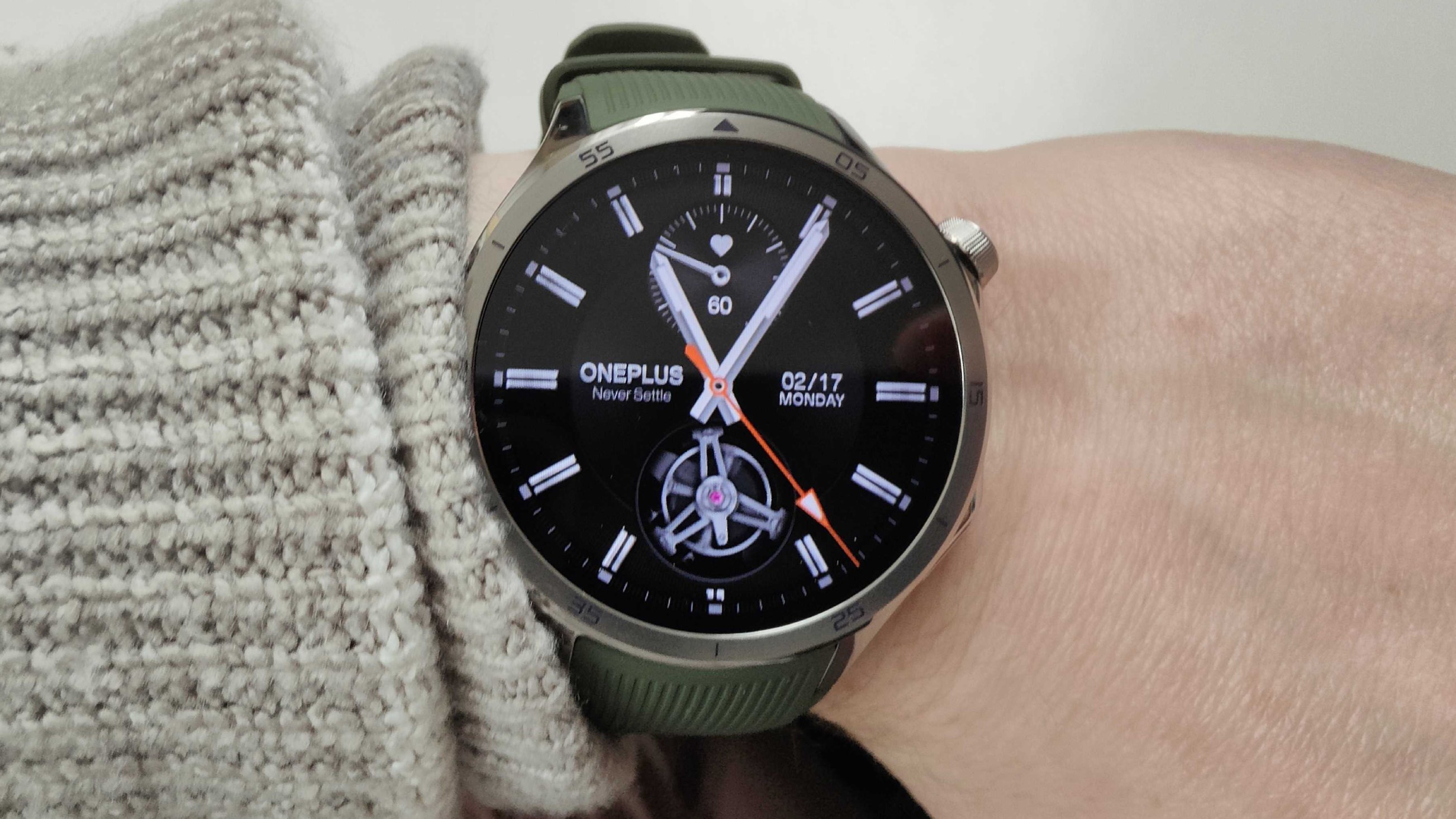
Rank 48202We have a release date for the smaller 43mm OnePlus Watch 3It will begin rolling out on July 8It's said to be "packed with specs that rival the full-sized version" When I reviewed the OnePlus Watch 3 two months ago (at the time of writing), I said it was already a contender for the best Android smartwatch of 2025. I loved the stainless steel, classic aesthetic and excellent battery life, but my biggest gripe was a style one: it was a big, heavy metal watch, and only came in one size.As a sports watch, that's a major downside. One of the reasons the best Apple Watches are so popular is that they offer watch faces of different sizes, allowing people with smaller and larger wrists to find a watch that feels like it belongs on their arm.Having reviewed fitness tech for many years, I know search terms like 'smallest Apple Watch' and 'best smartwatch for women' are popular on Google. Customers who don't want to wear big, chunky timepieces, whether that's due to aesthetics or comfort, are sadly limited in choice.Thankfully, OnePlus listened to our complaints. In my OnePlus Watch 3 review, I wrote: "My main gripe is the watch’s size: at the time of writing the initial early review, I said I would have loved to see OnePlus bring out a second, smaller model for those with smaller wrists. Many people, including a lot of women, will find it’s just too big and heavy for daily wear."However, during my testing, OnePlus published the news there would be a second, smaller size along with LTE capabilities for future models, and my fears were dispelled."(Image credit: OnePlus)OnePlus had already revealed a smaller size was coming, but not when, nor did we have any other details about it. Would it have the same specs as the larger model? What about battery life? Would it still be a OnePLus Watch 3, or something closer to an Apple-style 'SE' model? For months, we had no answers to these burning questions.Published today in an exclusive interview with TechRadar, Celina Shi – Chief Marketing Officer at OnePlus Europe – finally spilled the beans on the new watch's release date, and even provided an image – the picture above. At first glance, the 43mm looks a lot more Pixel Watch-y than the full-size 47mm Watch 3."In February this year, we launched our latest flagship wearable, the OnePlus Watch 3. It was highly popular due to its huge battery life, accurate GPS and health and wellbeing metrics," said Celina. "We're bringing a smaller iteration of this device that's perfect for those with smaller wrists – but don't underestimate it."It's packed with specs that rival the full-sized version, as well as exclusive monitoring features not found on any other device – and will be available in sleek Silver Steel!"It sounds like it's getting at least one exclusive feature, although we don't know any more details on it. It'll also pack specifications that match the 47mm version of the watch.The best part? It's launching on July 8, mere weeks away, along with a bevy of other OnePlus devices such as the OnePlus Nord 5, the OnePlus Buds 4 and the OnePlus Pad Lite.You might also like...Your Wear OS smartwatch can now warn you about imminent earthquakesGarmin Venu X1 revealed – meet the surprise new Apple Watch Ultra 2 rival with Garmin’s biggest display yetI wore the Samsung Galaxy Fit 3 for 2 weeks, and it's impressively cheap for the sheer amount of features it packs
-

Picture from static.independent.co.uk
Rank 48203 -

Picture from static.independent.co.uk
Rank 48204 -

Picture from static.independent.co.uk
Rank 48205 -

Picture from static.independent.co.uk
Rank 48206 -
Picture from cdn.mos.cms.futurecdn.net
Rank 48207BT could save £3 billion by cutting up to 55,000 workers, AI could end even more contractsIf share prices don't rise, BT might have to spin off OpenreachGroup revenue was down 2% year-over-yearBT CEO Allison Kirkby has indicated the increasing adoption of artificial intelligence could lead to even deeper cuts beyond current plans to trim the company's workforce.Kirkby confirmed plans, which are hoped to save £3 billion by 2030, to cut 40,000-55,000 jobs by the end of the decade.In an interview with the Financial Times, Kirkby stated: "Depending on what we learn from AI... there may be an opportunity for BT to be even smaller by the end of the decade."BT CEO blames AI for further job cutsKirkby took over BT in 2024, replacing former CEO Philip Jansen, and has led several saving exercises, including selling off non-core assets like the company's Italian and Irish units.The FT also noted that BT had spun off its international business last month, citing sources familiar with the matter, suggesting that it could be open to offers on it.However, the CEO believes that BT's current share price (£186.45) does not reflect the true value of Openreach – its broadband network arm. If this perceived undervaluation continues, BT could consider spinning off Openreach after the fibre rollout is complete, however Kirkby said she would prefer the share price to improve rather than having to resort to yet another spinoff.Speaking about BT's latest full fiscal year, which ended on March 31, Kirkby said the company had realized "over £900m of annualized cost savings." She blamed "lower international sales and handsets" on the 2% dip in revenue, to £20.4 billion.BT's reach across the UK could be about to get even stronger, with The Guardian revealing that the company could have entered initial discussions to buy out TalkTalk, a smaller broadband provider that has struggled financially.However, such an acquisition, together with BT's ownership of mobile network provider EE, could spell out great domination over UK networks, potentially sparking an antitrust investigation.The recently-completed merger of Three and Vodafone was subject to an in-depth investigation before eventually approved by the UK's Competition and Markets Authority (CMA).You might also likeOpenreach declares aim to accelerate UK high-speed broadband rolloutWant to maximize your signal? These are the best mesh Wi-Fi systemsWe've listed the best eSIMs for international travel
-

Picture from cdn.mos.cms.futurecdn.net
Rank 48208AI may be redefining cyberattacks and defenses, but the real security battleground is data. In an environment where information flows freely between SaaS platforms, personal devices, and remote endpoints, preventing data leakage is a strategic imperative critical to company performance.Data Loss Prevention (DLP) has become the cornerstone of digital trust, especially as organizations automate more of their operations and employees leverage AI platforms in their day-to-day work. Modern DLP tools need to support expanded functionality and new layers of context to truly integrate into broader access and identity policies in the quest to safeguard and futureproof business.Inside your business, the need for DLP continues to evolveEmployees do things they aren’t supposed to. That isn’t a new phenomenon, but it presents big challenges for DLP efforts. The rise of content-hungry tools such as ChatGPT and increased reliance on shared data repositories in the cloud – Google Drive, Dropbox, etc. – create more opportunities for workers to move or exfiltrate sensitive customer data in ways they shouldn’t.Alongside company-provided solutions, the 2025 Netskope Cloud and Threat Report found that 88% of people use personal cloud apps at work. Shadow IT, where users quietly implement SaaS apps without IT’s knowledge, means your business may have numerous undiscovered apps floating around that put your data at risk.Even the sanctioned use of large language models (LLMs) is frequently hampered by insufficient governance and oversight to ensure employees don’t run afoul of data boundaries. Companies struggle to identify and stop data leakage because there’s scant visibility into what the LLM is ingesting, what data it’s storing, where its outputs go, who’s using those outputs, and how. Unfortunately, legacy DLP platforms often can’t monitor and control AI-powered SaaS apps, leaving sensitive data potentially unprotected.External threats amp up the value of DLPWhen threat actors get onto a network, they’re typically looking to steal sensitive data or encrypt files for a future ransom. Those two risks have enterprises on high alert, and while robust ransomware prevention tools can help with the latter, DLP is key to protecting against the former.The right DLP platform can prevent sensitive data from leaving your network, no matter how the attacker entered or where their search for content takes them. Anytime somebody tries to touch, access, or move data you’ve earmarked as sensitive, you’re going to know who’s trying to access it and what they’re trying to do with it.Used in conjunction with a capable ransomware protection service to manage against attacks, DLP can stop external threat actors from accessing and moving your sensitive data.Integrations solve DLP challenges in modern architecturesThere are a few core capabilities to consider that make a big difference in a DLP solution’s effectiveness and usability. Historically, some primary complaints have been the lack of integrations and limited ability to stop employees from getting around established parameters.Modern DLP tools can integrate with tens of thousands of web applications used by employees, from email to Slack, Salesforce, Teams, and others. A DLP solution designed for today’s infrastructure can also keep an eye on what users are submitting to LLMs.Custom rules enable you to scan LLM inputs for discrete data types, such as credit card numbers, customer records, valuable source code, and even confidential keywords that may denote a highly sensitive project or pending business deal. If you can define it, an integrated DLP can watch for it and prevent unauthorized actions.Context and customizations are key to quick response and efficient alert triageEvery threat is not created equal. Leading DLP tools offer flexibility in customizing rules and responses to suit nearly every scenario. To achieve the best results, your security team must begin by finding and defining your sensitive data, which may be different from one company to the next. CRM lists, source code, customer data—it’s up to you to decide what you want to monitor.An advanced DLP can then use your unique content definitions to drive tailored response actions. What if a user tries to exfiltrate sensitive customer data? Your DLP may automatically block the action and immediately notify your security team. Alternatively, a less risky action might trigger a pop-up window that provides active coaching and policy reminders to help change user behavior. The DLP could allow an action after confirming the user’s identity through an additional authentication prompt, or allow an action but automatically redact sensitive data, such as patient names or payment card numbers.The ability to customize your DLP strategy by choosing the automated response based on the severity of the threat enables a faster and more effective response to every event. By adding context to surface the most pressing risks, you also reduce the non-critical alerts sent to your security and IT teams and preserve their time for high-priority situations that require their attention.Data loss prevention is a priority for enterprises navigating the AI age. Managing and protecting data moving through the organization requires integrated tools that can act as a traffic light to stop risky actions, encourage users to adopt preferred behaviors, and apply automated rules to free your security and IT teams to focus on critical threats. Innovative solutions empower security and IT teams to effectively prevent data leakage even in highly fluid environments.We list the best data recovery service.This article was produced as part of TechRadarPro's Expert Insights channel where we feature the best and brightest minds in the technology industry today. The views expressed here are those of the author and are not necessarily those of TechRadarPro or Future plc. If you are interested in contributing find out more here: https://www.techradar.com/news/submit-your-story-to-techradar-pro
-

Picture from static.independent.co.uk
Rank 48209 -

Picture from static.independent.co.uk
Rank 48210 -

Picture from static.independent.co.uk
Rank 48211 -
Picture from o.aolcdn.com
Rank 48212There’s nothing worse than trying to get work done offsite and realizing your laptop is nearly dead. OK, there are plenty of worse things, but running out of battery when you’re not near an outlet can be seriously inconvenient. Laptop power banks are similar to other rechargeable banks you may have used to top off a smartphone, but with larger capacities and more ports. There’s no standard rating to qualify a battery as a laptop-grade brick, but here we only considered versions with at least a 20,000mAh capacity so they can deliver enough charge but under 27,000mAh (99Wh) so the TSA will let you fly with them in your carry-on luggage. After testing a slew of popular options over the past couple of years, we think these are the best laptop power banks you can buy.
Table of contents
Best laptop power banks for 2025
What to look for in a laptop power bank
How we test portable laptop chargers
Laptop power bank FAQs
Best laptop power banks for 2025
What to look for in a laptop power bank
Capacity
If you just need to keep a smartphone from dying before you can make it home, just about any power bank will do. But if you need to revive multiple devices or the substantial battery of a laptop, you’ll want something with a high milliamp-hour (mAh) capacity. A power bank capable of delivering enough power to a laptop will have a capacity between 20,000 and 27,000 mAh.
Go higher than 27,000mAh and you likely won’t be able to take it on an airplane, which is why most portable chargers top out around that number. Since the voltage for most portable power banks is around 3.7 volts, a 27,000mAh battery translates to 99.9 watt hours — which is the maximum capacity the TSA will allow for carry-on luggage. (And note that these batteries can’t be checked, regardless of size).
If you want something even bigger than a laptop power bank, and don’t need to fly with it, you’ll likely want to look into portable power stations. These can be the size of a car battery or larger and can potentially fuel an entire weekend away.
Another thing to keep in mind is that the capacity listed in a power bank's specs is not what will be delivered to your devices. As I mentioned, the capacity of these banks is around 25,000mAh. Even the huge battery on a 16-inch MacBook Pro or a Dell XPS 16 has a mAh rating of around 5,000 - 6,000mAh, so you might think you’d get five full charges but in reality, you only get about a single 70-percent charge. The voltage is different (typically 3.7V for the power bank and 11.4V for a laptop) which makes the watt-hours, or the amount of energy each battery can hold, different (working out to 92Wh for the battery and 72Wh for the built-in laptop batteries). On top of that, in order to feed a charge from a power bank to a laptop, a voltage conversion takes place and that dissipates a decent amount of energy.
Without turning this into a physics lesson, this all means that a power bank with a 25,000mAh (or 92Wh) capacity will typically fill a 5,000mAh (or 72Wh) laptop battery to about 75 percent. In my tests, I averaged about a 60-percent efficiency rate between a power bank’s listed capacity and the actual charge delivered.
Ports
Every large power bank I’ve tested has at least three USB ports, with a mix of USB-C and USB-A, which should cover nearly any portable device you need to recharge — earbuds, phones, tablets, laptops, you name it. In addition to the different plug formats, some ports supply power at different wattages. For example, one USB-C port might be rated for 60 watts, while the one next to it is rated for 100 watts. So if you’ve got a device that’s capable of 70W fast charging, such as the new MacBook Air, you’d want to opt for the 100W port to get the best charging speeds possible. Note that devices with a smaller wattage draw won’t be negatively affected by connecting to ports with high ratings. For example, a Galaxy S24 Ultra, capable of 45W super fast charging, can happily plug into the 100W port. A device will only draw what it can take, regardless of what a port can supply. Just remember that the port, device and cable need to be at or above the desired wattage rating to achieve maximum charging rates.
Some of these larger batteries also have AC ports. It might seem like a natural fit to plug in your laptop’s power adapter for a recharge. But really, the AC port should only be for devices that can’t use USB — such as a lamp or a printer. Plugging a power adapter into the AC port only wastes energy through conversion. First, the battery converts its DC power to supply the port with AC power, then the power adapter converts that AC power back to DC so your laptop can take it in. And as you’ll remember from physics class, each time energy is converted, some is lost to heat and other dissipations. Better to cut out the middleman and just send that DC power straight from the battery to the device.
Also, you can use more than one port at a time with these devices; just remember that the speed of whatever you’re charging will likely go down, and of course, the battery is going to drain proportionally to what you’re refilling.
Wireless charging
Just in the last year and a half that I’ve been testing portable power banks, wireless charging capabilities have noticeably improved. The first few I tried were painfully slow and not worth recommending. Now the wireless pads built into power banks are impressively fast — particularly, in my experience, when charging Samsung Galaxy phones (though the lack of a stabilizing magnetic connection like Apple’s MagSafe means they only work when rested flat on a pad). Most wireless charging connections can be used while other ports are also being employed, making them convenient for some mobile battlestation setups.
Of course, wireless charging is always less efficient than wired, and recharging from an external battery is less efficient in general. If you want to waste as little energy as possible, you’re better off sticking to wired connections.
Design
All power banks are designed to be portable, but there’s a big difference between a pocket-friendly 5,000mAh battery and one of these laptop-compatible bruisers. Most of the latter weigh between a pound and a half to two pounds, which is a considerable addition to a backpack. Many of the options listed here have a display to tell you how much charge remains in the battery, which is helpful when you’re trying to judiciously meet out charges to your devices. If a bank has a wireless connection, the pad is usually on the flat top and any available AC connection is usually at one end. Both may require you to engage those charging methods. Don’t be like me and grumble loudly that you got a bum unit without pressing (and sometimes double pressing) all the buttons first.
How we test portable laptop chargers
For the past year and a half, I’ve been testing and using dozens of portable batteries for our other battery guide. Some of those batteries include the higher-capacity power banks you see here. I also got a hold of a few extra banks just for this guide to make sure we covered what’s available. I went for brands I’m already familiar with, as well as battery packs from well-received manufacturers I hadn’t tried before (like UGREEN and Lion Energy). I only considered banks with at least a 20,000mAh capacity and mostly stuck with those that rated 25,000mAh and higher.
Here’s everything we tested:
Zendure Supertank Pro
Mophie Powerstation Pro XL
Mophie Powerstation Pro AC
Lion Energy Eclipse Mag
Lion Energy Trek
Baseus Blade Laptop
Anker Prime 27,650mAh
Goal Zero Sherpa 100 AC
Due to shipping and travel issues, I wasn’t able to test two of the batteries I had slated: the HyperJuice 245W and the UGREEN Power Bank 25,000mAh. Once I’ve had a chance to see how these two perform — as well as any new worthy contenders that hit the market — I’ll update this guide accordingly.
I tested each power bank with an iPhone 15, a Galaxy S23 Ultra, an iPad Air (M1) and a 16-inch MacBook Pro with the M1 Pro chip. Even though these banks can charge multiple devices at once, I refilled one at a time, to make side-by-side comparisons more straightforward. I drained the batteries of the phones and tablets to between zero and five percent and then didn’t use any device as it refilled.
For the MacBook, I let it run down to 10 percent before plugging in the power bank. That's when most laptops give display a “connect to power” warning, as draining any battery to empty will compromise the battery life. I then used it as one might in a mobile office, with a Bluetooth keyboard and mouse, while connected to Wi-Fi and a VPN.
For each test, I noted how long a completely charged battery took to get a device back to full and how much of the battery’s capacity was used up in one charge. I also noted things like portability, apparent durability, helpful features and overall design.
For reference, here are the battery capacities of the devices I used:
iPhone 15: 3,349mAh
Galaxy S23 Ultra: 4,855mAh
iPad Air (5th gen): 7,729mAh
16-inch M1 Pro MacBook Pro: 27,027mAh
Laptop power bank FAQs
How do laptop power banks differ from phone power banks?
The main difference is size. Phone power banks tend to have a capacity ranging from 5,000mAh to 20,000mAh and laptop powerbanks are typically rated between 20,000mAh and 27,000mAh. There’s no official definition, however. Laptop batteries are simply larger and need a bigger supply of power to give them a meaningful charge.
How do you fast charge a power bank?
You can charge a power bank exactly as fast as the power bank’s internal mechanisms will allow. Most batteries are limited in how quickly they can accept and deliver a charge to avoid dangerously overheating. But to make sure you’re charging a bank as quickly as possible, make sure the wall adapter and the USB-C cable you are using have a high wattage rating — using a 5W power brick and a 10W cable will take a lot longer to refill your bank than a 65W wall charger and a 100W cord.
What size power bank do I need for a laptop?
Look for a power bank with a rating of at least 20,000mAh. Slightly smaller batteries may work, but they won’t deliver a significant charge to your laptop.
How many mAh to charge a laptop?
A milliamp hour (mAh) is how much a battery can hold, and most portable batteries list their capacity using mAh. If you get a battery rated at 20,000mAh or above, it should be able to charge your laptop.
Using mAh to discuss laptop batteries can be confusing. Due to differing voltages, you can’t directly compare the mAh ratings of a power bank battery to a laptop battery. Using watt-hours is a better gauge, as that calculation takes voltage into account.This article originally appeared on Engadget at https://www.engadget.com/computing/accessories/best-laptop-power-bank-120040388.html?src=rss
-

Picture from ichef.bbci.co.uk
Rank 48213 -

Picture from static.independent.co.uk
Rank 48214 -
Picture from assets2.cbsnewsstatic.com
Rank 48215 -

Picture from assets2.cbsnewsstatic.com
Rank 48216 -

Picture from static.independent.co.uk
Rank 48217 -

Picture from static.independent.co.uk
Rank 48218 -
Picture from static.independent.co.uk
Rank 48219 -

Picture from ichef.bbci.co.uk
Rank 48220 -

Picture from static.independent.co.uk
Rank 48221 -

Picture from static.independent.co.uk
Rank 48222 -

Picture from static.independent.co.uk
Rank 48223 -

Picture from static.independent.co.uk
Rank 48224 -

Picture from static.independent.co.uk
Rank 48225 -

Picture from static.independent.co.uk
Rank 48226 -

Picture from static.independent.co.uk
Rank 48227 -

Picture from static.independent.co.uk
Rank 48228 -

Picture from cdn.mos.cms.futurecdn.net
Rank 48229A Minecraft Movie will be available to stream on Max very soonWarner Bros. has confirmed it'll arrive on June 20The biggest film of 2025 has almost reached the $1 billion mark globallyGet ready to shout "chicken jockey!" at your screens, everyone, because A Minecraft Movie has finally dug up a streaming release date.Well, that is in countries where Warner Bros. Discovery's (WBD) super streamer Max, i.e., one of the world's best streaming services, is available.The Jason Momoa and Jack Black-starring film will launch on the service this Friday (June 20), so you don't have long to wait to check out one of the highest-grossing new movies of the year at home in nations including the US, Australia, New Zealand, and Singapore.Craft at your own pace. #MinecraftMovie begins streaming June 20 exclusively on Max. pic.twitter.com/lHH18JD6fbJune 13, 2025Viewers in places where Max isn't available, such as the UK, Canada, and India, can still watch Minecraft's movie adaptation at home. However, you'll have to rent or buy it from Amazon, Apple TV, the Microsoft Store, and other online stores. Hopefully, it won't be long until deals are struck with Max's distribution partners in these nations, so that viewers can watch on services like Sky, Crave, and JioHotstar.Debuting in theaters on March 4, A Minecraft Movie stars Momoa, Black, Danielle Brooks, Emma Myers, and Sebastien Hansen as five humans transported to the Overworld, aka Minecraft's cube-based dimension where the only limit to creativity is your imagination. There, they must help to defeat the nefarious Malgosha, who wants to rule the Overworld using a magical artifact known as the Orb of Dominance.A movie worth its weight in gold (or diamonds)A Minecraft Movie was propelled to its near-billion dollar mark by viral videos of chaos-filled screenings (Image credit: Warner Bros. Pictures/Mojang Studios)Not many people expected A Minecraft Movie to be such a huge hit. Despite the enduring popularity of Mojang's hugely successful video-game namesake, I was one of those who expected its film reimagining to fall flat on its face. And my belief didn't waver after watching it – indeed, as part of my A Minecraft Movie review, I said it wasn't the wildly creative blockbuster video-game film adaptation I was hoping for.I'm not afraid to admit that I underestimated how wildly successful it would be, though. Per BoxOfficeMojo, A Minecraft Movie has raked in over $951.51 million worldwide since it debuted in theaters. That makes it the biggest money-spinner of the year in the western world (China's animated fantasy flick Ne Zha 2 has reportedly made an eye-popping $1.89 billion, with $1.82 billion made domestically in that nation).Disney's Lilo & Stitch remake could surpass A Minecraft Movie before the former's theatrical run ends – at the time of writing, Lilo & Stitch has amassed $858.3 million globally. However, thanks to its game namesake's worldwide fanbase and those viral TikTok videos of chaotic A Minecraft Movie screenings, Warner Bros' film remake may yet hold onto its box office crown – at least until Superman and/or The Fantastic Four: First Steps arrive and potentially earn more money.You might also like'They were taken out of context': A Minecraft Movie director responds to fan backlash over the film adaptation's visuals'We weren't able to do it': A Minecraft Movie's Jared Hess explains why one of its funniest scenes isn't in the final cut'We had to have the same approach': A Minecraft Movie's simple title was chosen for one very big reason, director says
-

Picture from ichef.bbci.co.uk
Rank 48230 -

Picture from static.independent.co.uk
Rank 48231 -

Picture from static.independent.co.uk
Rank 48232 -

Picture from static.independent.co.uk
Rank 48233 -

Picture from ichef.bbci.co.uk
Rank 48234 -

Picture from ichef.bbci.co.uk
Rank 48235 -

Picture from static.independent.co.uk
Rank 48236 -

Picture from static.independent.co.uk
Rank 48237 -

Picture from ichef.bbci.co.uk
Rank 48238 -

Picture from static.independent.co.uk
Rank 48239 -

Picture from static.independent.co.uk
Rank 48240 -

Picture from static.independent.co.uk
Rank 48241 -
Picture from static.independent.co.uk
Rank 48242 -
Picture from static.independent.co.uk
Rank 48243 -

Picture from image.cnbcfm.com
Rank 48244 -

Picture from static.independent.co.uk
Rank 48245 -

Picture from static.independent.co.uk
Rank 48246 -

Picture from static.independent.co.uk
Rank 48247 -

Picture from static.independent.co.uk
Rank 48248 -
Picture from ichef.bbci.co.uk
Rank 48249 -

Picture from static.independent.co.uk
Rank 48250
