News
This constantly updated list features the latest and most important news articles, ranked in order of significance. The top stories highlight major developments, breaking news, and critical updates across various topics, ensuring you stay informed about the most pressing issues. As new articles are added, the list adapts to reflect the latest priorities, keeping the most impactful stories at the forefront. Whether it’s global events, technology breakthroughs, or industry trends, this dynamic list ensures you always have access to the most relevant and timely information.
-

Picture from static.independent.co.uk
Rank 47051 -

Picture from assets1.cbsnewsstatic.com
Rank 47052 -

Picture from assets1.cbsnewsstatic.com
Rank 47053 -

Picture from techcrunch.com
Rank 47054 -

Picture from static.independent.co.uk
Rank 47055 -

Picture from image.cnbcfm.com
Rank 47056 -

Picture from ichef.bbci.co.uk
Rank 47057 -

Picture from static.independent.co.uk
Rank 47058 -

Picture from static.independent.co.uk
Rank 47059 -

Picture from static.independent.co.uk
Rank 47060 -

Picture from assets2.cbsnewsstatic.com
Rank 47061 -

Picture from assets3.cbsnewsstatic.com
Rank 47062 -

Picture from assets2.cbsnewsstatic.com
Rank 47063 -

Picture from cdn.mos.cms.futurecdn.net
Rank 47064The Fiio M21 hi-res audio player costs £279 / $329 (about AU$583) Quad-DAC configuration and two-stage amplificationDesktop mode for optimized output for hi-fi systemsThe arrival of a new affordable audio player from FiiO is guaranteed to get our attention: when we reviewed the JM21 portable music player we were blown away by its sound and its value for money. And now there's a new player that's more powerful without being much more expensive.Where the JM21 is a dual-DAC device, the new FiiO M21 is a quad-DAC player. And double the DACs doesn't mean double the price: where the JM21 launched at $199 / £179, the M21 is $329 / £279.FiiO M21 portable audio player: key specifications and features(Image credit: FiiO)The M21 is a sleek-looking thing with a big 4.7-inch IPS touchscreen on the front, a glass back, and an octa-core Snapdragon 680 inside it. The device runs Android 13 and comes with 4GB of RAM, 64GB of internal storage with 52GB of that available for use, and you can add up to 2TB via microSD. Bluetooth is 5.0 (SBC, AAC, aptX, aptX HD, LDAC and LHDC).The DACs are four Cirrus Logic CS4319s arranged to minimize crosstalk and noise. The two-stage amplification provides voltage first and current second, which Fiio says creates a clean and dynamic sonic profile.A key new feature is M21, a first for Fiio's entry-level Androids. It enables you to connect to a USB-C supply and bypass the battery, delivering up to 21Vpp peak voltage and 950mW per channel into 32 ohms. Desktop mode also enables you to use the M21 as a hi-res streamer for a wider hi-fi system.Battery life in portable mode is 15 hours over the 3.5mm output and 11.5 hours with the balanced 4.4mm output. And there's an optional retro case that looks like a cassette tape – it's the larger metal-colored box the M21 is sitting on in the main photo at the top.There's no doubt that this is going to sound fantastic – and I suspect it'll probably cope better with higher volumes than the JM21, which gets a bit shouty when you crank things up too high. And at £279 / $329 the M21 still undercuts many rival hi-res audio devices – not least Fiio's own M23, another player we love.Between that and the fake-cassette cas,e I think FiiO's come up with a winning formula here. The player is available now.You might also likeBest MP3 player 2025: top portable hi-res music players for everyoneThis affordable new hi-res music player is the iPod replacement I've been waiting forThis cheap Hi-Res Audio music player is like a modern iPod mini, with the funky colors to match
-

Picture from static.independent.co.uk
Rank 47065 -

Picture from assets3.cbsnewsstatic.com
Rank 47066 -

Picture from assets3.cbsnewsstatic.com
Rank 47067 -

Picture from image.cnbcfm.com
Rank 47068 -

Picture from image.cnbcfm.com
Rank 47069 -
Picture from cdn.mos.cms.futurecdn.net
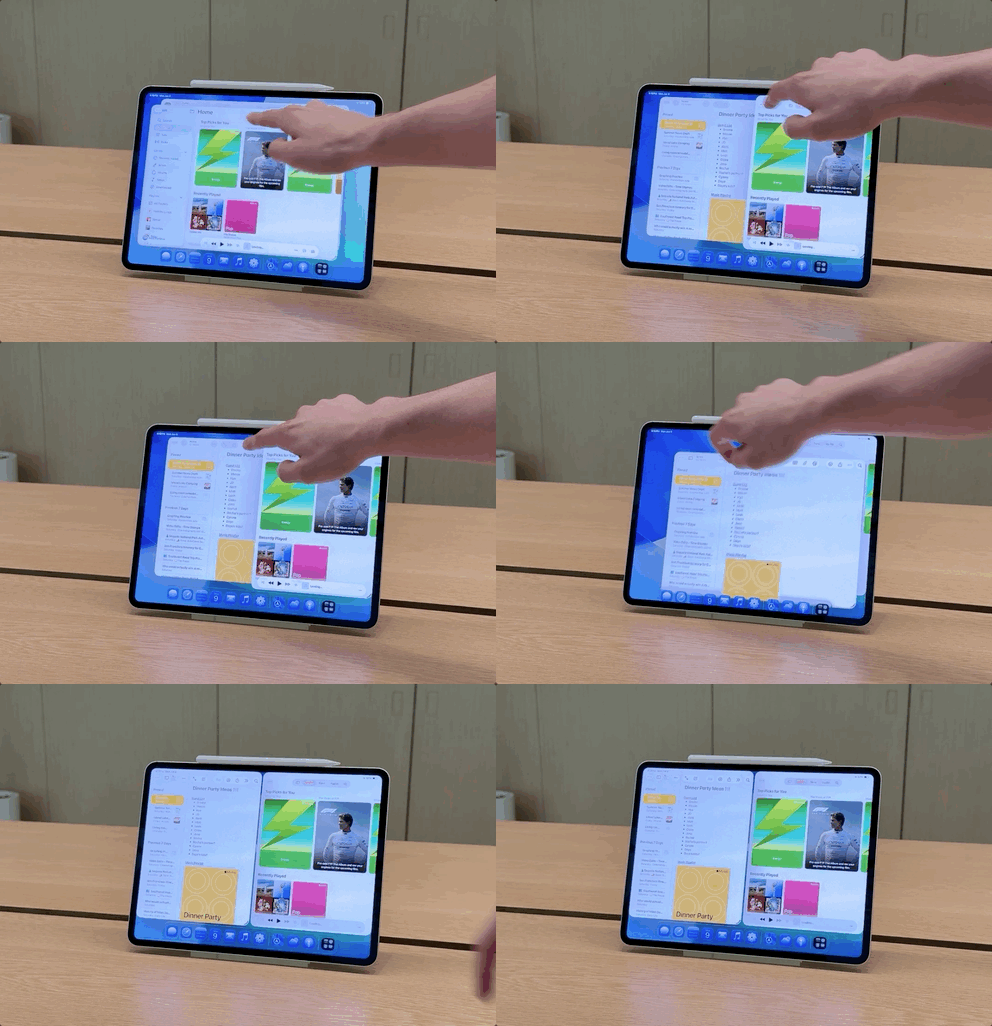
Rank 47070Well, for the iPad faithful, Apple’s WWDC 2025 keynote was the day that faith was rewarded. I, like countless others, have been waiting for a major upgrade for iPadOS, and the Cupertino-based tech giant delivered.Yes, iPadOS 26 brings with it Liquid Glass, but more importantly for all iPads that support it, you’ll get actual windowed multitasking, the ability to drop folders in the dock, a menu bar up-top, one of the most addicting gestures I’ve used, and the ability for tasks to run in the background.Easily, it was the standout moment from the keynote, and I got to go hands-on briefly with iPadOS 26 running on a 13-inch iPad Pro with M4 attached to a Magic Keyboard with an Apple Pencil Pro.Now, let’s address the elephant in the room – allowing those landmark features I listed out above makes the iPad seem like a Mac, but don’t call this a Mac. Yes, Apple did take some features from the Mac rather than reinventing the entire concept – say, for the close, minimize, or expand buttons in the top left or the menu bar – but this is all well thought out for the iPad, and takes advantage of one of the best parts of an iPad.Multitouch.With the iPad’s approach, it’s sort of a choose-your-own-adventure, while on the Mac, it’s keyboard and trackpad. I used it and saw a demo of fingers controlling the windows, as well as using the Apple Pencil to move items around and even the cursor. It's all about control, in that however you see it and want to use it, you can do so to get more out of your iPad. Let’s talk about why.(Image credit: Jacob Krol/Future)Let’s start with the most exciting part – from any app, you can pull from the bottom corner – it’s set with an effect, a slightly darker edge in the bottom right – to easily resize the window by pulling it back and forth. So from full screen, you just pull it towards the other side to make it smaller, by width or height, and then you can grab the top of the window to place it where you like.Using the dock, you can then drag and drop another app up or do a swipe up for the peek mode to access your home screen and place any app in this layout. It’s really smooth and lets you finally have your ultimate iPad layout. Maybe that’s a Safari window open to a Google Meet in the corner, the reminders app for your checklist, and your email as you start your day.You can also split the screen with an image and then open an app like ProCreate, allowing you to see your starting point while drawing something awesome. It really lets you tailor the experience to how you see fit.Now this new windowing setup does replace SplitView and SlideOver, and while that didn’t excite me when I first heard, I do like the various preset options you can pick from via a long press in the top left corner of any window and the new gesture.(Image credit: Jacob Krol/Future)With a flick to the left or right, you can effortlessly split your screen and then adjust it further by moving the slider in the middle as needed. This feels like an easier way to achieve a similar result to SplitView, and is quite frankly fun to do.You can also tap the top of the iPad’s screen to access a menu bar for things like more precise settings or easy exports – it’s the most similar part of the experience to the Mac. Still, considering it’s hidden until you need it, I think iPad power users will likely get the most out of this.It feels really natural in this implementation, and not a cookie-cutter copy and paste from the Mac, given the updated elements and the ability to control with both touch and a trackpad.(Image credit: Jacob Krol/Future)Complementing the new multitasking approach is a significantly improved Files app and a dock that can now display a live folder. The app will feel familiar, but a new list view with the ability to customize modifiers, also known as the columns you see, will really let you tailor this for your specific needs.For instance, I could see myself sorting by last modified and then pulling the folder containing images to the dock to edit in an app like Pixelmator, export, and then upload it into a content management system for a story build. Changes you make within folders or to these layouts can be synced across devices and updated in iCloud as well. If you’re a fan of colored folders and keen to name with emojis, you get this as well.Those larger exports, maybe a batch photo editor or video export from Final Cut Pro, can now run in the background. I got a demo of this, and it either lives at the top of your device with a progress bar or in a little icon near your time where you can track multiple exports or tasks.(Image credit: Jacob Krol/Future)The really exciting part, even from these demos and a little usage, is the fact that this isn’t just limited to the iPad Pro with M4 or the iPad Air with M3 or even another step-up model. This new multitasking experience is the result of a new ‘Window Prioritization Model’ that works in conjunction with the performance and resource manager. It has been entirely re-architected to run on any iPad that supports iPadOS 26.Meaning that the 9th Gen iPad – one of the best values Apple’s ever released – will get this new multitasking experience, same for the 10th, 11th, or 13th Gen, the iPad Air, iPad mini, and Pro. You might not be able to open a dozen there all at once, but it will let you push the chip inside further.For now, iPadOS 26 is in a developer beta, which means it's not for your main device as bugs and issues are to be expected, but a public beta will arrive in July, and this will be released for everyone with an eligible device in the Fall. I’m super excited to spend time with it and eventually give it a full review treatment, but for now, it’s the upgrade we’ve been waiting for that feels distinctly like an iPad.Sure, the Mac has long been the ultimate in productivity, but that lacks touch and is truly designed for keyboard and trackpad. The iPad is multitouch first, and Apple really put the time in to craft an experience that feels purpose-made for multiple inputs, with touch being first.Just fair warning, I’ll be using many, many windows.You might also likeLive from WWDC 2025 – TechRadar podcast unpacks that massive iPadOS update and looks through Liquid GlassThis is what really happened with Siri and Apple Intelligence, according to AppleYou won't believe how insanely realistic Personas are in visionOS 26 on the Vision Pro
-

Picture from static.independent.co.uk
Rank 47071 -

Picture from assets2.cbsnewsstatic.com
Rank 47072 -

Picture from image.cnbcfm.com
Rank 47073 -

Picture from image.cnbcfm.com
Rank 47074 -

Picture from image.cnbcfm.com
Rank 47075 -
Picture from o.aolcdn.com
Rank 47076The Internet Archive made it easier to search for '90s-era GIFs. GifCities contains millions of animations from the decade of flannel shirts and Soup Nazis. The GIFs were pulled from old GeoCities webpages, which (mostly) bit the dust in 2009.
The new version of GifCities is much easier to search. You can now search semantically, based on the animation's content. In other words, it's much more likely to bring up the topic or scene you're looking for by describing it. In GifCities' old version, you could only search by file name. (If you're feeling masochistic, you can still access that version under a "Special search" tab.)
The updated GifCities also now uses pagination. That's a good thing, as the old version's infinite scrolling could make for slow browsing. You can also create and share "GifGrams." As the name suggests, these are custom e-greetings made from those ancient GIFs.
Internet Archive
The Internet Archive launched GifCities in 2016 to celebrate its 20th anniversary. If you're too young to know, GeoCities was the quintessential early internet web-hosting service. A precursor to social media, it was full of embarrassing fan pages, personal photo albums and "Under construction" GIFs. (You'll find plenty of the latter in this search engine.) Yahoo pulled the plug on most of GeoCities in 2009. (Disclosure: That's Engadget's parent company.) However, the Japanese version survived for another decade.
If you're of a certain age, you'll likely enjoy browsing the archive. (Or, learn what passed for internet humor before you were born!) Just note that many results are NSFW. I made the mistake of searching for "Mr. T," and I will now leave you to douse my eyes with bleach.This article originally appeared on Engadget at https://www.engadget.com/entertainment/the-internet-archive-modernizes-its-geocities-gif-search-engine-192315963.html?src=rss
-

Picture from assets3.cbsnewsstatic.com
Rank 47077 -

Picture from static.independent.co.uk
Rank 47078 -

Picture from static.independent.co.uk
Rank 47079 -

Picture from static.independent.co.uk
Rank 47080 -

Picture from assets3.cbsnewsstatic.com
Rank 47081 -

Picture from image.cnbcfm.com
Rank 47082 -

Picture from image.cnbcfm.com
Rank 47083 -

Picture from static.independent.co.uk
Rank 47084 -

Picture from static.independent.co.uk
Rank 47085 -

Picture from image.cnbcfm.com
Rank 47086 -

Picture from static.independent.co.uk
Rank 47087 -

Picture from static.independent.co.uk
Rank 47088 -

Picture from assets1.cbsnewsstatic.com
Rank 47089 -

Picture from static.independent.co.uk
Rank 47090 -

Picture from static.independent.co.uk
Rank 47091 -

Picture from assets1.cbsnewsstatic.com
Rank 47092 -

Picture from assets3.cbsnewsstatic.com
Rank 47093 -

Picture from assets3.cbsnewsstatic.com
Rank 47094 -

Picture from assets2.cbsnewsstatic.com
Rank 47095 -

Picture from static.independent.co.uk
Rank 47096 -

Picture from assets1.cbsnewsstatic.com
Rank 47097 -

Picture from static.independent.co.uk
Rank 47098 -

Picture from static.independent.co.uk
Rank 47099 -

Picture from cdn.mos.cms.futurecdn.net
Rank 47100Default passwords and outdated firmware are turning your home camera into a public livestream, report warnsThousands of exposed webcams are offering a front-row seat into private and corporate lifeA simple web browser is all it takes to peek into 40,000 unsecured camera feedsThousands of internet-connected webcams, intended to enhance safety and convenience, are now unintentionally offering a window into private lives and secure environments.Research by Bitsight claims over 40,000 webcams around the world are publicly accessible online, often without their owners’ knowledge.These include security cameras, baby monitors, office surveillance systems, and even devices inside hospitals and factories.A growing digital threat, not a hypothetical oneThe investigation highlights just how easily accessible these cameras are.“No passwords. No protections. Just out there,” wrote João Cruz, Principal Security Research Scientist at Bitsight TRACE, noting it requires neither elite hacking skills nor expensive software. In many cases, all it takes is a web browser and a valid IP address.“We first raised the alarm in 2023, and based on this latest study, the situation hasn’t gotten any better.”Exposed footage ranges from innocent scenes, like bird feeders, to far more sensitive views, such as home entry points, live feeds from living rooms, whiteboards in office spaces, and even operations inside data centers.Worryingly, disturbing conversations have emerged on dark web forums, where some users share methods for locating exposed cameras, or even sell access to live feeds.“This isn’t hypothetical: this is happening right now,” Cruz emphasized.The United States leads with roughly 14,000 exposed cameras, followed by Japan, Austria, Czechia, and South Korea. These aren’t isolated incidents but part of a broader failure in how internet-connected cameras are deployed and managed.Bitsight’s team scanned for both HTTP- and RTSP-based cameras, and the results suggest these figures may only scratch the surface.Many of the exposed devices result from basic setup errors: default credentials, open internet access, and outdated firmware that leave systems vulnerable.While vendors and manufacturers must improve device security, users also share responsibility.Choosing products vetted for cybersecurity can help, but users should also pair their camera setups with tools like leading antivirus software and top-rated parental control solutions, which often include network monitoring to flag unusual access or unprotected devices.Ultimately, private users should always check remote accessibility settings, change default passwords, update firmware regularly, and, especially for enterprises, enforce firewall protections and require VPN access.You might also likeThese are the best VPN with antivirus solutionsTake a look at our pick of the best password managersEpson launches subscription where you pay "just" $7.99 to rent a printer and print 50 pages every month
