News
This constantly updated list features the latest and most important news articles, ranked in order of significance. The top stories highlight major developments, breaking news, and critical updates across various topics, ensuring you stay informed about the most pressing issues. As new articles are added, the list adapts to reflect the latest priorities, keeping the most impactful stories at the forefront. Whether it’s global events, technology breakthroughs, or industry trends, this dynamic list ensures you always have access to the most relevant and timely information.
-
Picture from o.aolcdn.com
Rank 37101Apple's WWDC isn't usually known for a lot of a hardware news, but the company previewed a couple intriguing updates coming to AirPods with its latest batch of software updates. The earbuds are getting built-in camera control features that allow you to snap photos or control video recording.
With the update, users will be able to control the camera on iPhone, iPads and compatible third-party camera apps by pressing and holding on the stems of their AirPods. No word yet on which non-Apple camera apps might support this feature, but it could be particularly handy for creators if it's widely adopted in popular apps.
Another AirPods update likely to appeal to content creators is the addition of studio quality recording for AirPods. According to Apple, the change will allow "interviewers, podcasters, singers, and other creators can record their content with greater sound quality" even in noisy environments.
The updates will arrive as a firmware update that's part of iOS 26, PadOS 26 and macOS Tahoe 26 and will be available for AirPods 4, AirPods 4 with ANC and the second-gen AirPods Pro.
Developing...This article originally appeared on Engadget at https://www.engadget.com/audio/headphones/apple-is-adding-a-camera-remote-and-upgrading-audio-recording-on-airpods-180211014.html?src=rss
-
Picture from o.aolcdn.com
Rank 37102It's safe to say Apple Intelligence hasn't landed in the way Apple likely hoped it would. However, that's not stopping the company from continuing to iterate on its suite of AI features. During its WWDC 2025 conference on Monday, Apple announced a collection of new features for Apple Intelligence, starting with upgrades to Genmoji and Image Playground.
In Messages, for instance, you'll be able to use Image Playground to generate colorful backgrounds for your group chats. At the same time, Apple has added integration with ChatGPT to the tool, meaning it can produce images in entirely new styles. As before, if you decide to use ChatGPT directly through your iPhone in this way, your information won't be shared with OpenAI without your permission.
Separately, Genmoji will allow users to combine two emoji from the Unicode library to create new characters. For example, you might merge the sloth and light bulb emoji if you want to poke fun at yourself for being slow to understand a joke.
Visual Intelligence is also in line for an upgrade. Now in addition to working with your iPhone's camera, the tool can scan what's on your screen. Like Genmoji, Visual Intelligence will also benefit from deeper integration with ChatGPT, allowing you to ask the chat bot questions about what you see. Alternatively, you can search Google, Etsy and other supported apps to find images or products that might be a visual match. And if the tool detects when you're looking at an event, iOS 26 will suggest you add a reminder to your calendar. Nifty that. If you want to access Visual Intelligence, all you need to do is press the same buttons you would to take a screenshot on your iPhone.
Apple
As expected, Apple is also making it possible for developers to use its on-device foundational model for their own apps. "With the Foundation Models framework, app developers will be able to build on Apple Intelligence to bring users new experiences that are intelligent, available when they’re offline, and that protect their privacy, using AI inference that is free of cost," the company said in its press release. Apple suggests an educational app like Kahoot! might use its on-device model to generate personalized quizzes for users. According to the company, the framework supports Swift, Apple's own coding language, and the model is as easy as writing three lines of code.
Developing...This article originally appeared on Engadget at https://www.engadget.com/ai/apple-intelligence-at-wwdc-everything-apple-announced-for-ios-macos-and-more-171133202.html?src=rss
-

Picture from techcrunch.com
Rank 37103 -

Picture from ichef.bbci.co.uk
Rank 37104 -

Picture from assets2.cbsnewsstatic.com
Rank 37105 -

Picture from assets3.cbsnewsstatic.com
Rank 37106 -

Picture from assets1.cbsnewsstatic.com
Rank 37107 -

Picture from assets2.cbsnewsstatic.com
Rank 37108 -

Picture from assets1.cbsnewsstatic.com
Rank 37109 -

Picture from assets3.cbsnewsstatic.com
Rank 37110 -

Picture from assets3.cbsnewsstatic.com
Rank 37111 -

Picture from assets1.cbsnewsstatic.com
Rank 37112 -

Picture from assets1.cbsnewsstatic.com
Rank 37113Call it "dad style," or "dadcore." Call it unsexy. But the chinos, Hawaiian shirts and washed-out denims that fathers sport are also taking over the runway. In fact, they've become downright cool. Really! Bloomingdale's fashion director Erica Russo and journalist Max Berlinger help guide correspondent Mo Rocca through the clothes that truly make the man. And for good measure, Rocca checks out the sartorial elegance of "Sunday Morning" senior producer Gavin Boyle.
-

Picture from assets2.cbsnewsstatic.com
Rank 37114 -

Picture from assets1.cbsnewsstatic.com
Rank 37115 -

Picture from image.cnbcfm.com
Rank 37116 -

Picture from techcrunch.com
Rank 37117 -

Picture from techcrunch.com
Rank 37118 -

Picture from techcrunch.com
Rank 37119 -

Picture from techcrunch.com
Rank 37120 -

Picture from ichef.bbci.co.uk
Rank 37121 -

Picture from static.independent.co.uk
Rank 37122 -

Picture from assets3.cbsnewsstatic.com
Rank 37123It's the age-old question: Is the glass half empty, or half full? For the people of Flint Michigan, it's far from being a settled issue. Some three years after the city's water crisis first made headlines, many people still don't believe their tap water is safe. Correspondent Martha Teichner talks with Dr. Mona Hanna-Attisha, the whistleblower who alerted Flint residents to the dangers posed by the very water they drank, and to activists who discuss the legacy of the Flint water crisis: A loss of trust.
-

Picture from image.cnbcfm.com
Rank 37124 -
Picture from cdn.mos.cms.futurecdn.net
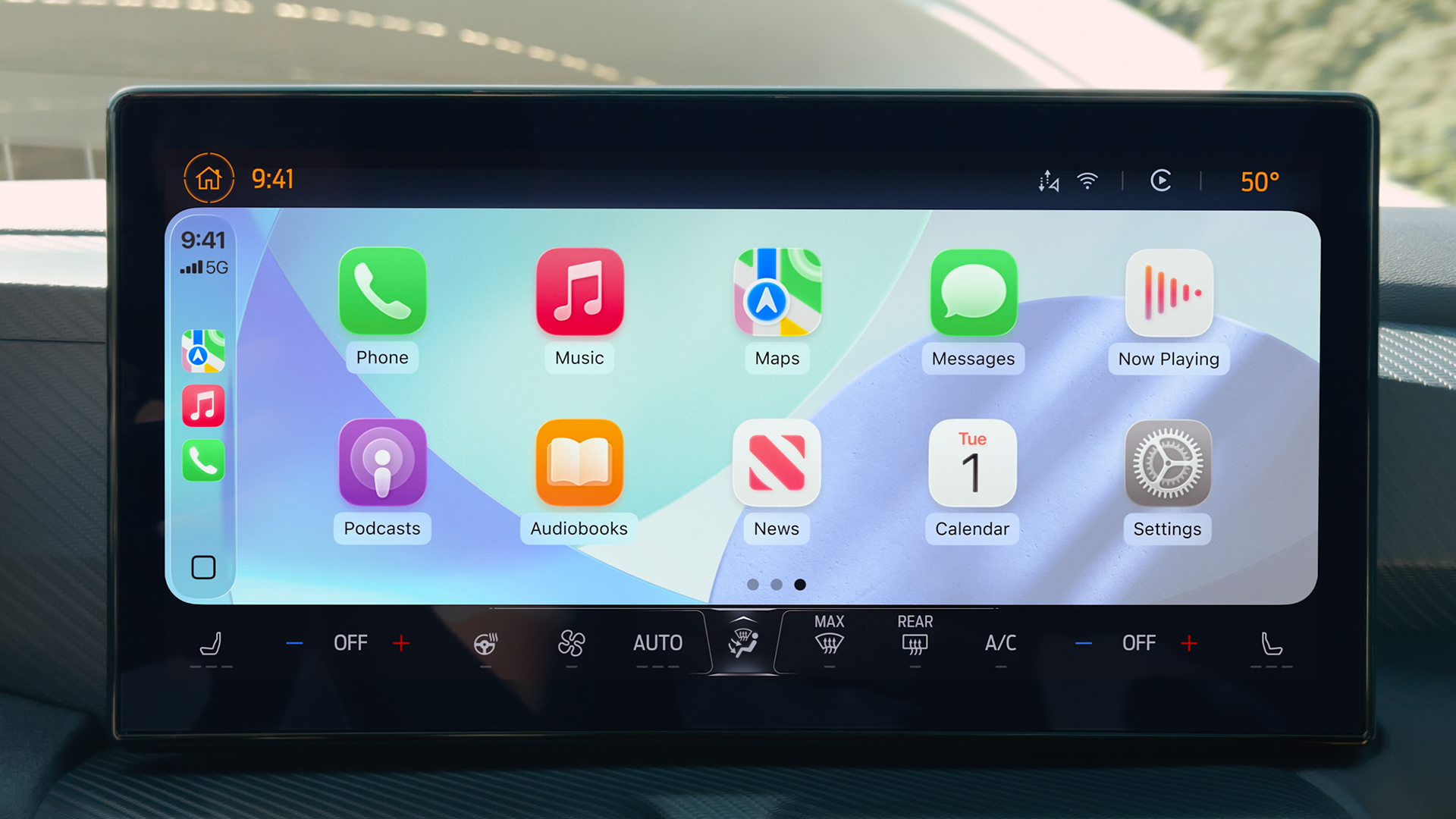
Rank 37125A cleaner design introduces more information with minimal distraction Tapbacks allows for quick, emoji-based responses to messagesA new widget-based layout means more info on the screenApple has revealed the first all-new design of iOS since 2013, as it looks to introduce a brand new look and feel across its devices – and that also means new features for CarPlay.Alongside a multitude of new features for iPhone, iPad and Mac, the tech behemoth also announced that this fresh new look will also make its way into vehicles via Apple CarPlay – the smartphone mirroring service that allows drivers to safely take advantage of applications while behind the wheel.Although not the complete overhaul that Apple CarPlay Ultra introduces, which sees CarPlay extend well beyond the central infotainment display and effectively take over all screens within a vehicle, the upcoming update to regular ol' CarPlay still brings with it some useful features.1. Easy on the eye, easier to use(Image credit: Apple)The introduction of iOS 26 will usher in a new ‘Liquid Glass’ design ethos that the company describes as a "translucent material that reflects and refracts its surroundings".In plain speak, the UX acts like small magnifying glass that highlights content when a user interacts with it.The look will be carried across to Apple CarPlay, so we will no longer have the very basic two or three rows of static, 2D app icons and instead have emblems that appear to pop out of the screen.There’s also a navigation bar to the left or right of the main screen that allows easy hopping between the most-used or favorite applications.2. Compact view reduces interruptions(Image credit: Apple)Currently, receiving a call while using CarPlay can be frustrating, as the incoming call notification butts into entertainment and gets in the way of navigation.Apple’s iOS 26 will get rid of this, as it will introduce a compact view that delivers pop-up overlay whenever a call comes in.This makes it a lot simpler to see who is calling and choose to either answer or reject, without missing an important upcoming turn.What’s more, Apple will also introduce Tapbacks and pinned conversations to the messaging app, making it a lot easier to reply to messages with simple emojis and keep track of conversations without taking eyes off the road to read reams of text.3. Widgets are welcome(Image credit: Apple)It looks like Apple will address some of the key concerns with current CarPlay, including the requirement to constantly juggle and swipe between the numerous screens when interacting with various apps.The introduction of widgets, which is one of the key components of Apple CarPlay Ultra and a feature that Android Auto users have been able to enjoy for a long time, allows multiple apps to effectively be open on a single screen.For example, Apple Maps can take up the majority of an infotainment display, while widgets at the side can indicate an estimated arrival time, a condensed icon of the current track that’s playing (as well as the ability to skip songs) and even a live flight tracker.4. Take back control of calls(Image credit: Apple)Several new iPhone-based iOS 26 features that have been designed to minimize distractions will also make their way into the vehicle, with Call Screening building on the current Live Voicemail feature by gathering information on the caller and delivering this in the form of a notification.The driver (or anyone in the car with an iPhone, for that matter) can then look at this information and decide whether or not they can be bothered to pick up. It’s a handy feature for screening the numerous fraudulent calls and irritating sales pitches that nobody has time for, especially when driving.Hold Assist also streamlines productivity in so much that it detects hold music and asks the user if they would like their place in the queue to be automatically held. The iPhone will then call the user back when an operator becomes free.This reduces the amount of time spent listening to annoying hold music, rather than enjoying a radio station, podcast or Spotify playlist when attempting to keep on top of life admin when on the road.You might also likeApple CarPlay Ultra finally rolls out – here are 4 things you need to know about its Aston Martin debutI’ve tried the new Mercedes-Benz Superscreen – and its Google Gemini-powered smarts push EV infotainment to the next levelHuawei and Xpeng just turned an entire EV windshield into a head-up display – and it could be a glimpse of your distracting driving future
-

Picture from techcrunch.com
Rank 37126 -

Picture from static.independent.co.uk
Rank 37127 -

Picture from static.independent.co.uk
Rank 37128 -

Picture from assets1.cbsnewsstatic.com
Rank 37129 -

Picture from cdn.mos.cms.futurecdn.net
Rank 37130Apple Music is getting lyrics translation/pronunciation, AutoMix and Music PinsThe updates will roll out with iOS 26, along with Apple Music Sing upgradesApple made the announcement at WWDC 25 Liquid Glass, aka Apple's new glass-like redesign for its software platforms, is a clear headline grabber at WWDC. But what is iOS 26 bringing to Apple Music?A few things, actually: Apple Music is getting Lyrics Translation, Lyrics Pronunciation, AutoMix for creating beat-perfect playlists and sets, plus Music Pins to put your favorite artists and albums right to the top of your home screen.Meanwhile, Apple's Liquid Glass will level up what you see while a song is playing, because it'll provide more glass-like depth – and elements within a track's artwork will move with a more three-dimensional quality; in and out of focus, as it were.(Image credit: Apple)AutoMix is here – finally! What exactly is AutoMix? Think seamless mixing of your songs into one continuous playlist, for a stream of music without any annoying gaps between tracks. It'll be similar to what a DJ does, but carried out automatically by Apple Music via Apple Intelligence's AI brain. Outstanding!One of the other biggest perks of today's Apple WWDC 2025 event in the audio sphere? The knowledge that buying either a shiny new set of AirPods 4, AirPods 4 with Noise Cancelling or AirPods Pro 2 is a smart and future-proof thing to do: Apple has announced studio-quality audio recording and camera remote is coming to these models – and as luck would have it, both are also currently on sale too. Of course, AirPods, Apple Music and iPhones all play especially nice together (it's the way Apple wants you to listen): think personalized spatial audio with Dolby Atmos, plus dynamic head-tracking that uses your iPhone or iPad as a source device to ping the soundscape all around your head as you turn it.And then there's Live Translation. I've just finished working on a French opera, namely Gounod's Faust, and I think it might be a huge plus for me in Apple Music.(Image credit: Apple)Your iPhone can now become a mic in Apple Music Sing, with tvOS And we're not done! With tvOS 26, karaoke sessions can reach new levels of fun. How? Users will be able to transform their iPhone into a handheld mic for Apple TV and have their voice amplified as they belt out their very best go at TayTay's Eyes Open.Everyone in your sing-along session will be able to jump in using their own iPhone to cue up tracks, too, or even react with an onscreen emoji.Along with the aforementioned Lyrics Translation and Pronunciation updates, plus visual effects to light up the main screen, Sing in Apple Music will be more advanced and engaging than ever, allowing you to sing along even if you don't speak the language fluently (which is music to my ears).I cannot wait to try it out. For now though, I'm gonna keep on dancin' at the Pink Pony Club… with all my iPhone-toting, Apple Music-streaming friends.(Image credit: Apple)You may also like Keep up on all things WWDC with our Apple WWDC Live Blog No new AirPods, no problem: check out the best earbuds around right nowNot sold on Apple Music? See our pick of the best music streaming services
-

Picture from static.independent.co.uk
Rank 37131 -

Picture from assets2.cbsnewsstatic.com
Rank 37132 -

Picture from cdn.mos.cms.futurecdn.net
Rank 37133Retro Workstation for Mac Mini M4 looks like a Mac from the past, but it’s all about modern portsThe helmet-shaped dock is nostalgic eye candy, but the price invites real scrutinyIt’s cute, it’s quirky, but it might be more gimmick than workstation for power usersA new docking station has emerged for the Apple Mac Mini M4 blending retro design with modern functionality.Wokyis has unveiled the Retro Workstation for Mac Mini M4, now available for pre-order on the crowdfunding platform Prelaunch.At first glance, it’s hard not to be captivated by its helmet-like silhouette, clearly inspired by the original Macintosh. But as with many products that trade heavily on nostalgia, questions around real-world utility and value inevitably arise.A throwback form factor with modern ambitionsThe dock mimics the shape of the original Macintosh, featuring a matte casing and a 5-inch HD LCD screen (1280 x 720) embedded where the vintage monitor would have been.It accepts the Mac Mini M4 or M4 Pro by sitting over the device, essentially transforming Apple’s compact computer into the brain of a retro-styled workstation.Measuring 145 x 131 x 154.3 mm and weighing 750g, it’s compact, but its added height may not appeal to those aiming for a minimalist setup.Functionally, the unit aims to deliver more than just visual homage. Wokyis promotes it as a “13-in-1 Workstation,” describing it as “a versatile hub for daily tasks, content creation, and storage expansion.”The device includes an M.2 NVMe SSD slot supporting up to 8TB, along with a USB 3.2 Gen 2 port offering up to 10Gbps transfer speeds. It also features USB-C connectivity, SD 4.0 and microSD slots (UHS-II compatible), HDMI input, and even a 3.5mm headphone jack.The inclusion of the LCD screen might raise some eyebrows. While technically functional, its limited resolution and lack of touch input suggest it's more decorative than essential.Similarly, though the unit includes ventilation, the concept of enclosing a Mac Mini, which already has integrated thermal management, inside another structure could prove counterproductive.The Retro Workstation is priced at $199, or $99 for a slower version limited to 10Gbps performance.That said, it's unclear whether the performance justifies the cost, especially when compared to the best USB hubs, many of which offer similar speeds and port availability without borrowing their aesthetic from 1984.You might also likeCheck out the best laptop docks for MacBook Air available right nowTake a look at the best Apple AirTag deals on offerWe've also listed the best laptop docks for MacBook Pro
-
Picture from cdn.mos.cms.futurecdn.net
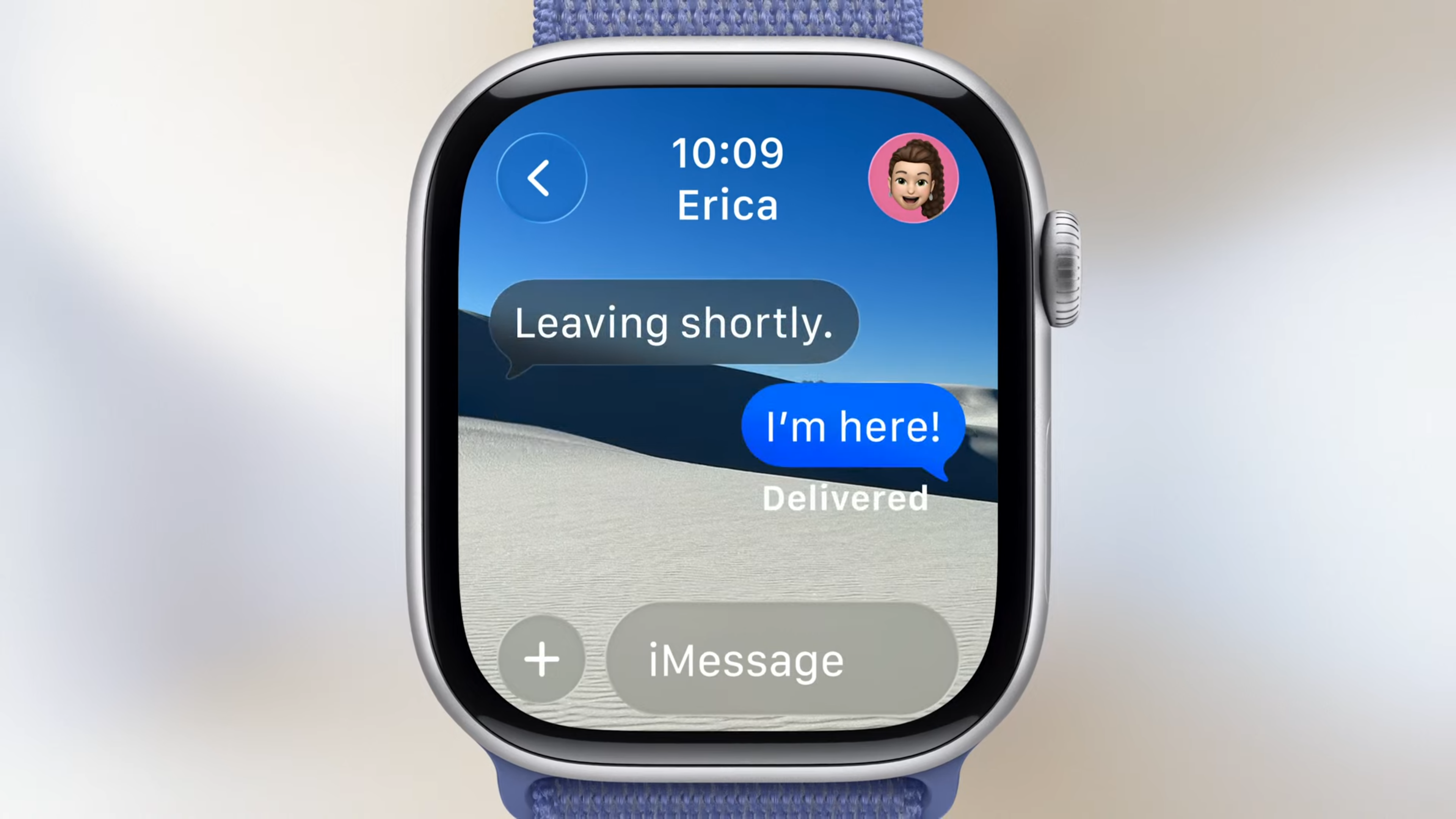
Rank 37134watchOS 12 – or as it's henceforth to be known, watchOS 26 – has been revealed at this year's WWDC conferenceNew features include an AI Workout Buddy, an improved Smart Stack and the new Liquid Glass visual languageIt also gets a Notes app!We made it! watchOS 26 – formerly and never-again referred to as watchOS 12 – has been revealed at this year's WWDC 2025 developer's conference at Apple Park.You can catch all the action live as Tim Cook's keynote speech wraps up and the post-game unfolds, and you can check out what's new with iOS 26 and macOS 26 Tahoe too.However, this is the Apple Watch's time to shine, and the presentation didn't disappoint when it came to features for the best Apple watches. Without gilding the lily and with no more ado, here's everything announced so far for the current crop of Apple Watches.1. Liquid GlassLiquid Glass is the new cross-hardware operating system design from Apple. Essentially, Apple has changed the way all its operating systems look, from watches and phones to tablets and computers, to ensure they're unified in design and pleasant to navigate.With material that 'dynamically morphs' to ensure your experience becomes more intuitive, elements that were solid-color rectangles in the old design become transparent, and change shape as you move through them.The Liquid Glass design is across all Apple's ecosystem. In watchOS 26, it ensures widgets expand and contract almost automatically to make use of the small screen space, and elements like the music playback widget share the transparent look of its bigger siblings, instead of being a solid white block. Apple also emphasizes that you'll be able to see more of your photos on-watch.2. Redesigned workout appThe workout app has been redesigned with Liquid Glass in mind, and it's got in-built media playback from Apple Music automatically recommended based on your listening history. Four new customizable buttons allow you to front-load your most-used features.3. Workout buddy(Image credit: Jacob Krol / Future)We were wondering how Apple Intelligence was going to manifest on the watch in a meaningful way, and here we are. Described as a "first-of-its-kind" fitness experience by Apple which accesses the user's fitness, health and workout history, a little like the AI-powered training insights from Strava and Garmin Connect+. It's designed to "motivate you in a new and unique way" taking into account Training Load, Elevation, Heart Rate... anything in your fitness history.Some of it seems not all that useful, such as telling us "so far this year, you've run 200 miles", but the short-term stuff, such as telling us "you're 18 minutes away from closing your Activity Ring" will likely get some use. It can also summarize your recent workouts, telling you how you've fared when it comes to pace and distance against your recent milestones.The feature mimics the vocal tones of Apple Fitness+ trainers, so the voice is designed to be energetic and uplifting, and you can choose multiple voices. I hope the feature will get more sophisticated and be able to automatically detect, assign and adjust heart rate zones as your fitness improves, but I don't think Workout Buddy is that intuitive. Yet.4. Live translation(Image credit: Apple)The iPhone presentation made much of Apple Intelligence's Live Translation feature, and Apple Watch gets in on the action with Apple Intelligence translation for Messages, translating into a user's preferred language on-wrist.Apple Intelligence also suggests relevant actions on-wrist, like opening CashApp when a friend asks for a contribution to a gift or dinner.4. Notes on wrist(Image credit: Apple)Requested by many on forums in the run-up to this year's WWDC, the Notes app is coming to the Apple Watch in an almost blink-and-you'll-miss-it mention.5. Wrist flickAlong with the Double Tap gesture, Apple Watch can now make use of a simple Wrist Flick to dismiss a notification, silence a timer or alarm, or close the Smart Stack.6. A better Smart Stack(Image credit: Apple)Speaking of the Smart Stack, some changes are coming to the popular widget stacking overlay. The Smart Stack gets hints, which are actionable prompts appearing as an unobtrusive notification at the bottom of your Apple Watch's display.Tapping on the hint provides contextual information and actions. The example provided was when you arrive at your favorite pilates studio at your usual time, a hint will appear to start a pilates workout. This is the kind of small Apple Intelligence addition that really offers personal assistant capability.Smart Stack has also received an updated algorithm, reordering itself based on contextual data.You might also like...Does your Apple Watch support watchOS 26? Here’s the full list of compatible Apple Watches (and which ones will miss out)Apple watchOS 26: Everything we know after WWDC 2025 today
-

Picture from techcrunch.com
Rank 37135 -

Picture from static.independent.co.uk
Rank 37136 -

Picture from assets3.cbsnewsstatic.com
Rank 37137 -

Picture from assets1.cbsnewsstatic.com
Rank 37138 -

Picture from assets2.cbsnewsstatic.com
Rank 37139 -

Picture from assets3.cbsnewsstatic.com
Rank 37140 -
Picture from o.aolcdn.com
Rank 37141Apple continues to improve gaming features on Macs with Metal 4 for Apple Silicon on its latest version of macOS Tahoe 26 announced at WWDC 26. The new graphics platform introduces two new technologies designed to make graphics look better and run faster, MetalFX Frame Interpolation and MetalFX denoising.
MetalFX Frame Interpolation generates an intermediate frame for every two input frames to boost frame rates with minimal computing overhead, while MetalFX Denoising "makes real-time ray tracing and path tracing possible in the most advanced games," the company said. It pointed out that upcoming titles like Crimson Desert and InZOI will use technologies like MetalFX Upscaling to improve performance and visuals via technology like ray-tracing available with the company's M3 and M4 family of chips.
Apple put a fair amount of emphasis on gaming during this year's developer conference. It revealed the new Games app that will come pre-installed on Mac, iPhone and iPad with macOS Tahoe 26 and iOS 26 this fall. The company also reminded us of new games arriving on macOS, including Cyberpunk 2077, Cronos: The New Dawn, Architect: Land of Exiles, Lies of P: Overture, HITMAN World of Assassination, EVE Frontier and Where Winds Meet. This article originally appeared on Engadget at https://www.engadget.com/gaming/metal-4-for-macos-tahoe-26-introduces-new-gaming-features-like-frame-interpolation-183247623.html?src=rss
-

Picture from techcrunch.com
Rank 37142 -

Picture from static.independent.co.uk
Rank 37143 -

Picture from assets3.cbsnewsstatic.com
Rank 37144 -

Picture from assets3.cbsnewsstatic.com
Rank 37145 -

Picture from assets1.cbsnewsstatic.com
Rank 37146 -

Picture from assets1.cbsnewsstatic.com
Rank 37147 -

Picture from assets3.cbsnewsstatic.com
Rank 37148 -

Picture from assets1.cbsnewsstatic.com
Rank 37149 -

Picture from assets1.cbsnewsstatic.com
Rank 37150


