News
This constantly updated list features the latest and most important news articles, ranked in order of significance. The top stories highlight major developments, breaking news, and critical updates across various topics, ensuring you stay informed about the most pressing issues. As new articles are added, the list adapts to reflect the latest priorities, keeping the most impactful stories at the forefront. Whether it’s global events, technology breakthroughs, or industry trends, this dynamic list ensures you always have access to the most relevant and timely information.
-

Picture from cdn.mos.cms.futurecdn.net
Rank 24501Marvel fans are worried about the fate of Thor in Avengers: DoomsdayA video uploaded to Chris Hemsworth's YouTube channel has sparked fears about his potential MCU exitChris Hemsworth has been playing Thor in the MCU since 2011Avengers: Doomsday is 18 months away from landing in theaters, but Marvel fans are already fearing the worst about one of the Marvel Cinematic Universe's (MCU) longest-serving heroes.Yesterday (May 28), a new video was uploaded to the personal YouTube channel of Chris Hemsworth, who's played Thor since 2011 and is one of the MCU's six original Avengers.Ordinarily, this wouldn't be a big deal. Hemsworth and/or his social media team regularly post videos on the A-lister's account, so the arrival of a new video shouldn't come as a shock.This video is different to the usual ones that get posted, though. Titled 'Thank You! The Legacy of Thor', the two-minute-long video comprises footage of Hemsworth's various appearances as the God of Thunder over the past 14 years. The clips are interspersed with behind-the-scenes footage, plus interviews with Hemsworth and other creatives who have worked on the Thor films, too.Taken at face value, there's an air of finality to the video's title and the footage contained within. That's before you read the earnest video description accompanying said footage, which has seemingly been written by Hemsworth and reads: "Playing Thor has been one of the greatest honors of my life."For the last 15 [sic] years I've held Mjolnir and then Stormbreaker as the God of Thunder, but what made it truly special was sharing it with all of you. Your passion, your cheers, and your love for this character have meant everything to me. Thank you for making my journey through the MCU unforgettable. Next up, Doomsday!"Thor is one of the MCU's most iconic heroes, so his potential demise would be felt acutely among viewers (Image credit: Marvel Studios)Predictably, Hemsworth's latest YouTube upload has sparked fears among MCU fans, with many drawing the conclusion that Thor is going to be killed off in Avengers 5. After all, Hemsworth was confirmed to be part of Doomsday's initial 27-strong cast. With filming now underway on one of 2026's most anticipated new movies, why would Hemsworth, who's probably seen a script and/or starting shooting scenes, post a video like this now if there wasn't a significant reason to do so?Fan worries aren't consigned to a single corner of the internet, either.Indeed, threads on the r/Marvel subreddit and ResetEra, plus the comments section of Hemsworth's latest YouTube video, are full of viewers expressing concerns that the Asgardian's MCU journey will soon come to an end. Is he going to be murdered by Doctor Doom in the same way that Thanos killed Loki in Avengers: Infinity War? It would certainly prove how powerful Doom is if he kills someone like Thor who's survived so many life-threatening events in the MCU.Comment from r/marvelstudiosThere are people who aren't convinced this is the end of the line for Hemsworth, though.Some believe this is nothing more than a promotional video for Thor: Love and Thunder, aka the character's latest Marvel film that was released in July 2022, which has been uploaded to Hemsworth's channel three years too late.Meanwhile, others say their fellow fans are reading too much into the video, with some pointing out that Marvel and Hemsworth have consistently talked about the possibility of making a fifth Thor solo movie. In fact, just three weeks ago, industry insider MyTimetoShineHello, whose recent track record has been patchy at best, suggested Thor 5 is still in the works. If that's the case, the God of Thunder won't perish in Doomsday.Ultimately, it's hard to determine why this video has made its way onto Hemsworth's YouTube channel. I can see why people are scared about the possibility that Thor will die in the Marvel Phase 6 movie. However, I also understand the argument that some are putting two and two together and getting five.If I had to get off of the proverbial fence, I'd err on the side of caution and agree that people are reading too much into this video. I don't think Hemsworth's time in the MCU is done yet, but I guess we'll know for sure when Avengers: Doomsday is released worldwide on its revised launch date of December 18, 2026.You might also likeNew Avengers: Doomsday behind-the-scenes images from Robert Downey Jr are getting Marvel fans excited about his portrayal of Doctor DoomMarvel sleuths think they've solved the case about Avengers: Doomsday's story, and it's all down to a single chair's shadow'There is always room for more': Marvel drops big hint that it isn't done with its Avengers: Doomsday cast announcements
-

Picture from static.independent.co.uk
Rank 24502 -

Picture from static.independent.co.uk
Rank 24503 -

Picture from static.independent.co.uk
Rank 24504 -

Picture from static.independent.co.uk
Rank 24505 -

Picture from static.independent.co.uk
Rank 24506 -

Picture from cdn.mos.cms.futurecdn.net
Rank 24507Pokémon Legends: Z-A will officially launch on October 16 for Nintendo Switch and Nintendo Switch 2A digital or physical Switch version can be upgraded to the Nintendo Switch 2 Edition via a $10 upgrade packThe Nintendo Switch 2 Edition will "offer improved graphics and frame rates"The Pokémon Company has announced that Pokémon Legends: Z-A will officially launch on October 16 for Nintendo Switch and Nintendo Switch 2.Pre-orders for the next major Pokémon game begin on June 5, and it's been confirmed that players who purchase either a digital or physical version on the Switch can upgrade their copy to the Nintendo Switch 2 Edition via a $10 upgrade pack on the Nintendo eShop and My Nintendo Store.It might be worth investing in the Switch 2 Edition as The Pokémon Company has also revealed in a social media post that the version will "offer improved graphics and frame rates", but there's no new trailer for us to compare to the Switch version just yet.In addition, players who pre-order Legends: Z-A through the Pokémon Center in the US, UK, and Canada will receive a random, exclusive Pokémon Sitting Cuties plush featuring Chikorita, Tepig, or Totodile.According to Nintendo, those who pre-order a version of the game from My Nintendo Store will receive a Partner Pokémon figurine as a bonus item, and Mega Evolution, Trainer, and Champion's Choice bundles will also be available."#PokemonLegendsZA arrives October 16, 2025!In addition to the #NintendoSwitch title, a #NintendoSwitch2 Edition will offer improved graphics and frame rates! The digital and physical versions of #PokemonLegendsZA can be upgraded to the #NintendoSwitch2 Edition via upgrade pack pic.twitter.com/DqAcfYPxiKMay 28, 2025We've also received brand new cover art for the game, along with an official blurb, which reads: "Pokémon Legends: Z-A is a new frontier for the Pokémon video game series, blending an RPG story unfolding in a single city with action elements and a real-time battle system unlike anything seen before in the franchise."Trainers can look forward to the beginning of a new adventure in Lumiose City — one woven by people and Pokémon together!"Pokémon fans won't have to wait long for another look at the game because the next Pokémon Presents livestream will air this summer on July 22.The Nintendo Switch 2 launches next week on June 5 for $449.99 / £395.99, and $499.99 / £429.99 for the official Mario Kart World bundle, which comes with a digital copy of the game.UK pre-orders and US pre-orders are now live. If you missed out on securing a pre-order, GameStop and Best Buy have announced that they will be restocking Switch 2 units in-store and online during the console's launch.You might also like...Nintendo Switch 2 pre-orders live: latest UK stock updates as My Nintendo Store's pre-order date arrives, while US pre-orders remain delayedThe Nintendo Switch 2 has been spotted at retailers ahead of its June release - but the reported stock numbers aren't hugeSony's Days of Play sale kicks off tomorrow and will bring price cuts to the PS5 Pro, DualSense Edge, the PS5 Call of Duty: Black Ops 6 bundle, and a host of price cuts on accessories and games
-

Picture from cdn.mos.cms.futurecdn.net
Rank 24508The new version of macOS will be revealed on June 9 at WWDCSeveral older Intel-based Macs might be incompatible with itApple is rumored to be switching to a year-based “macOS 26” nameApple releases a new version of its Mac operating system every year, and when that happens, there are inevitably older Macs that are no longer supported.We’re just a week or two away from Apple unveiling its latest iOS and macOS updates at its WWDC 2025 event, and we’ve just found out exactly which Macs might be left behind.That information comes from AppleInsider, which cites “people familiar with the matter.” These sources have revealed that a slate of Intel-based Macs will be incompatible with the forthcoming software update, meaning they’ll be stuck on older versions of Apple’s operating systems.Specifically, AppleInsider says the following Macs will be compatible with the next version of macOS:MacBook Pro 2019 or laterMacBook Air M1 or lateriMac 2020 or laterMac Pro 2019 or laterMac mini M1 or laterMac StudioThat means there are some notable omissions. The 2018 MacBook Pro, 2020 Intel-based MacBook Air, 2017 iMac Pro, and 2018 Mac mini all work with the current version of macOS (macOS Sequoia) but are left off AppleInsider’s list. That suggests that they won’t be able to upgrade beyond macOS Sequoia.What’s in a name?(Image credit: Future / Apple)Interestingly, Bloomberg reporter Mark Gurman has also claimed that Apple is set to switch up its operating system naming conventions. Instead of the previously expected iOS 19 and macOS 16, Apple could name its platforms after the calendar year. So that means we’ll have iOS 26 and macOS 26, Gurman believes.Alongside the name change, these operating systems are expected to come with sweeping changes to their visual styles and user interfaces, something that AppleInsider’s sources also confirmed. Unfortunately, that means that the aforementioned Macs will miss out on this new look as well.If you have one of the Macs that are set to miss out on macOS 26, you might want to think about upgrading. Not only will that ensure you get all the latest macOS features, but you’ll likely get hardware improvements and better battery life too.If you’re thinking about it, our guide to the best Macs and MacBooks should help you decide which one to get.You might also likeApple might be about to make a major change to how it names its operating systemsReport: iOS 19 and macOS 16 could mark their biggest design overhaul in years – and we have one requestiOS 19: new features, a new design, and everything you need to know
-

Picture from techcrunch.com
Rank 24509 -

Picture from static.independent.co.uk
Rank 24510 -

Picture from static.independent.co.uk
Rank 24511 -
Picture from static.independent.co.uk
Rank 24512 -

Picture from cdn.mos.cms.futurecdn.net
Rank 24513Google Gemini is heading to Android Auto soonA new video shows how the integration will workThe new AI will replace Google Assistant in carsGemini is taking over from Google Assistant across all of Google's apps and devices, and Android Auto will be making the switch soon – as shown by a new demo video that gives us an idea of how the AI assistant is going to work on your car's dashboard.The video was captured at Google I/O 2025 and posted by 9to5Google, and you can see how Gemini slots in on the right-hand of the screen (or perhaps the left-hand, depending on the rules of the road in your country).If you've used Gemini on your phone, the interface will be familiar, with the glowing blue-ish ripples showing that Gemini is active. You're then free to ask whatever questions you have on the road, using natural language.You might want to see nearby gas stations for example, or have Gemini pull up the location of an event you're heading to from your Google Calendar. Anything you can do on your phone you can do through Gemini on Android Auto.More flexibilityOne demo Google showed off was using Gemini to compile a list of ingredients for a particular meal in Google Keep, then asking for directions to the local grocery store to pick up the necessary supplies – all very impressive.Generally, it's much more flexible and more intelligent than Google Assistant. All of your in-car chats will be synced back to Gemini on the web and on your phone, so you can pick up where you left off on other devices and carry on the conversation.With Android Automotive (so the version built right into cars), the interface is a little more subtle, with a small pop-up bar showing Gemini. However, the exact look can vary depending on your vehicle and the dashboard screen configuration.It's not clear exactly when Gemini will show up on Android Auto, but Google has said it's coming soon, and we've seen numerous signs that it's on the way. Gemini is already the default AI assistant on new Android phones.You might also likeGemini 2.5 Flash promises to be your favorite AI chatbotA useful new Android Auto video feature has been spottedWe've tried Google Pixel 9's new Gemini Astra upgrade
-

Picture from ichef.bbci.co.uk
Rank 24514 -
Picture from static.independent.co.uk
Rank 24515 -

Picture from assets3.cbsnewsstatic.com
Rank 24516 -

Picture from cdn.mos.cms.futurecdn.net
Rank 24517Virtual Private Networks (VPNs) are supposed to be the internet’s cloak of invisibility. Long embraced by corporations to secure remote access and by individuals to shield their browsing activity, VPNs have built a reputation as tools of privacy, security, and digital freedom. But that reputation is now under threat.A growing number of criminal groups are repackaging open source VPN frameworks into malware-laced products, disguising their intent behind familiar language, friendly branding, and fake reviews. What looks like a quick fix for accessing overseas content or bypassing geo-restrictions is, in many cases, an entry point for data theft, surveillance, and fraud.It’s ironic in many ways. The promise of privacy has become the perfect lure for privacy-hacking criminals. Users who download these malicious VPNs often think they’re outsmarting content restrictions – watching football matches from abroad, placing bets where they legally shouldn’t, or cashing in on digital deals restricted by region.At the very least, they might think that having a VPN shields them from the prying eyes of online snoopers. In reality, they’re likely handing over control of their device to a shadow network. These fake VPNs quietly turn home networks into residential proxies, harvest personal and financial data, and open the door for broader criminal operations – all while maintaining the illusion of security.This isn’t to say that VPNs are bad. Far from it. But a user's choice of VPN matters today more than ever before. With so many affordable, easy options flooding the market, latching onto a cheap VPN to cloak your device or access geo-restricted content is a gamble – and the cost of losing that gamble simply isn’t worth the risk.Behind the mask: How VPNs are being weaponizedWhat makes these VPNs so effective as attack vectors is how seamlessly they blend into the digital noise. Many operate through traffic distribution systems (TDSs) like Vextrio, which funnel users toward seemingly legitimate downloads. These platforms don’t just advertise VPNs – they create an entire illusion of trust, complete with sponsored search results, polished websites, and glowing reviews on platforms like Trustpilot.Some VPNs are free, others charge modest monthly fees, but the business model is the same: install the software and you unwittingly join a network of compromised machines. These apps often double as information stealers – scraping keystrokes, intercepting browser activity, and quietly logging banking credentials.Worse still, the infected device becomes part of a much larger infrastructure. Malicious VPNs routinely convert users’ home internet connections into residential proxies, effectively turning everyday consumers into unknowing enablers of criminal activity.This allows attackers to route their own traffic through compromised systems, making it harder for authorities to trace or block malicious behavior. It’s like a parasite worming its way in unnoticed – users pay for access to content they’re not legally allowed to watch, while criminals profit by harvesting their data and hijacking their connections. Users think they’ve found a clever workaround, but in reality they’re simply being exploited.DNS, RDGAs, and the art of evasionThe success of these criminals depends on their ability to hide and deceive. To maintain the illusion of legitimacy and avoid detection, malicious VPN operators rely heavily on rapidly generated domain aliases (RDGAs) and DNS tunneling. These tactics allow them to constantly shift the endpoints used by their software, cycling through thousands of domains so that if one is flagged or taken down, the service continues uninterrupted.Take “Reckless Rabbit” and “Ruthless Rabbit” for instance – two recently discovered investment scam actors that use RDGAs to scale their advertising campaigns and lure victims using well-known names to appear trustworthy. Unlike legitimate providers, whose infrastructure remains relatively stable, these actors thrive on churn.The fast rotation of domains not only obscures the true nature of the traffic but also makes it nearly impossible for traditional blocklists or IP reputation tools to keep up. From the outside, it simply looks like a user is accessing routine web services, when in fact, DNS is being manipulated to mask criminal infrastructure.This constant domain hopping is part of a broader evasion strategy. DNS tunneling, in particular, allows attackers to disguise command-and-control traffic as benign DNS requests. It’s a method often used to sneak malware past firewalls or send data out of restricted environments without detection.When embedded within VPN software, this technique becomes even more insidious: not only is the app encrypting the user's traffic, but it’s also silently exfiltrating information and receiving instructions from remote servers, all under the cover of what appears to be a legitimate privacy tool. This is how VPNs, when co-opted, transform from protective wrappers into full-fledged vehicles for criminal communication.Snakes and Ladders: Why do people fall for it?Contempt for the conners, compassion for the conned. That’s how this particular form of cyber-abuse should be viewed. Because the appeal of these rogue VPNs isn’t just technical – it’s psychological. Users are drawn in by the promise of unrestricted access: the ability to stream content blocked in their country, gamble on overseas platforms, or use region-specific services with no questions asked. For many, it feels like a harmless workaround.But that desire to outsmart the system is precisely what these criminal operators rely on. They know users will trade caution for convenience. They know a free or cheap download that promises to “just work” will attract attention. But once it’s installed, the cost is no longer just a few dollars a month – it’s your identity, your credentials, and even your bandwidth.Unwitting participants in criminal schemesIt’s not just about personal risk either. By participating in these networks, even unknowingly, users help power a much larger criminal economy. Their machines become part of an invisible infrastructure used to launder traffic, evade detection, and launch further attacks. In some cases, VPN clients are bundled with gambling or scam platforms, creating a double-loss scenario: victims hand over their data and their money.It’s not just that the VPN didn’t protect them – bad enough though that is – it was that the VPN was the bait all along. The irony stings: in trying to gain more freedom, users end up more surveilled, more exploited, and more vulnerable than they were before.Can app stores and search engines be trusted?When we need a service, we Google it. Or perhaps we scan our app store of choice to find a suitable candidate. We might look at a few reviews, but by and large we’re programmed to trust what we find in these places. But in the case of malicious VPNs, that trust is being actively abused. Traffic distribution systems like Vextrio are skilled at manipulating search rankings – pushing sponsored ads and SEO-optimized domains to the top of results pages within days.A quick search for “free VPN” or “VPN for Netflix” often leads users straight into their funnel. From there, everything is choreographed: the convincing website, the high user ratings, the false claims of speed and security. Even cautious users, seeing a top result or an official-looking listing in an app store, may assume legitimacy – especially when the app promises what they want to hear.Apple’s App Store and Google Play are not immune. Despite vetting processes, threat actors have found ways to sneak past these controls by rebranding malware over and over again – changing logos, names, domains, and shell companies with each iteration. Dozens of malicious VPNs have slipped through, some remaining live in the stores long after being flagged.Even the reviews can’t be trusted – so many of them are fabricated or bot-generated, designed to drown out real complaints and boost visibility. The emergence of tools like ChatGPT have made these bogus reviews all the more convincing and harder to spot. The result is a distorted marketplace where bad actors operate in plain sight, shielded by the very platforms users rely on for safety.How to choose a VPN without compromising yourselfSo how can users protect themselves without sacrificing privacy? The first step is a healthy dose of good old skepticism, particularly toward any VPN app that’s unfamiliar, heavily discounted, or promises unlimited access for free. If it sounds too good to be true, it usually is. Instead of trusting search engine rankings or user reviews, consumers should rely on well-established providers with transparent business models and a long-standing track record.Brands like NordVPN, ProtonVPN, and Malwarebytes are trusted not because they’re perfect, but because they’re accountable. They don’t need to hide behind a fresh logo or fake domain every time scrutiny increases. Reputation in this space isn’t just branding – it’s a proxy for security, support, and scrutiny.Equally important is understanding what a VPN can and can’t do. A VPN won’t make a user anonymous, and it doesn’t guarantee safety if the software itself is compromised. In many cases, Protective DNS offers a more targeted layer of defense, alerting users to suspicious activity, blocking access to malicious domains, and providing visibility into where traffic is really going. Whether on a personal device or in an enterprise setting, layered protection matters.VPNs were built to protect. But in the wrong hands, they become a perfect disguise for exploitation. Criminals are counting on users to trade caution for convenience, wrapping malware in the language of privacy and selling it as freedom. The safest path isn’t the fastest download or the highest-ranked result – it’s a trusted name, a transparent provider, and a double-dose of skepticism. Because when privacy tools are weaponized, the price of easy access can be far greater than it first appears.We list the best free VPN.This article was produced as part of TechRadarPro's Expert Insights channel where we feature the best and brightest minds in the technology industry today. The views expressed here are those of the author and are not necessarily those of TechRadarPro or Future plc. If you are interested in contributing find out more here: https://www.techradar.com/news/submit-your-story-to-techradar-pro
-

Picture from static.independent.co.uk
Rank 24518 -

Picture from static.independent.co.uk
Rank 24519 -

Picture from static.independent.co.uk
Rank 24520 -
Rank 24521
-

Picture from static.independent.co.uk
Rank 24522 -

Picture from static.independent.co.uk
Rank 24523 -

Picture from static.independent.co.uk
Rank 24524 -

Picture from static.independent.co.uk
Rank 24525 -

Picture from image.cnbcfm.com
Rank 24526 -
Picture from cdn.mos.cms.futurecdn.net
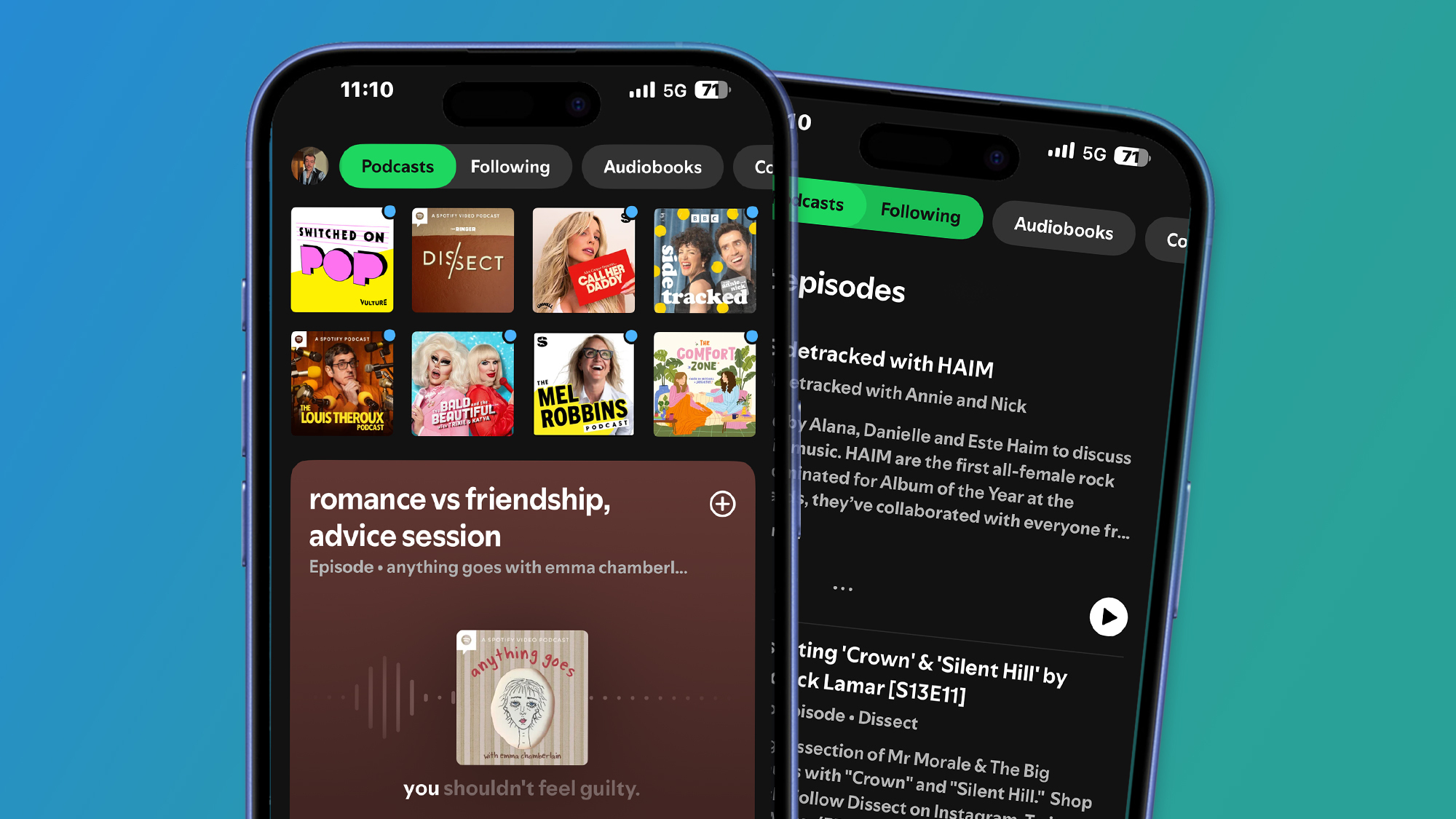
Rank 24527Spotify is rolling out new features for its library of podcasts, bringing you closer to the shows you love This includes a new Following feed in the Home page, which groups all the podcasts you follow There's also a new function that helps you to discover new shows, which Spotify has been criticized for lacking in the past Spotify has introduced a small slurry of new podcast features, all designed to boost the presence of its library of audio and video podcasts to the same level as its music catalog - the most notable new addition being a new Following feed.Yesterday the platform announced the new functions in a blog post and although they’re minor additions to Spotify’s interface, they play their part in bringing you closer to the podcasts you love while helping you discover your next favorite show. They also give creators an upper-hand, with Spotify adding ‘it gives them new ways to reach even more audiences around the globe’.The new features are already starting to roll out to users and are widely available, with the exception of one which Spotify says will be ‘rolling out globally in the coming weeks’. So if you’re a keen podcast fan, or you’re at least trying to be, these are the three new tools to test out.1. New podcasts Following feed (Image credit: Spotify)The main podcast feature of the three is the new Following feed, a dedicated space for shows you already follow. It puts them all into one place in the Spotify Home page, allowing you to stay on top of new episodes and releases from the creators you listen to the most.When you go to the Spotify Home page and use the Podcasts filter at the top of the screen, it now displays an extended Following tab that you can enable. From there, all of the latest episodes from the podcast you follow will appear. It’s simple, and easily accessible.2. Podcast recommendations in your Home feed(Image credit: Spotify)As well as bringing you closer to your favorite creators Spotify is doubling down on its podcast discovery features. The second new feature is a recommendation-focused function in your Home page.Just under your Home page shortcuts, Spotify has started displaying recommendations for new audio and video podcasts, ready for you to play or save. This new addition is designed to save you time when scrolling through Spotify’s podcasts categories in search of a new show, while adhering to its own ethos of optimizing exposure for creators.3. New ‘In this episode’ section Spotify recently launched its ‘Follow-Along’ feature for audiobooks, and it’s doing something similar with podcasts. In the coming weeks, Spotify will be rolling out a new ‘In this episode’ section for podcasts, which allows creators to link to content they mention in episodes that’s also available on Spotify.For example, if a creator mentions a specific album, song, or audiobook in a podcast episode, the ‘In this episode’ section will show those titles and give you the option to explore the referenced content.(Image credit: Spotify)For the past few years, Spotify has given much attention to bringing new features allowing users to optimize music discovery, however it has received criticism for not applying the same to podcasts. But these features mark a step towards Spotify’s new strategy for podcast discovery.The battle for the best podcast platform continues, and Spotify is putting up a fight to compete with the likes of Apple Music and YouTube, the latter of which is the current reigning champion for podcast fans in the US.You might also like Spotify HiFi: release date rumors, price predictions, and everything we know so farSpotify’s new Upcoming Releases hub may be my new favorite feature since Daylists, and now I can see all my pre-saved albumsSpotify updates iOS app in record time with new pricing options – leaving fans wondering why other fixes are taking so long
-

Picture from ichef.bbci.co.uk
Rank 24528 -

Picture from static.independent.co.uk
Rank 24529 -

Picture from static.independent.co.uk
Rank 24530 -

Picture from static.independent.co.uk
Rank 24531 -

Picture from static.independent.co.uk
Rank 24532 -

Picture from static.independent.co.uk
Rank 24533 -

Picture from static.independent.co.uk
Rank 24534 -

Picture from static.independent.co.uk
Rank 24535 -

Picture from static.independent.co.uk
Rank 24536 -

Picture from static.independent.co.uk
Rank 24537 -

Picture from static.independent.co.uk
Rank 24538 -

Picture from cdn.mos.cms.futurecdn.net
Rank 24539When choosing the best antivirus software for your device, its important to know how to use it - otherwise you could be paying for a service that isn't actually protecting anything.Running a virus scan is actually quite easy. You open an antivirus of your choice, click the usually prominent ‘Scan’ button, wait for the program to do its thing, and take care of anything that gets flagged. Or at least, that’s the gist of it and the bare minimum a user can do.In reality, the process can have a bit more to it than. So, we decided to write a detailed guide for conducting virus scans and everything else that comes with it, such as protecting all of your devices.Select the right security softwareBefore we get to the matter at hand, picking the right software for the job is the first step in doing a proper virus scan. Personal antivirus tools are a dime a dozen, with a lot of features and additional security options that go beyond just running a virus scan.With no shortage of options on the market sporting different features, the key is to discern between the stuff you need and what you can do without. That said, it’s always a good idea to pick an antivirus that has these features:Real-time protectionAutomatic updatesRansomware protectionWeb protectionFirewall integrationEmail scanningBonus points if the software is lightweight so that it doesn’t slow down your system. That said, you want to avoid any free tools with excessive ads, poor reviews, or that come bundled with bloatware.Keep your antivirus up to dateIt’s prudent to do some preparation work prior to the scan, as keeping antivirus software up-to-date is something you don’t want to forget. This includes doing (boring but important) stuff like updating antivirus definitions and signatures, applying the latest software patches, and similar, either automatically or manually.The main reason you need to do this is that malware evolves rapidly, no thanks to the increasing use of AI. As a result, users face all kinds of attacks, such as advanced persistent threats, ransomware-as-a-service, or targeted attacks. Granted, it’s more likely that businesses (big and small) will be attacked by more advanced threats, though individual users aren’t exempt from it either, especially if they have valuable data on their devices.Hence, outdated software can easily miss these threats or just fail to protect you altogether, and then you’ll be in quite a pickle. In the best-case scenario, your device will now be very slow with subpar performance, prompting a big clean-up, and that’s always a hassle.Also, if you’re using a subscription-based software, it might be an idea to keep the renewal option on, so you don’t end up without any protection.If you’re unaware that your device has been infected, do note that there are always signs. These include, but are not limited to, sudden slow performance, excessive ads, new browser toolbars or search engines, apps opening or crashing on their own, unknown files or shortcuts on the desktop, and more. In case any of these happen, run a full scan immediately.Choose an appropriate scan typeWhen it comes to actual scans, there are several types available, with some more suitable than others depending on the needs. A quick scan can be a good choice for routine operations and daily or continuous monitoring of high-risk areas like memory or system files.A full or deep scan takes time and is more fitting for weekly or monthly checkups across all files, especially after patch cycles or any security incidents. It checks every file, app, folder, and system component on your device, but it takes a long time.In the event of newly introduced devices, a custom scan will do the trick, more so if a targeted scan on high-value assets and suspicious directories is required. USB drives are a good example.In some instances, a boot-time scan might be the best option if malware is deeply embedded. This type of scan runs before an operating system starts, catching hidden or rootkit malware.Whatever the occasion, automated and policy-driven scan schedules are essential as they minimize manual work and guarantee consistency.Executing scansWith all the preparation in place, we’ve reached the crux of this guide - actually running a scan. There shouldn’t be any complications here, as with the right tool, performing a scan is straightforward and easy. However, there are a few things to keep in mind.For instance, don’t use heavy apps while scanning because they may slow down the scan and your system. Antivirus software has the ability to pause the scan, so use that if the device is busy or if you ever need to take a break for other reasons.If you’re using a laptop, keep it charged and plugged in. This might sound silly, but people sometimes forget the simplest things.During the scan, your antivirus may detect potentially unwanted programs called PUPs. It’s usually adware, but don’t ignore them since they can very easily be malicious.Remember, the goal here is to minimize operational disruption while still maintaining a thorough security coverage.Analyzing scan results and taking actionAfter the scan is done, it’s time to go over the results. Simply detecting malware isn’t enough. Detailed reporting is a must, and the reports should include threat names, severity ratings, affected files, and recommended actions. This is obviously under the assumption that something harmful was found.In that case, you should try to correlate detections with known vulnerabilities if there are any. Otherwise, make sure you thoroughly read the report so you’re aware of what you’re dealing with.If the threat is detected, there should be a structured response to it (preferably a fast one) before the damage is done. At a minimum, you want to reduce its impact.Get to know what kind it is, and either quarantine or delete it. Normally, malware or suspicious files are auto-quarantined or erased from the system, but it never hurts to check.In some situations, you’ll have to perform a device restart since some malware can't be removed while the operating system is running. For particularly pesky threats that keep returning, try boot-time scanning and reinstalling the antivirus.You can always manually remove the infected file by following the antivirus instructions. This shouldn’t be an issue, as most top-rated AVs are capable of dealing with problems like these. If all else fails, perhaps pick a different antivirus - you might have more luck with it.What’s more, it’s not a bad idea to maintain exportable logs in case you need to learn more about the threat or Google it.Afterward, its a good idea to analyze how the malware entered. For example, malicious files often enter your system through phishing, unpatched vulnerabilities, or some other method. It’s essential to know so it doesn’t happen again.Post-scan security measuresOnce the immediate threat is neutralized, there is still some work left. Namely:Patch operating systems and applications to remove vulnerabilitiesChange passwords if keyloggers or credential-stealing malware were detectedPerform a system backup after confirming the system is cleanMaintain a regular backup and recovery planMost antivirus programs allow you to automate scans and enable real-time protection, so absolutely make sure you do that. You can schedule weekly quick scans, run full scans monthly, get notified if definitions are out of date, and so on.Generally speaking, antivirus works best when set and forgotten - that is, after you’ve configured it correctly and thoroughly. Make sure to always check the reports, though.There is a human element to keeping your device free of viruses, namely:Avoid clicking on unknown links or email attachmentsOnly download legitimate software from official websitesUse strong, unique passwords for each accountBack up important files to a cloud service or an external driveKeep your browser and plugins up to dateEnable multi-factor authentication wherever possibleRegular virus scans make all the differenceIn today’s technology-led world, cybersecurity plays a huge role that only grows with every new attack and data breach. So, regular virus scans go a long way in helping you stay secure online. They will protect intellectual property, financial data, and personal information, as well as avert downtime, performance and time loss, and numerous other things that can hurt an everyday user.As such, consumers ought to consider integrating virus scanning into their daily online activities and device use. After all, prevention is the best medicine.
-

Picture from static.independent.co.uk
Rank 24540 -

Picture from static.independent.co.uk
Rank 24541 -

Picture from static.independent.co.uk
Rank 24542 -

Picture from ichef.bbci.co.uk
Rank 24543 -

Picture from techcrunch.com
Rank 24544 -

Picture from techcrunch.com
Rank 24545 -

Picture from static.independent.co.uk
Rank 24546 -

Picture from static.independent.co.uk
Rank 24547 -

Picture from image.cnbcfm.com
Rank 24548 -
Picture from cdn.mos.cms.futurecdn.net
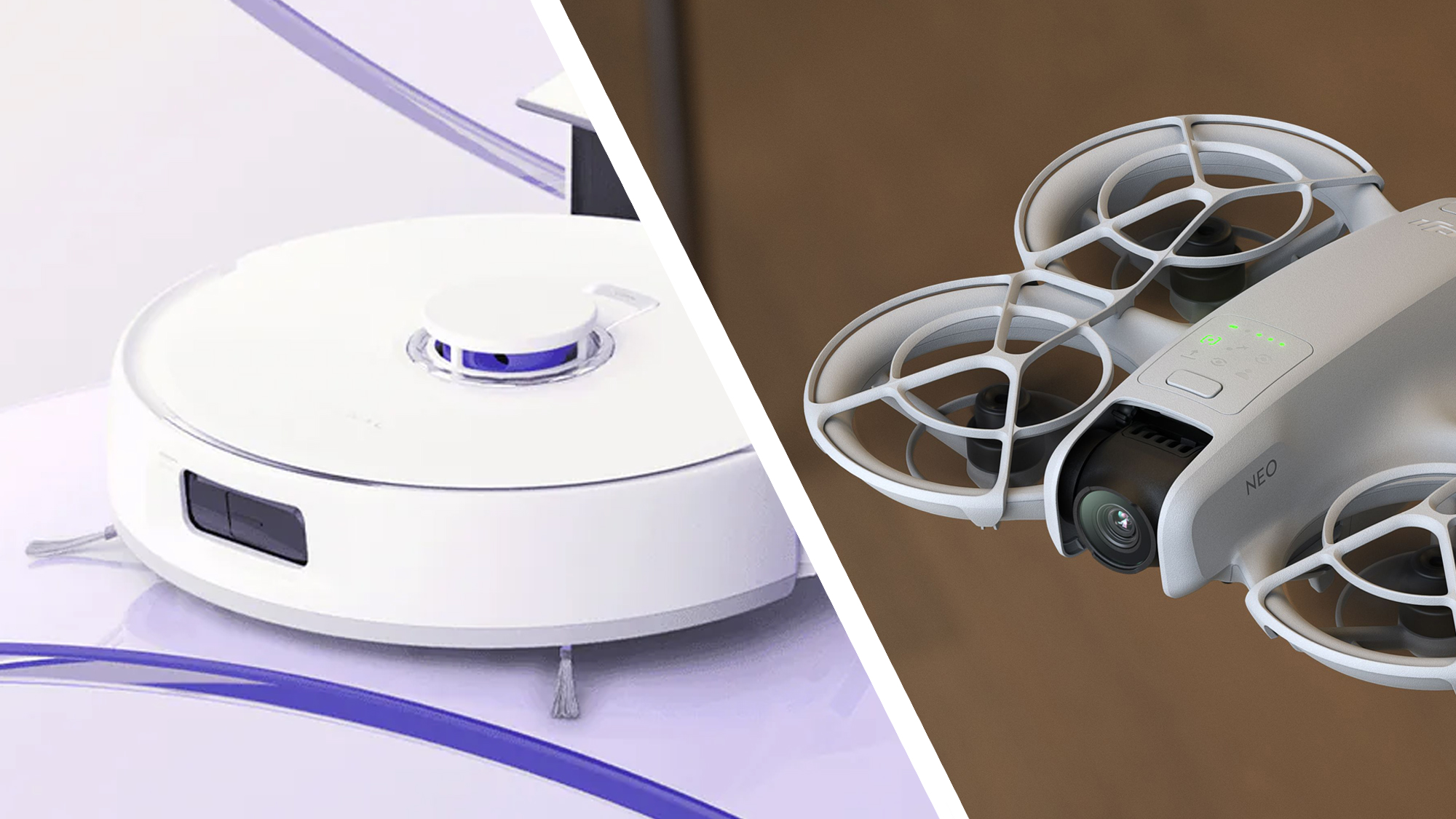
Rank 24549Photo shows 'DJI Romo' product boxed on shipping palletRumors suggest Romo will combine vacuum and mop functions, plus pet avoidanceIt would be DJI's first vacuum – but the company has shown willingness to enter new market sectors recentlyIt appears that the rumored DJI Romo, a robot vacuum with integrated mop, is not only real but moving closer to launch.A photograph tweeted by China-based drone leaker OsitaLV shows what appears to be a shipment of six boxed Romo vacuum cleaners on a pallet and ready for shipping, which suggests that the product could be poised to go on sale very soon.I'm sure this thing has no NFZ! pic.twitter.com/TRkv9G80iuMay 29, 2025We first heard rumblings about the Romo back in November 2024, where a leaked image purported to show the robot’s design. However, even if this picture was real, it wasn’t clear at the time whether or not the product was merely in prototype form or destined for a real-world release. It now seems likely that it’s very much a real product, coming to stores imminently.DJI has never confirmed the existence of the Romo. However, initial speculation suggested that the Romo would combine vacuum and mop functions, and include features like individual room controls and pet detection.More recently, other leaked imagesof what appears to be Romo's companion app, suggest it'll match the best robot vacuums with features like automatic self-emptying and powerful obstacle avoidance (which is something DJI's drones are known for).While the Romo's release would represent DJI’s first foray into the robot vacuum market, we think it's highly plausible that the Chinese company would make a move into this market sector.Why a robot vacuum?The DJI RomoMaster S1, the company's educational robot, was released in 2019. (Image credit: DJI)DJI is best known for its aerial photography drones (like the new Mavic 4 Pro), action cameras and smartphone gimbals. But its proficiency in automated motion, obstacle avoidance and battery technology make it well-positioned to produce a self-guiding domestic robot. It’s even made a ground-based educational robot in the past: the 2019-released RoboMaster S1.Diversifying its product line-up could prove a canny strategy for DJI, given that its drone business seems to be under threat – in the US, at least – on account of the Trump administration’s chaotic tariffs plans and general US regulatory hostility towards Chinese-made drones. The Mavic 4 Pro hasn't even been launched in the US, for instance, despite it being DJI's new flagship camera drone.The robot vacuum market could also be ripe for disruption, with no clear dominant manufacturer in place. Check out our best robot vacuums guide, for instance, and you’ll find it contains a wide mix of brands, each with varying strengths.If we hear any more on the DJI Romo, we’ll bring you further updates.You might also like4 things I loved about the world's first robovac with a mechanical arm – and 3 that need workI test robot vacuums for a living, and this new bot has the best mopping system I've seenDJI isn't slowing down: the DJI Mini 5 Pro, DJI Avata 3, and DJI Neo 2 all get mentioned in new leaks
-

Picture from static.independent.co.uk
Rank 24550