News
This constantly updated list features the latest and most important news articles, ranked in order of significance. The top stories highlight major developments, breaking news, and critical updates across various topics, ensuring you stay informed about the most pressing issues. As new articles are added, the list adapts to reflect the latest priorities, keeping the most impactful stories at the forefront. Whether it’s global events, technology breakthroughs, or industry trends, this dynamic list ensures you always have access to the most relevant and timely information.
-

Picture from ichef.bbci.co.uk
Rank 9551 -

Picture from techcrunch.com
Rank 9552 -

Picture from ichef.bbci.co.uk
Rank 9553 -
Picture from o.aolcdn.com
Rank 9554According to an SEC filing from NVIDIA, the US government now requires companies to obtain a license to export H20 integrated circuits and any other products that achieve the same performance benchmarks. The filing states that "the license requirement addresses the risk that the covered products may be used in, or diverted to, a supercomputer in China." Mainland China is not the only place targeted by this license; NVIDIA will also require permission to sell the H20 to the territories of Hong Kong and Macau as well as to nations with the D:5 designation as US Arms Embargo Countries.
The H20 chips are currently the most advanced chips that can be sold to select international markets under present laws and they are powerful enough to be used for artificial intelligence applications. NVIDIA has wanted the ability to retain Chinese customers for these products and last week, it seemed like the company may have gotten a reprieve on new restrictions. However, it appears that the new license requirement "will be in effect for the indefinite future."
NVIDIA said in the SEC filing that it now expects to report about $5.5 billion in charges related to "inventory, purchase commitments and related reserves" associated with the H20 circuits in the results for its current fiscal quarter.This article originally appeared on Engadget at https://www.engadget.com/big-tech/nvidia-says-the-us-has-put-export-restrictions-on-h20-ai-chips-224822930.html?src=rss
-
Picture from techcrunch.com
Rank 9555 -

Picture from cdn.mos.cms.futurecdn.net
Rank 9556Skullcandy Method 360 ANC are wireless earbuds with Bose sound9 hrs battery in the buds with ANC on, Bose-style ergonomic fitAvailable now for $99 / £99 (about AU$200) – US price will rise to $119
Skullcandy has just unveiled its latest earbuds, and they're a mashup with Bose that I think looks like incredibly good value for their $99 / £99 launch price – though in the US, that's just an initial introductory price, and will rise to $119 officially.The Skullcandy Method 360 ANC buds are true wireless buds that come in a really cool slide-out case with an O-ring to connect to your backpack or cool skate clothes (the press images seem to emphasize the skating vibe).The design of the buds themselves bears more than a passing resemblance to the Bose QuietComfort Ultra Earbuds, but with Skullcandy-like funky color options. They have fins for a super-secure fit, and apparently this is "licensed technology from Bose [to] help ensure a perfect fit and block out unwanted sound". There are different-sized fins and eartips to help get the most secure fit for your ear shape.Speaking of blocking out the sound, they have active noise cancellation, with adjustable modes via Skullcandy's app and a 'Stay-Aware' passthrough mode. Four mics power the ANC, and given the tech involved, it seems that Bose has had its hand in here as well – these could rank among the best noise-canceling earbuds on a budget.Impressively, the battery life with ANC turned on is nine hours from the earbuds, with another 23 hours from the case. That's way above most of the competition from even the best earbuds. With the ANC off, you get 11 hours from the buds and a further 29 from the case.
(Image credit: Skullcandy)
Now, you might assume (as I did) from the '360' name that there's some kind of spatial audio here. Well, there isn't.Which is fine given the budget, I have no complaint about that – but it feels like Skullcandy already blew the perfectly good name it could've given the next-gen version where it did add this feature.There's multi-point pairing, Google Fast Pair support, and Bluetooth 5.3 including Bluetooth LE Audio support, so they're somewhat future-proof. There's no mention of Bluetooth Auracast support, but the version of Bluetooth here supports it, so it might be possible in the future.It's also a shame there's no Find My support, but I can live without that. There's very little to complain about otherwise – even little things that are often left out of budget buds are here, including IPX4 sweat resistance and auto-pausing wear detection when you take them off.
Left to right: Plasma, Primer, Black, Bone, Leopard (Image credit: Skullcandy)
The color options are especially good. They are, in order of how awesome they sound: Plasma, Leopard, Bone, Primer, and Black. They are, in order of how cool they look: Leopard, Plasma, Primer, Black, and Bone.If these have sound quality and ANC to match the Bose partnership, and the comfort we expect from Skullcandy, these look like they've hit a real value sweet spot, and may rank among the best budget earbuds.We've already had our hands on them, and will bring you some first impressions once we've had a chance to make some early judgments. They're available to buy from today.
You might also like
Sennheiser launches AirPods-like open earbuds, and if they're as good as the rest of its Accentum headphones, they'll be a bargainOne of the best budget earbuds brands just launched two super-cheap noise cancelling buds, and some open earbuds with Hi-Res AudioDenon's AirPods-like new earbuds range beats Apple with next-gen Bluetooth audio and a tempting low price
-

Picture from ichef.bbci.co.uk
Rank 9557 -
Picture from o.aolcdn.com
Rank 9558Skullcandy just revealed a new pair of wireless earbuds, the Method 360 ANC. Interestingly, the company has teamed up with rival headphone-maker Bose for this product. The earbuds have been tuned by Bose and use eartips similar to the ones found with the company’s QuietComfort line.
This is part of the pre-existing Sound by Bose platform, in which the company helps rivals with tuning and sound quality. The Motorola Moto Buds+ earbuds also include this feature.
Otherwise, the Method 360 ANC earbuds seem like a solid entry in a crowded field. They offer ANC, multipoint connections, custom EQ options, wear detection and other bells and whistles. The battery lasts around 10 hours per charge, which increases to 40 hours when considering the charging case. However, this metric is with ANC turned off. There is a quick-charge feature that advertises two hours of use on just ten minutes of charging. This charging case includes an O-ring, so it can be clipped to stuff, and is available in several colors.
Skullcandy
The earbuds ship with multiple sets of eartips that also use technology by Bose to ensure a “secure, ultra-comfortable fit and superior noise isolation.” They integrate with the Skull-iQ app, for making EQ adjustments, reconfiguring buttons and changing ANC modes. The Method 360 ANC earbuds are available right now at an introductory price of $100. The cost will go up to $130 later on.This article originally appeared on Engadget at https://www.engadget.com/audio/headphones/skullcandys-new-method-360-anc-earbuds-have-been-tuned-by-bose-230053911.html?src=rss
-

Picture from ichef.bbci.co.uk
Rank 9559 -

Picture from ichef.bbci.co.uk
Rank 9560 -

Picture from ichef.bbci.co.uk
Rank 9561 -

Picture from ichef.bbci.co.uk
Rank 9562 -

Picture from ichef.bbci.co.uk
Rank 9563 -

Picture from ichef.bbci.co.uk
Rank 9564 -

Picture from ichef.bbci.co.uk
Rank 9565 -

Picture from ichef.bbci.co.uk
Rank 9566 -

Picture from ichef.bbci.co.uk
Rank 9567 -

Picture from ichef.bbci.co.uk
Rank 9568 -
Picture from cdn.mos.cms.futurecdn.net
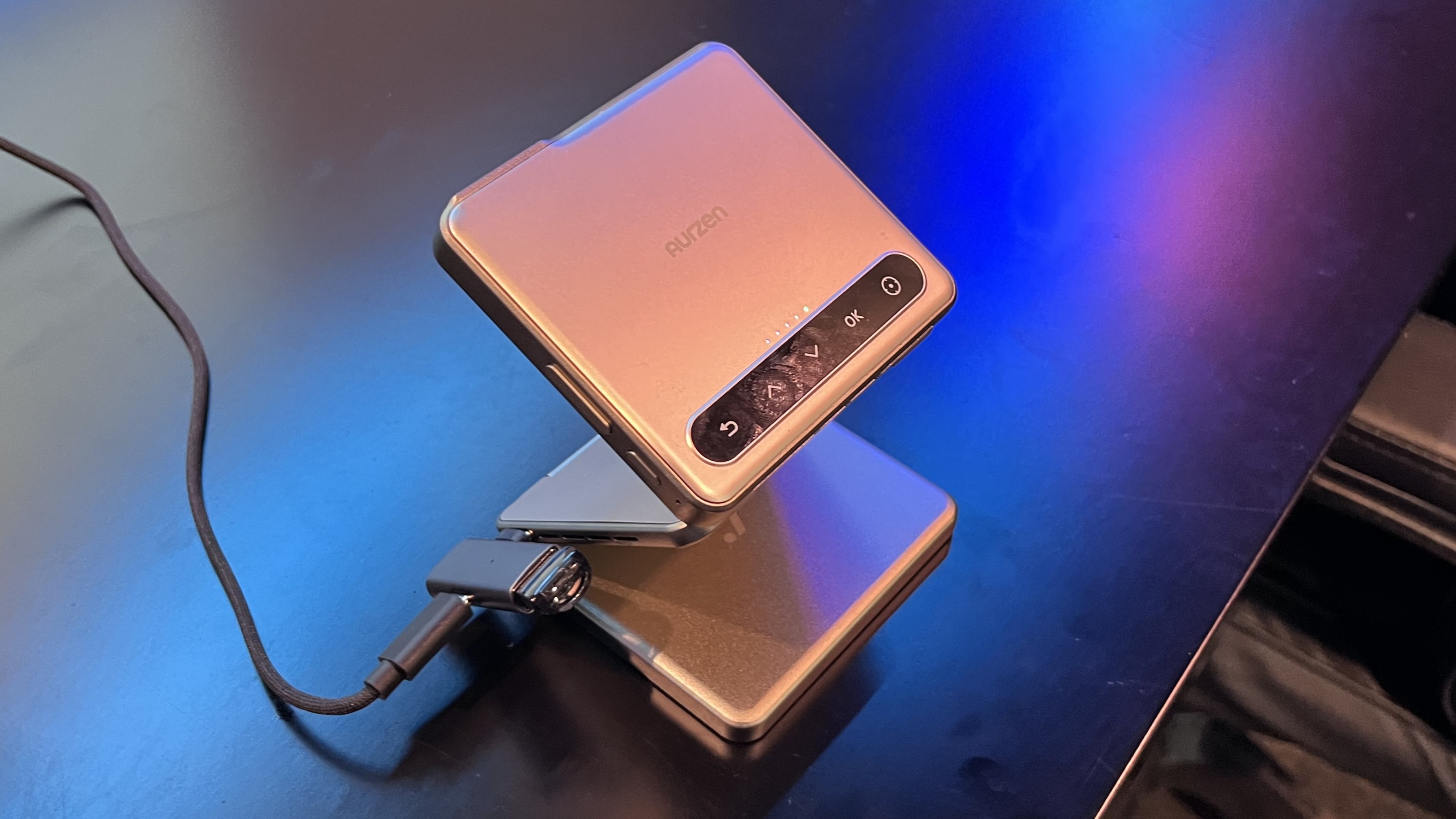
Rank 9569Aurzen first debuted its tri-folding compact projector at CES 2025After a Kickstarter, it's now up for sale on Amazon and already seeing a discountWith the ultra-portable Zip projector, it can show content horizontally or vertically
The 2025 Consumer Electronics Show might be long over, but in about four months since then, one of the wildest products we saw on the show floor is well up for order and shipping soon.The Aurzen ZIP is a tri-folding ultra-portable projector, making the like of the Samsung Freestyle seem downright clunky. It impressed us in a brief demonstration at the show, mostly for the sheer novelty and it’s up for order right now on Amazon.It’s priced at $399.99, with Prime members scoring free shipping, but if you pick the Gold color you can clip a coupon on the page for $20 off.That brings the cost for this compact projector down to $379.99. Though, if you’re set on Grey you’ll need to pay the full price of $399.99.
@techradar
♬ original sound - TechRadar
Aurzen’s ZIP lets you cast a 720pHD screen on nearly any surface from an integrated DLP projector. It promises up to 100 ANSI lumens of brightness and even has stereo speakers built-in, though considering the size, we wouldn’t expect super-powerful audio.It even packs a solid amount of connectivity, including Bluetooth 5.4 for screen mirroring or connecting to another audio service. Still, through a Wi-Fi dongle, you can utilize CastPlay to communicate with other devices and cast content.Even neater, though, is that the ZIP can cast content horizontally, which makes it great for watching movies, TV shows, or even a sports game, but the versatility is upped as it can also show vertical content in the 3:2 format.This means you can connect your iPhone or Android to watch TikToks, YouTube Shorts, or Instagram Reels on the big screen. Err, wherever you opt to put that big screen. There is a built-in gyroscope to let it make that switch from horizontal to vertical or vice versa as well. An Apple-esque feature list on Amazon lists that the Zip features Auto Keystone – which should mean you get a clear picture – and ‘Zero-Lag Focus.’Even with a laundry list of features, don’t go into the Aurzen Zip thinking it’s going to deliver the best picture possible. It's almost certainly a step below the Samsung Freestyle.Rather, this will be excellent for the traveler or someone who is on the go and wants to take in content – horizontal or vertical – via a bigger view. Maybe, you’re on the road and want to lie in bed and watch a show on your ceiling.It also speaks to the design here, which is the really neat part – the Zip is a full tri-folding design for a projector that weighs in at just 9.8 ounces or 280 grams. When closed, it’s a bit bigger than a Post-it note at 3.1 x 3.1 x 1 inch, and you can get it to project the perfect view by tilting the top panel, which contains the projector and top controls.You can watch our first look at the Aurzen Zip from CES 2025 above, and let me know in the comments if you end up adding this to your cart. Again, it’s available on Amazon for $399.99 in Grey, but if you get in Gold, you can clip the $20 off coupon on the page to get it for just $379.99.
You might also like
The best 4K projector 2025: top home theater beamersSamsung The Freestyle 2nd Gen review: the best portable projector gets even betterLego just dropped 9 new sets, but as a Star Wars obsessed fan, I'd shop these three first
-

Picture from techcrunch.com
Rank 9570 -

Picture from ichef.bbci.co.uk
Rank 9571 -

Picture from techcrunch.com
Rank 9572 -

Picture from ichef.bbci.co.uk
Rank 9573 -

Picture from ichef.bbci.co.uk
Rank 9574 -

Picture from ichef.bbci.co.uk
Rank 9575 -

Picture from ichef.bbci.co.uk
Rank 9576 -

Picture from ichef.bbci.co.uk
Rank 9577 -

Picture from ichef.bbci.co.uk
Rank 9578 -

Picture from cdn.mos.cms.futurecdn.net
Rank 9579It’s hard to believe it’s been five years since the COVID-19 pandemic first hit. While life has gradually moved forward, its impact is still being felt in countless ways. COVID accelerated the development of many kinds of technology including artificial intelligence (AI). Once seen as novel and full of promise, AI has seen a meteoric shift – from something promising and experimental into something that is a critical driver of innovation.One sector that has reaped the benefits of this accelerated development is healthcare, where it is being used to support clinical decision-making, monitor patient outcomes, and accelerate drug discovery.So, what would a pandemic response look like today, in a world where AI tools play such a central role?
Enhanced detection and forecasting
There are straightforward ways that more advanced AI models could support the healthcare system. Data analysis, for instance, could help track the spread of a virus in real time and pinpoint the most effective treatments more quickly than ever before.But the real potential of AI goes far beyond the basics. Today, we’re able to use its capabilities in far more impactful ways, particularly when it comes to tackling the challenges we faced five years ago.Take detection, for example. AI has the incredible ability to analyze large sets of data from multiple sources in the blink of an eye. Through this analysis, it can then predict any unusual patterns that might occur, allowing governments the opportunity to be one step ahead. Not only that, with machine learning, AI can be trained on the historical data from previous outbreaks and forecast any red flags that may be on the horizon. Governments could then use this intelligence to plan their response and take steps to slow the spread.A secondary and major benefit of a powerful forecasting system is that it can markedly improve efficiency – in many areas. There has been a swell of conversation around the financial viability of our NHS as the world becomes more expensive and life expectancy rises. The government has already acted, with plans to scrap NHS England after a £6.6 billion budget deficit was predicted for the coming year. Step forward AI. By accurately forecasting and predicting future health trends, governments can allocate resources in a much more efficient manner, reducing government waste.Further, today’s AI models could play a vital role in the more technical healthcare challenges a major health crisis presents. Looking back, one of the most challenging features of COVID-19 was the development and rollout of the vaccine. The overall cost of the vaccine was estimated to cost the government £376 billion.
Development and discovery
Today, however, AI is doing powerful work in vaccine development and discovery. In America, AI is being harnessed to help create vaccines tailored to vulnerable groups. Additionally, through data analysis, it could predict which individuals are in the most immediate need of the vaccine and predict how candidates may react to it. Going even further, AI has the capacity to test millions of vaccine variations before a human trial has even begun, therefore optimizing clinical trial design.A more efficient system for vaccine discovery, development, and distribution would allow the government to not only respond more quickly, but also better allocate resources to other areas of the healthcare system that are under great strain.It can improve outcomes, but it can also help shape how information around those outcomes is shared. Which brings us on to another area where AI could make a meaningful difference: misinformation.When the virus struck, little information was available about it and how it would affect the public, and the information that was relayed was possibly less robust than it needed to be. The government at the time had to set up specialist units to combat false narratives – costing valuable resources. With AI’s ability to decipher information in real time, any information or data getting passed around can be easily fact-checked, mitigating the spread of false and dangerous guidance.AI has transformed how we would handle a global pandemic, but it’s also important to understand how the COVID-19 virus accelerated this progress. While the role of AI in healthcare was already being established at the time of the pandemic, COVID compressed the timeline – accomplishing in five years what might have taken a decade.
From experimentation to implementation
In truth, when the pandemic hit, AI in healthcare was largely experimental and often used solely for research and diagnostics, with little real-world deployment. COVID acted as a catalyst for investment in AI – and technology in general. Prior to the pandemic, investment in tech was dwindling, but fast-forward to 2021, and there was a marked difference in the attitude towards technology.As we moved into lockdowns and a period with strict social restrictions, the focus turned to developing and implementing AI and tech that could improve mental health and wellness, with the use of mental health and well-being apps increasing 200% during the pandemic.COVID also exposed gaps in the healthcare system; overburdened staff, slower diagnostics, and delayed responses. However, one of the most significant gaps was the bias in the data collected. The pandemic highlighted the lack of trust in healthcare in certain populations. The black community in the UK were much less likely to get the vaccine compared with other ethnic groups, for example.Building trust in healthcare among minority communities is, therefore, vital to ensuring healthcare systems can support everyone. If provided with the right data, AI can significantly build trust and challenge misinformation that spreads so easily in today’s tech-centric society.
AI and the future of crisis response
Looking ahead, AI has the power to transform the management of global health crises. Governments are investing in AI infrastructure, building large language models (LLMs), and considering creating data-sharing platforms to support this innovation.This is where we need collaboration. The NHS has the most extensive set of healthcare data but doesn’t share it. If that data is made available, we can train our AI platforms to analyze areas where improvements can be made. There also needs to be a commitment to train staff and make them aware of the benefits that AI can provide in terms of their productivity and workflow.In conclusion, the pandemic and the following five years have highlighted how AI and healthcare institutions can be better prepared for any potential health crisis in the future. With a commitment to collaboration, the power of artificial intelligence can foster transparency, gather equitable data, and build trust among the population. By working hand in hand, we can build a healthcare ecosystem that is proactive and resilient.
We list the best IT infrastructure management service.
This article was produced as part of TechRadarPro's Expert Insights channel where we feature the best and brightest minds in the technology industry today. The views expressed here are those of the author and are not necessarily those of TechRadarPro or Future plc. If you are interested in contributing find out more here: https://www.techradar.com/news/submit-your-story-to-techradar-pro
-

Picture from ichef.bbci.co.uk
Rank 9580 -

Picture from ichef.bbci.co.uk
Rank 9581 -

Picture from techcrunch.com
Rank 9582 -

Picture from ichef.bbci.co.uk
Rank 9583 -
Picture from o.aolcdn.com
Rank 9584It's been over one year since Intuit shut down the popular budgeting app Mint. I was a Mint user for many years; millions of other users like me enjoyed how easily Mint allowed us to track all accounts in one place and monitor credit scores. I also used it regularly to help me track spending, set goals like pay my mortgage down faster and with general money management.Ahead of Mint’s demise, I gave Credit Karma, Intuit’s other financial app, a try but found it to be a poor Mint alternative. So I set out to find a true replacement in another budgeting app. The following guide lays out my experience testing some of the most popular Mint replacement apps available today.Our pick for best Mint alternative remains Quicken Simplifi, even this long after Mint being shut down, thanks to its easy to use app, good income and bill detection and its affordable price. But there are plenty of other solid options out there for those with different needs. If you’re also on the hunt for a budgeting app to replace Mint, we hope these details can empower you to choose which of the best budgeting apps out there will be right for you.
Table of contents
Best Mint alternatives in 2025
What is Plaid and how does it work?
My top Mint alternative picks
How to import your financial data from the Mint app
How we tested Mint alternatives
What about Rocket Money?
Best Mint alternatives in 2025
No pun intended, but what I like about Quicken Simplifi is its simplicity. Whereas other budgeting apps try to distinguish themselves with dark themes and customizable emoji, Simplifi has a clean user interface, with a landing page that you just keep scrolling through to get a detailed overview of all your stats. These include your top-line balances; net worth; recent spending; upcoming recurring payments; a snapshot of your spending plan; top spending categories; achievements; and any watchlists you’ve set up.
Another one of the key features I appreciate is the ability to set up savings goals elsewhere in the app. I also appreciate how it offers neat, almost playful visualizations without ever looking cluttered. I felt at home in the mobile and web dashboards after a day or so, which is faster than I adapted to some competing services (I’m looking at you, YNAB and Monarch).
Getting set up with Simplifi was mostly painless. I was particularly impressed at how easily it connected to Fidelity; not all budget trackers do, for whatever reason. This is also one of the only services I tested that gives you the option of inviting a spouse or financial advisor to co-manage your account. One thing I would add to my initial assessment of the app, having used it for a few months now: I wish Simplifi offered Zillow integration for easily tracking your home value (or at least a rough estimate of it). Various competitors including Monarch Money and Copilot Money work with Zillow, so clearly there's a Zillow API available for use. As it stands, Simplifi users must add real estate manually like any other asset.
Dana Wollman / Engadget
In practice, Simplifi miscategorized some of my expenses, but nothing out of the ordinary compared to any of these budget trackers. As you’re reviewing transactions, you can also mark if you’re expecting a refund, which is a unique feature among the services I tested. Simplifi also estimated my regular income better than some other apps I tested. Most of all, I appreciated the option of being able to categorize some, but not all, purchases from a merchant as recurring. For instance, I can add my two Amazon subscribe-and-saves as recurring payments, without having to create a broad-strokes rule for every Amazon purchase.
The budgeting feature is also self-explanatory and can likely accommodate your preferred budgeting method. Just check that your regular income is accurate and be sure to set up recurring payments, making note of which are bills and which are subscriptions. This is important because Simplifi shows you your total take-home income as well as an “income after bills” figure. That number includes, well, bills but not discretionary subscriptions. From there, you can add spending targets by category in the “planned spending” bucket. Planned spending can also include one-time expenditures, not just monthly budgets. When you create a budget, Simplifi will suggest a number based on a six-month average.
Not dealbreakers, but two things to keep in mind as you get started: Simplifi is notable in that you can’t set up an account through Apple or Google. There is also no option for a free trial, though Quicken promises a “30-day money back guarantee.”
Monarch Money grew on me. My first impression of the budgeting app, which was founded by a former Mint product manager, was that it's more difficult to use than others on this list, including Simplifi, NerdWallet and Copilot. And it is. Editing expense categories, adding recurring transactions and creating rules, for example, is a little more complicated than it needs to be, especially in the mobile app. (My advice: Use the web app for fine-tuning details.) Monarch also didn’t get my income right; I had to edit it.
Once you’re set up, though, Monarch offers an impressive level of granularity. In the budgets section, you can see a bona fide balance sheet showing budgets and actuals for each category. You'll also find a forecast, for the year or by month. And recurring expenses can be set not just by merchant, but other parameters as well. For instance, while most Amazon purchases might be marked as “shopping,” those for the amounts of $54.18 or $34.18 are definitely baby supplies, and can be automatically marked as such each time, not to mention programmed as recurring payments. Weirdly, though, there’s no way to mark certain recurring payments as bills, specifically.
Dana Wollman / Engadget
Not long after I first published this story in December 2023, Monarch introduced a detailed reporting section where you can create on-demand graphs based on things like accounts, categories and tags. That feature is available just on the web version of the app for now. As part of this same update, Monarch added support for an aggregator that makes it possible to automatically update the value of your car. This, combined with the existing Zillow integration for tracking your home value, makes it easy to quickly add a non-liquid asset like a vehicle or real estate, and have it show up in your net worth graph.
The mobile app is mostly self-explanatory. The main dashboard shows your net worth; your four most recent transactions; a month-over-month spending comparison; income month-to-date; upcoming bills; an investments snapshot; a list of any goals you’ve set; and, finally, a link to your month-in-review. That month-in-review is more detailed than most, delving into cash flow; top income and expense categories; cash flow trends; changes to your net worth, assets and liabilities; plus asset and liability breakdowns. In February 2024, Monarch expanded on the net worth graph, so that if you click on the Accounts tab you can see how your net worth changed over different periods of time, including one month, three months, six months, a year or all time.
On the main screen, you’ll also find tabs for savings and checking accounts (and all others as well), transactions, cash flow, budget and recurring. Like many of the other apps featured here, Monarch can auto-detect recurring expenses and income, even if it gets the category wrong. (They all do to an extent.) Expense categories are marked by emoji, which you can customize if you’re so inclined.
Monarch Money uses a combination of networks to connect with banks, including Plaid, MX and Finicity, a competing network owned by Mastercard. (I have a quick explainer on Plaid, the industry standard in this space, toward the end of this guide.) As part of an update in late December, Monarch has also made it easier to connect through those other two networks, if for some reason Plaid fails. Similar to NerdWallet, I found myself completing two-factor authentication every time I wanted to get past the Plaid screen to add another account. Notably, Monarch is the only other app I tested that allows you to grant access to someone else in your family — likely a spouse or financial advisor. Monarch also has a Chrome extension for importing from Mint, though really this is just a shortcut for downloading a CSV file, which you’ll have to do regardless of where you choose to take your Mint data.
Additionally, Monarch just added the ability to track Apple Card, Apple Cash, and Savings accounts, thanks to new functionality brought with the iOS 17.4 update. It's not the only one either; currently, Copilot and YNAB have also added similar functionality that will be available to anyone with the latest versions of their respective apps on a device running iOS 17.4. Instead of manually uploading statements, the new functionality allows apps like Monarch's to automatically pull in transactions and balance history. That should make it easier to account for spending on Apple cards and accounts throughout the month.
Monarch also recently launched investment transactions in beta. It also says bill tracking and an overhauled goals system are coming soon. Monarch hasn't provided a timeline for that last one, except to say that the improved goals feature is coming soon.
Copilot Money might be the best-looking budgeting app I tested. It also has the distinction of being exclusive to iOS and Macs — at least for now. Andres Ugarte, the company’s CEO, has publicly promised that Android and web apps are coming soon. But until it follows through, I can’t recommend Copilot for most people with so many good competitors out there.
Copilot Money for Web and Android!Thanks to the support from our users, and the overwhelming positive reception we're seeing from folks migrating from Mint, we can now say that we'll be building @copilotmoney for Web and Android with a goal to launch in 2024.We'll continue to…— Andres Ugarte (@chuga) November 15, 2023
There are other features that Copilot is missing, which I’ll get into. But it is promising, and one to keep an eye on. It’s just a fast, efficient, well designed app, and Android users will be in for a treat when they’ll finally be able to download it. It makes good use of colors, emoji and graphs to help you understand at a glance how you’re doing on everything from your budgets to your investment performance to your credit card debt over time. In particular, Copilot does a better job than almost any other app of visualizing your recurring monthly expenses.
Behind those punchy colors and cutesy emoji, though, is some sophisticated performance. Copilot’s AI-powered “Intelligence” gets smarter as you go at categorizing your expenses. (You can also add your own categories, complete with your choice of emoji.) It’s not perfect. Copilot miscategorized some purchases (they all do), but it makes it easier to edit than most. On top of that, the internal search feature is very fast; it starts whittling down results in your transaction history as soon as you begin typing.
Dana Wollman / Engadget
Copilot is also unique in offering Amazon and Venmo integrations, allowing you to see transaction details. With Amazon, this requires just signing into your Amazon account via an in-app browser. For Venmo, you have to set up fwd@copilot.money as a forwarding address and then create a filter, wherein emails from venmo@venmo.com are automatically forwarded to fwd@copilot.money. Like Monarch Money, you can also add any property you own and track its value through Zillow, which is integrated with the app.
While the app is heavily automated, I still appreciate that Copilot marks new transactions for review. It’s a good way to both weed out fraudulent charges, and also be somewhat intentional about your spending habits.
Like Monarch Money, Copilot updated its app to make it easier to connect to banks through networks other than Plaid. As part of the same update, Copilot said it has improved its connections to both American Express and Fidelity which, again, can be a bugbear for some budget tracking apps. In an even more recent update, Copilot added a Mint import option, which other budgeting apps have begun to offer as well.
Because the app is relatively new (it launched in early 2020), the company is still catching up to the competition on some table-stakes features. Ugarte told me that his team is almost done building out a detailed cash flow section as well. On its website, Copilot also promises a raft of AI-powered features that build on its current “Intelligence” platform, the one that powers its smart expense categorization. These include “smart financial goals,” natural language search, a chat interface, forecasting and benchmarking. That benchmarking, Ugarte tells me, is meant to give people a sense of how they’re doing compared to other Copilot users, on both spending and investment performance. Most of these features should arrive in the new year.
Copilot does a couple interesting things for new customers that distinguish it from the competition. There’s a “demo mode” that feels like a game simulator; no need to add your own accounts. The company is also offering two free months with RIPMINT — a more generous introductory offer than most. When it finally does come time to pony up, the $7.92 monthly plan is cheaper than some competing apps, although the $95-a-year-option is in the same ballpark.
You may know NerdWallet as a site that offers a mix of personal finance news, explainers and guides. I see it often when I google a financial term I don’t know and sure enough, it’s one of the sites I’m most likely to click on. As it happens, NerdWallet also has the distinction of offering one of the only free budgeting apps I tested. In fact, there is no paid version; nothing is locked behind a paywall. The main catch: There are ads everywhere. To be fair, the free version of Mint was like this, too.
Even with the inescapable credit card offers, NerdWallet has a clean, easy-to-understand user interface, which includes both a web and a mobile app. The key metrics that it highlights most prominently are your cash flow, net worth and credit score. (Of note, although Mint itself offered credit score monitoring, most of its rivals do not.) I particularly enjoyed the weekly insights, which delve into things like where you spent the most money or how much you paid in fees — and how that compares to the previous month. Because this is NerdWallet, an encyclopedia of financial info, you get some particularly specific category options when setting up your accounts (think: a Roth or non-Roth IRA).
Dana Wollman / Engadget
As a budgeting app, NerdWallet is more than serviceable, if a bit basic. Like other apps I tested, you can set up recurring bills. Importantly, it follows the popular 50/30/20 budgeting rule, which has you putting 50% of your budget toward things you need, 30% toward things you want, and the remaining 20% into savings or debt repayments. If this works for you, great — just know that you can’t customize your budget to the same degree as some competing apps. You can’t currently create custom spending categories, though a note inside the dashboard section of the app says “you’ll be able to customize them in the future.” You also can’t move items from the wants column to “needs” or vice versa but “In the future, you'll be able to move specific transactions to actively manage what falls into each group.” A NerdWallet spokesperson declined to provide an ETA, though.
Lastly, it’s worth noting that NerdWallet had one of the most onerous setup processes of any app I tested. I don’t think this is a dealbreaker, as you’ll only have to do it once and, hopefully, you aren’t setting up six or seven apps in tandem as I was. What made NerdWallet’s onboarding especially tedious is that every time I wanted to add an account, I had to go through a two-factor authentication process to even get past the Plaid splash screen, and that’s not including the 2FA I had set up at each of my banks. This is a security policy on NerdWallet’s end, not Plaid’s, a Plaid spokesperson says.
Precisely because NerdWallet is one of the only budget trackers to offer credit score monitoring, it also needs more of your personal info during setup, including your birthday, address, phone number and the last four digits of your social security number. It’s the same with Credit Karma, which also does credit score monitoring.
Related to the setup process, I found that NerdWallet was less adept than other apps at automatically detecting my regular income. In my case, it counted a large one-time wire transfer as income, at which point my only other option was to enter my income manually (which is slightly annoying because I would have needed my pay stub handy to double-check my take-home pay).
YNAB is, by its own admission, “different from anything you’ve tried before.” The app, whose name is short for You Need a Budget, promotes a so-called zero-based budgeting system, which forces you to assign a purpose for every dollar you earn. A frequently used analogy is to put each dollar in an envelope; you can always move money from one envelope to another in a pinch. These envelopes can include rent and utilities, along with unforeseen expenses like holiday gifts and the inevitable car repair. The idea is that if you budget a certain amount for the unknowns each month, they won’t feel like they’re sneaking up on you.
Importantly, YNAB is only concerned with the money you have in your accounts now. The app does not ask you to provide your take-home income or set up recurring income payments (although there is a way to do this). The money you will make later in the month through your salaried job is not relevant, because YNAB does not engage in forecasting.
The app is harder to learn than any other here, and it requires more ongoing effort from the user. And YNAB knows that. Inside both the mobile and web apps are links to videos and other tutorials. Although I never quite got comfortable with the user interface, I did come to appreciate YNAB’s insistence on intentionality. Forcing users to draft a new budget each month and to review each transaction is not necessarily a bad thing. As YNAB says on its website, “Sure, you’ve got pie charts showing that you spent an obscene amount of money in restaurants — but you’ve still spent an obscene amount of money in restaurants.” I can see this approach being useful for people who don’t tend to have a lot of cash in reserve at a given time, or who have spending habits they want to correct (to riff off of YNAB’s own example, ordering Seamless four times a week).
My colleague Valentina Palladino, knowing I was working on this guide, penned a respectful rebuttal, explaining why she’s been using YNAB for years. Perhaps, like her, you have major savings goals you want to achieve, whether it’s paying for a wedding or buying a house. I suggest you give her column a read. For me, though, YNAB’s approach feels like overkill.
PocketGuard is one of the only reputable free budget trackers I found in my research. Just know it’s far more restricted at the free tier than NerdWallet or Mint. In my testing, I was prompted to pay after I attempted to link more than two bank accounts. So much for free, unless you keep things simple with one cash account and one credit card. When it comes time to upgrade to PocketGuard Plus, you have three options: pay $7.99 a month, $34.99 a year or $79.99 for a one-time lifetime license. That lifetime option is actually one of the few unique selling points for me: I’m sure some people will appreciate paying once and never having to, uh, budget for it again.
From the main screen, you’ll see tabs for accounts, insights, transactions and the “Plan,” which is where you see recurring payments stacked on top of what looks like a budget. The main overview screen shows you your net worth, total assets and debts; net income and total spending for the month; upcoming bills; a handy reminder of when your next paycheck lands; any debt payoff plan you have; and any goals.
Dana Wollman / Engadget
Like some other apps, including Quicken Simplifi, PocketGuard promotes an “after bills” approach, where you enter all of your recurring bills, and then PocketGuard shows you what’s left, and that’s what you’re supposed to be budgeting: your disposable income. Obviously, other apps have a different philosophy: take into account all of your post-tax income and use it to pay the bills, purchase things you want and maybe even save a little. But in PocketGuard, it’s the “in your pocket” number that’s most prominent. To PocketGuard’s credit, it does a good job visualizing which bills are upcoming and which ones you’ve already paid.
PocketGuard has also publicly committed to adding some popular features. These include rollover budgeting, categorization rules and shared household access.
Dana Wollman / Engadget
Although PocketGuard’s UI is easy enough to understand, it lacks polish. The “accounts” tab is a little busy, and doesn’t show totals for categories like cash or investments. Seemingly small details like weirdly phrased or punctuated copy occasionally make the app feel janky. More than once, it prompted me to update the app when no updates were available. The web version, meanwhile, feels like the mobile app blown up to a larger format and doesn’t take advantage of the extra screen real estate.
Of note, although PocketGuard does work with Plaid, its primary bank-connecting platform is actually Finicity. Setting up my accounts through Finicity was mostly a straightforward process. I did encounter one hiccup: Finicity would not connect to my SoFi account. I was able to do it through Plaid, but PocketGuard doesn’t make it easy to access Plaid in the app. The only way, as far as I can tell, is to knowingly search for the name of a bank that isn’t available through Finicity, at which point you get the option to try Plaid instead. Like I said: the experience can be janky.
What is Plaid and how does it work?
Each of the apps I tested uses the same underlying network, called Plaid, to pull in financial data, so it’s worth explaining in its own section what it is and how it works. Plaid was founded as a fintech startup in 2013 and is today the industry standard in connecting banks with third-party apps. Plaid works with over 12,000 financial institutions across the US, Canada and Europe. Additionally, more than 8,000 third-party apps and services rely on Plaid, the company claims.
To be clear, you don’t need a dedicated Plaid app to use it; the technology is baked into a wide array of apps, including the budget trackers I tested for this guide. Once you find the “add an account” option in whichever one you’re using, you’ll see a menu of commonly used banks. There’s also a search field you can use to look yours up directly. Once you find yours, you’ll be prompted to enter your login credentials. If you have two-factor authentication set up, you’ll need to enter a one-time passcode as well.
As the middleman, Plaid is a passthrough for information that may include your account balances, transaction history, account type and routing or account number. Plaid uses encryption, and says it has a policy of not selling or renting customer data to other companies. However, I would not be doing my job if I didn’t note that in 2022 Plaid was forced to pay $58 million to consumers in a class action suit for collecting “more financial data than was needed.” As part of the settlement, Plaid was compelled to change some of its business practices.
In a statement provided to Engadget, a Plaid spokesperson said the company continues to deny the allegations underpinning the lawsuit and that “the crux of the non-financial terms in the settlement are focused on us accelerating workstreams already underway related to giving people more transparency into Plaid’s role in connecting their accounts, and ensuring that our workstreams around data minimization remain on track.”
My top Mint alternative picks
To conclude, you might be wondering what app I decided on for myself after all of this research. The answer is actually two apps: Quicken Simplifi, my overall top pick, and Copilot Money. For now, I am actively using both apps and still deciding, long-term, which I feel more comfortable with. I tend to prefer Copilot's fast, colorful user interface, but as I explained above, it's too lacking in table-stakes features for me to go so far as to name it the best overall option.
How to import your financial data from the Mint app
Mint users should consider getting their data ready to migrate to their new budgeting app of choice soon. Unfortunately, importing data from Mint is not as easy as entering your credentials from inside your new app and hitting “import.” In fact, any app that advertises the ability to port over your stats from Mint is just going to have you upload a CSV file of transactions and other data.
To download a CSV file from Mint, do the following:
Sign into Mint.com and hit Transactions in the menu on the left side of the screen.
Select an account, or all accounts.
Scroll down and look for “export [number] transactions” in smaller print.
Your CSV file should begin downloading.
Note: Downloading on a per-account basis might seem more annoying, but could help you get set up on the other side, if the app you’re using has you importing transactions one-for-one into their corresponding accounts.
How we tested Mint alternatives
Before I dove into the world of budgeting apps, I had to do some research. To find a list of apps to test, I consulted trusty ol’ Google (and even trustier Reddit); read reviews of popular apps on the App Store; and also asked friends and colleagues what budget tracking apps they might be using. Some of the apps I found were free, just like Mint. These, of course, show loads of ads (excuse me, “offers”) to stay in business. But most of the available apps require paid subscriptions, with prices typically topping out around $100 a year, or $15 a month. (Spoiler: My top pick is cheaper than that.)
Since this guide is meant to help Mint users find a permanent replacement, any services I chose to test needed to do several things: import all of your account data into one place; offer budgeting tools; and track your spending, net worth and credit score. Except where noted, all of these apps are available for iOS, Android and on the web.
Once I had my shortlist of six apps, I got to work setting them up. For the sake of thoroughly testing these apps (and remember, I really was looking for a Mint alternative myself), I made a point of adding every account to every budgeting app, no matter how small or immaterial the balance. What ensued was a veritable Groundhog Day of two-factor authentication. Just hours of entering passwords and one-time passcodes, for the same banks half a dozen times over. Hopefully, you only have to do this once.
What about Rocket Money?
Rocket Money is another free financial app that tracks spending and supports things like balance alerts and account linking. If you pay for the premium tier, the service can also help you cancel unwanted subscriptions. We did not test it for this guide, but we'll consider it in future updates.This article originally appeared on Engadget at https://www.engadget.com/apps/the-best-budgeting-apps-to-replace-mint-143047346.html?src=rss
-

Picture from ichef.bbci.co.uk
Rank 9585 -

Picture from ichef.bbci.co.uk
Rank 9586 -

Picture from ichef.bbci.co.uk
Rank 9587 -

Picture from techcrunch.com
Rank 9588 -

Picture from ichef.bbci.co.uk
Rank 9589 -

Picture from ichef.bbci.co.uk
Rank 9590 -

Picture from ichef.bbci.co.uk
Rank 9591 -

Picture from ichef.bbci.co.uk
Rank 9592 -

Picture from techcrunch.com
Rank 9593 -

Picture from cdn.mos.cms.futurecdn.net
Rank 9594Ransomware has always been an evolving threat, as criminal gangs experiment with new tactics to terrorize their victims and gain maximum leverage for making extortion demands. Weaponized AI is the latest addition to the arsenal, enabling high-level groups to launch more advanced attacks and opening the door for novice hackers. The NCSC has warned that AI is increasing the global threat posed by ransomware, and there has also been a reported increase in AI-powered phishing attacks.Organizations now face increased threats from more sophisticated attacks, such as polymorphic malware that can mutate in real time to evade detection, enabling groups to strike with more accuracy and frequency.As AI continues to rewrite the rules of ransomware attacks, organizations are still relying on traditional defenses are at a greater risk of falling victim to this next generation of cyber attacks.
How AI is making ransomware more accessible
Cybercriminals, like legitimate businesses, are finding new ways to use AI tools and this is making ransomware attacks more accessible and scalable. By automating critical attack processes, cybercriminals can launch faster, more sophisticated campaigns while minimizing human effort.There are benefits for established and experienced criminal gangs which can now increase the scale of their operations. At the same time, because AI is lowering the barriers for entry, those with less technical expertise can access ransomware as a service (RaaS) to launch advanced attacks at a level that would normally be above their pay grade.OpenAI, the company behind ChatGPT, confirmed it has detected and disrupted more than 20 operations using its popular generative AI tool for malicious activity. This ranged from writing copy for targeted phishing campaigns to directly coding and debugging malware.The group known as FunkSec - a RaaS provider - is a recent example of how these tools are elevating the capabilities of criminal groups. It’s believed the gang only has a handful of members, and their human-created code has been fairly simplistic, with a very basic level of English.However, since emerging in late 2024, FunkSec racked up more than 80 reported victims within a single month, with various AI tools helping them punch well above their weight.Investigations have found signs of AI-generated code within the ransomware used by the gang alongside web and ransom copy clearly written by a Large Language Model (LLM). The group also used a generative AI tool called Miniapps to create a chatbot to support their operations.
AI-powered attacks are more precise and powerful
AI tools also enable attackers to research their victims and create targeted phishing campaigns far more efficiently. Malicious activity is easy to disguise as legitimate sales and marketing emails, enabling cybercriminals to slip past attempts by LLMs to block illegal and unethical activity. Some criminal groups are also starting to use LLM-powered chatbots to handle ransom negotiations. As these malicious models learn from experience, we may see more aggressive and effective psychological tactics ahead.One of the most significant concerns is that attackers can create more sophisticated ransomware that moves faster, hits harder, and is designed to evade detection.An example of this is polymorphic malware, which is programmed to automatically modify code each time the malware replicates or infects a new system and uses obfuscation and encryption to hide malicious payloads. This makes it extremely difficult for traditional signature-based detection tools to identify an active attack.Polymorphic malware, such as Storm Worm, has been around for some time, but the AI revolution of the last two years had made it easier to create and deploy. Polymorphic ransomware is especially dangerous since attacks will cause more damage, the longer they can evade detection.
How can businesses defend against AI-driven ransomware?
With AI powering up ransomware gangs, businesses must evolve their defenses to stay protected. Traditional security tools alone are no longer enough, and organizations need to match their fast-moving adversaries with their own adaptive, AI-driven strategies to keep up.One crucial step is considering how to fight AI with AI. Advanced AI-driven detection and response solutions can analyze behavioral patterns in real time, spotting anomalies that traditional signature-based tools might miss. This is essential for countering tactics like polymorphism that have been specifically developed to evade standard detection tools. Continuous network monitoring adds another layer of defense, helping to detect suspicious activity before ransomware can activate and spread.Beyond detection, AI-powered solutions are also important for preventing data exfiltration as modern ransomware gangs almost always rely on data theft to pressure their victims. Our research found that 94% of reported ransomware attacks in 2024 involved exfiltration, underlining the need for Anti Data Exfiltration (ADX) solutions to be part of a layered security strategy. By blocking unauthorized data transfers organizations can shut down extortion attempts leaving attackers with no choice but to move on.While advanced tools are essential for keeping up, it’s important not to neglect the fundamentals - at the foundation of a strong defense lies basic cybersecurity hygiene. Many attacks exploit simple security gaps, so businesses must patch vulnerabilities quickly and adopt Zero Trust security principles, enforcing MFA and least privilege access to limit lateral movement.
Facing the future of ransomware
AI is transforming ransomware into a more targeted threat that moves faster and is better at evading defenses. These increasingly efficient, scalable, and sophisticated ransomware campaigns are making businesses more vulnerable than ever.But while cybercriminals evolve quickly, so can defenders. Although AI tools are rewriting many of the ransomware rules, the fundamentals of defense remain the same. Businesses need to anticipate AI-powered tactics and strengthen their defenses to match. Companies that can detect and stop incoming attacks and prevent attackers from accessing and exfiltrating their data will present hardened targets that disrupt the ransomware business model.
We've listed the best business password manager.
This article was produced as part of TechRadarPro's Expert Insights channel where we feature the best and brightest minds in the technology industry today. The views expressed here are those of the author and are not necessarily those of TechRadarPro or Future plc. If you are interested in contributing find out more here: https://www.techradar.com/news/submit-your-story-to-techradar-pro
-

Picture from ichef.bbci.co.uk
Rank 9595 -

Picture from ichef.bbci.co.uk
Rank 9596 -
Picture from o.aolcdn.com
Rank 9597Wireless earbuds from Apple, Sony, Bose and other big-name brands may dominate the headlines, but these days you no longer need to spend triple digits to find a quality alternative. If you’re looking to upgrade without breaking the bank, we’ve spent countless hours digging through the bargain bin and reviewing top contenders over the past couple of years. Here are the best budget wireless earbuds we’ve tested thus far.
Table of contents
Best budget wireless earbuds for 2025
Other budget wireless earbuds we tested
Best budget wireless earbuds: FAQs
Recent updates
Best budget wireless earbuds for 2025
Other budget wireless earbuds we tested
The Beats Solo Buds.
Photo by Billy Steele / Engadget
Note: This is a selection of noteworthy earbuds we’ve put through their paces, not a comprehensive list of everything we’ve ever tried.
Beats Solo Buds
The $80 Beats Solo Buds are comfortable and long-lasting, with an impressive 18 hours of battery life. But they sound a bit flat and are severely lacking in features. There’s no ANC, wear detection or official water-resistance rating, and the included case can’t wirelessly charge the earbuds on its own. You can read our full Beats Solo Buds review for more details.
JLab Go Pop ANC
The $30 JLab Go Pop ANC is worth a look if you just want a competent pair of wireless earphones for as little money as possible. It’s the cheapest set we’ve tested with active noise cancellation and transparency mode, though neither feature is all that effective. Like the Go Sport+, it also relies on a short USB-C cable tethered to its case to charge. But it actually sounds OK for the price: not particularly wide or detailed, but not harsh either, with decent energy and bass punch. The tiny earpieces fit snugly and isolate a good chunk of background noise passively. They’re also IP55-rated, while the case is similarly compact. There’s no auto-pausing, but you can connect to two devices at once, the touch controls work well and JLab’s app makes it easy to adjust settings. Battery life is alright at six to seven hours, too, though this is another one that’ll get wrecked by the wind if you take a call outside.
The JLab Go Pop+ is another option here. It gives up the ANC, IP55 rating and multipoint connectivity, but it costs $5 less and has longer battery life.
EarFun Air Pro 4
We liked what we heard from the EarFun Air Pro 4 for about a day or so — then one earbud broke, apparently deciding that it would only play at an extremely low volume from that point on. We’ve seen a few users report the same issue, while others have noted problems with crackling sounds coming out of single earpieces. This pair has received heaps of praise from other outlets, and we generally liked its predecessor, so we’ll try to get a replacement set for our next update. Until then, we can’t recommend something that died before we could finish testing it.
EarFun Free Pro 3
The EarFun Free Pro 3 are totally solid, but the Space A40 gets you superior ANC, longer battery life and a more comfortable design for a lower price these days.
EarFun Air 2
Along those lines, the EarFun Air 2 are a good alternative to EarFun’s Free 2S if you’re partial an AirPods-style stem design, but they cost $10 more and aren’t significantly better.
Baseus Bowie MA10
The Baseus Bowie MA10 are saddled with a ginormous charging case, a sloppy app and bulky earpieces that we found uncomfortable to wear over time.
Baseus Eli Sport 1
The Baseus Eli Sport 1 have a fully open design that wraps around the ear and rests outside of your ear canal entirely. That’s nice for staying alert to the outside world, but it’s less so for getting the most detail out of your music. This is another pair with an oversized case, too.
OnePlus Buds 3
The OnePlus Buds 3 have an excited sound and a stylish design in the same vein as the Soundcore Liberty 4 NC, and their mic is a bit clearer for phone calls. They fall short of Anker’s pair when it comes to noise cancellation and battery life, however.
Skullcandy Dime 3
The Skullcandy Dime 3 deliver a surprisingly neutral sound profile for their dirt-cheap price, so they’re worth considering over the JLab Go Pop ANC if you see them in the $25 range. Like that pair, they can also connect to two devices simultaneously. But their overall battery life is a bit shorter, their call quality is poor and their physical controls are both unintuitive and uncomfortable, since they lead you to push the buds deeper into your ear canals.
Skullcandy Smokin' Buds
The Skullcandy Smokin’ Buds are another ultra-budget option with a sick name, bro, but they sound harsher in the treble than the JLab Go Pop ANC and offer worse battery life through their charging case. This pair does use tap-based controls, but they can be finicky, and they still aren’t the most straightforward things to operate.
Best budget wireless earbuds: FAQs
The JLab Go Pop ANC (left) and EarFun Air Pro 4.
Jeff Dunn for Engadget
What are the biggest differences between cheaper earbuds and more premium models?
A higher price does not guarantee higher quality. We'd take a pair like the Anker Soundcore Space A40 over many alternatives priced well over $100. Broadly speaking, though, the pricier components used by the best wireless earbuds let them put out a more detailed and versatile sound, more powerful active noise cancellation and a more complete list of features like multipoint connectivity, faster pairing, wear detection or wireless charging. They generally feel less flimsy in the hand, and their companion software tends to be less buggy. Battery life may be longer as well. But you have to look at these things on a case-by-case basis: Some earbuds justify their cost, others very much do not.
Can you improve the sound of budget wireless earbuds?
Evaluating audio quality is always subjective to some extent — what I find "bloated," you may consider "fun" or "lively." In general, if a set of earbuds is tuned poorly or built with cheap materials, you can't magically fix that. However, most new pairs allow you to adjust their EQ curve through software, so you can sculpt the frequency ranges in a way that better suits your tastes, at least somewhat. Also, remember that fit is king: If your in-ear headphones aren't sealed tight enough, they'll inevitably sound less detailed, with weaker bass response and worse isolation from outside noise. Consider trying different ear tips in that case.
Can cheap earbuds sound as good as AirPods?
A few can, sure! I'd take the top-end AirPods Pro 2 over any of the top picks in this guide, but they are far from unassailable. Meanwhile, the AirPods 4's unsealed design prevents them from pumping out truly deep bass, and I find them to sound a bit veiled in the treble. (They're still a level above the open-back Amazon Echo Buds, though.) The big appeal with AirPods is how tightly they integrate with other Apple devices: You open them with an iPhone and they just work. No other earbuds can replicate that, cheap or otherwise, because Apple uses proprietary tech that prevents competitors from offering the same features. Again, price and advertising budget has little to do with how good a set of earbuds is. (This is a silly question, but we know some casual buyers will inevitably ask it.)
Recent updates
April 2025: The JLab Go Sport+ replaces the older JLab Go Air Sport as our “best for workouts” pick. We’ve also added testing notes on the EarFun Air Pro 4 and JLab Go Pop ANC, removing our blurbs for their predecessors along the way.
December 2024: We’ve lightly edited this guide for clarity and moved the aging JLab Go Air Pop and EarFun Air Pro 3 from honorable mentions to our “others we tested” section.
September 2024: We’ve added notes on a handful of other budget wireless earbuds that we’ve tested but fall short of our top picks, which remain unchanged.
June 2024: We’ve checked this guide to ensure that all of our picks are still in stock. Accordingly, we’ve removed the Nothing Ear Stick as an honorable mention, as it no longer appears to be available — though it remains a decent option if you do see it and want an unsealed alternative to the Amazon Echo Buds. We’re also still in the process of testing several other sub-$100 Bluetooth earbuds for a future update.This article originally appeared on Engadget at https://www.engadget.com/audio/headphones/best-budget-wireless-earbuds-130028735.html?src=rss
-
Picture from ichef.bbci.co.uk
Rank 9598 -

Picture from ichef.bbci.co.uk
Rank 9599 -

Picture from ichef.bbci.co.uk
Rank 9600


