News
This constantly updated list features the latest and most important news articles, ranked in order of significance. The top stories highlight major developments, breaking news, and critical updates across various topics, ensuring you stay informed about the most pressing issues. As new articles are added, the list adapts to reflect the latest priorities, keeping the most impactful stories at the forefront. Whether it’s global events, technology breakthroughs, or industry trends, this dynamic list ensures you always have access to the most relevant and timely information.
-

Picture from static.independent.co.uk
Rank 79251 -

Picture from static.independent.co.uk
Rank 79252 -

Picture from static.independent.co.uk
Rank 79253 -

Picture from static.independent.co.uk
Rank 79254 -

Picture from static.independent.co.uk
Rank 79255 -

Picture from static.independent.co.uk
Rank 79256 -

Picture from image.cnbcfm.com
Rank 79257 -
Picture from cdn.mos.cms.futurecdn.net
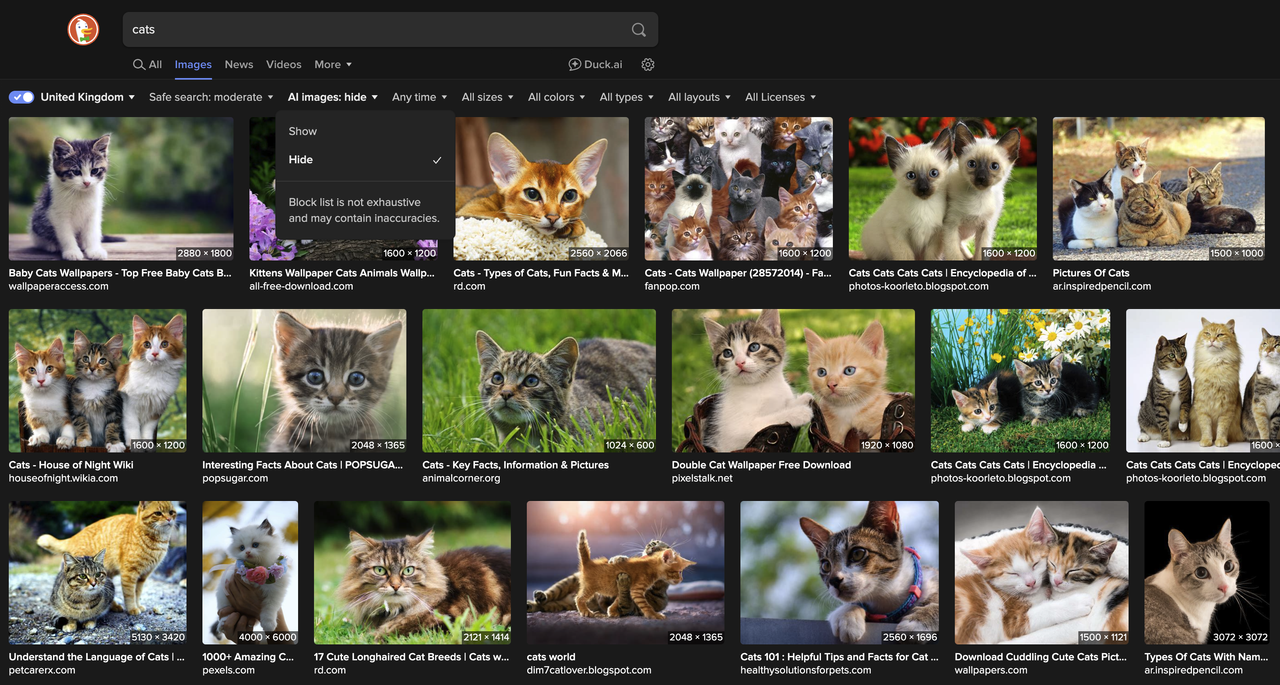
Rank 79258Popular search engine DuckDuckGo has added a new AI image-filtering toolUsers can now remove AI-generated images from their search resultsIt's available for free at duckduckgo.comPopular privacy-first search engine DuckDuckGo is rolling out a new feature that lets users remove AI-generated images from their search results.On X, the company tweeted, "Our philosophy about AI features is "private, useful, and optional.” Our goal is to help you find what you’re looking for. You should decide for yourself how much AI you want in your life – or if you want any at all.To that end, we’ve added a new setting to hide AI-generated images in your results when you’re searching for images on DuckDuckGo."The new AI filter feature has already started rolling out, and you can access it simply by searching on DuckDuckGo and selecting "hide AI images" from a new drop-down.Considering the rapid rise of image- and video-generation tools on the internet, this new feature could be a compelling reason to finally switch from Google to DuckDuckGo.If you're sick of all the AI content hogging your image searches, DuckDuckGo might be the way to go. That said, the company says, "The filter relies on manually curated open-source blocklists, including the ‘nuclear’ list, provided by uBlockOrigin and uBlacklist Huge AI Blocklist."This means it won't catch 100% of all AI-generated content, but DuckDuckGo says, "it will greatly reduce the number of AI-generated images you see.”New setting: hide AI-generated images in DuckDuckGoOur philosophy about AI features is “private, useful, and optional.” Our goal is to help you find what you’re looking for. You should decide for yourself how much AI you want in your life – or if you want any at all. (1/4) pic.twitter.com/pTolmsEQlQJuly 14, 2025Taking back controlDuckDuckGo is planning to add more filters in the future, which should improve the rate at which the company's algorithm is able to weed out AI-generated content.I've started to notice more and more AI-generated images in Google search over the last few months, and with tools like ChatGPT's image generation and Google's Veo 3 video generation easily accessible, online platforms are becoming more and more littered with AI slop.While DuckDuckGo won't solve all your issues with AI images overnight, this new feature is the first step in giving users the choice on how they want to experience AI. If you can't stand AI images, DuckDuckGo might be the solution you've been waiting for.You might also likeAI is tricking people into traveling to places that don't exist, and we all need to learn to avoid these scamsI tried using ChatGPT Agent to plan a date night, and it worked surprisingly wellNetflix uses generative AI VFX in a show for the first time
-

Picture from static.independent.co.uk
Rank 79259 -

Picture from static.independent.co.uk
Rank 79260 -

Picture from cdn.mos.cms.futurecdn.net
Rank 79261A major IT outage has affected Alaska AirlinesIts full fleet was grounded, and 11 flights were in the sky at the timeIt's not the company's first IT-related fleet groundingAlaska Airlines flights are back up and running after a mysterious IT outage grounded flights for several hours.The outage resulted in all of the company's flights being grounded as well as affecting Horizon Air flights – a subsidiary of the Alaskan company.Besides the flight disruptions, residual delays are expected as the airline repositions aircraft and crews to resume at normal capacity.Alaska Airlines IT outage"It will take some time to get our overall operations back to normal," the company explained in an X post.It's believed that around 11 flights were in the air during the outage, which was resolved several hours after first being detected.No official explanation of the root cause has been provided, but some signs point toward the Scattered Spider ransomware group, which has recently targeted other victims in the aviation sector including Qantas, Air Serbia and WestJet.Hawaiian Airlines, which has also been under Alaskan ownership since late 2024, also experienced a cyber incident earlier this year.In June 2025, Hawaiian Airlines shared in an X post: "Hawaiian Airlines is addressing a cybersecurity event that has affected some of our IT systems."For Alaska Airlines specifically, this marks the second IT-related fleet grounding in a little over a year. In April 2024, an issue with the system that calculates aircraft weight and balance also caused a full grounding.Interestingly, Microsoft also declared it was experiencing "active attacks" on server software on July 20 (via Reuters), but few details have been shared regarding that incident either. It's unclear whether the two incidents are related.TechRadar Pro has asked Alaska Airlines for more information on yesterday's incident, but we did not receive an immediate response.You might also likeDownloaded something dodgy? Here's the best malware removalThe best endpoint protection helps ensure your systems are saferQantas reveals massive data breach - 6 million customers possibly affected, here's what we know
-

Picture from static.independent.co.uk
Rank 79262 -

Picture from static.independent.co.uk
Rank 79263 -

Picture from ichef.bbci.co.uk
Rank 79264 -

Picture from static.independent.co.uk
Rank 79265 -

Picture from static.independent.co.uk
Rank 79266 -

Picture from image.cnbcfm.com
Rank 79267 -

Picture from cdn.mos.cms.futurecdn.net
Rank 79268Microsoft is collecting more data on performance issues with Windows 11This is happening via feedback from testers using preview buildsHoovering up a whole lot more logs relating to performance hitches will hopefully help Microsoft stamp out sluggishness on the desktopMicrosoft has promised to improve Windows 11's overall performance levels, ensuring the operating system runs more nippily all round, and it'll use data from the PCs of testers to do this.Windows Latest spotted that in a new preview build in the Dev channel, Microsoft announced the scheme, which urges testers to report incidents of system sluggishness.Microsoft informs us: "As part of our commitment to improving Windows performance, logs are now collected when your PC has experienced any slow or sluggish performance. Windows Insiders are encouraged to provide feedback when experiencing PC issues related to slow or sluggish performance, allowing Feedback Hub to automatically collect these logs, which will help us root cause issues faster."Essentially, Microsoft is attempting to expand the quantity and scope of logs relating to performance issues that it's receiving, in order to better deal with speed-related niggles in Windows 11.The logs pertaining to performance issues are stored in a temporary folder on the system drive, and Microsoft says they're only sent across to the company when the user submits feedback (via the Feedback Hub, where there's a new section for reports of 'system sluggishness').Analysis: exploring new avenues of improvement(Image credit: Future)There have been a good few complaints about performance hiccups – or indeed more serious failings – with Windows 11, so it's good to see Microsoft launch a fresh initiative to help combat these issues (with any luck – the results, of course, remain to be seen).Sluggish search functionality and wonkiness with File Explorer performing sub-optimally have been a couple of obvious problems that Windows 11 has caused for some users. Granted, not everyone has suffered from these kinds of woes, although I've certainly experienced File Explorer sluggishness on my Windows 11 laptop (but not on my desktop PC).These are frustrating issues to be faced with, given that they're key pieces of the interface which really shouldn't be going awry. Hopefully testers will get behind this effort, as it would be good for all concerned if Microsoft can get a better handle on improving the performance of Windows 11 for those who find it lacking (especially on older PCs – like my notebook, which is a venerable Surface model – where any shortcomings are more likely to be noticeable).Finally, it's worth making clear that data on incidents of sluggish performance is only being collected through preview builds of Windows 11, so those logs are just kept on the PCs of testers, not normal users of the release version of the OS.And, as noted, logs from testers are only sent to Microsoft voluntarily, so even if the data itself is collected automatically, it doesn't leave your drive until and unless you submit a feedback post.You might also like...Windows 11's handheld mode spotted in testing, and I'm seriously excited for Microsoft's big bet on small-screen gamingNo, Windows 11 PCs aren't 'up to 2.3x faster' than Windows 10 devices, as Microsoft suggests – here's why that's an outlandish claimmacOS Tahoe 26: here's everything you need to know about all the new features
-

Picture from cdn.mos.cms.futurecdn.net
Rank 79269We've had confirmation on when you can watch the first trailer for Avatar: Fire and Ash – and you'll be able to get your next glimpse of Pandora this week.The trailer will run in front of The Fantastic Four: First Steps, which not only means that you'll be able to watch it from Thursday (July 24), but also means you can potentially watch the trailer in 3D, as it's obviously meant to be seen.It's availability in 3D might depend on your location – we know for a fact that the trailer is available in 3D, which shouldn't surprise anyway, but whether it's actually shown in 3D even in a 3D screening of First Steps obviously isn't something I can promise you.And even then, my local movie theater is only doing one 3D showing of Fantastic Four per day, so I guess I know which one I'm going to…I've long since given up on 3D movies in general – barely any are shown in 3D where I live anyway, and they never feel like they're making good use of it (though I did like Doctor Strange in the Multiverse of Madness' 3D effects).But obviously an Avatar movie is a special case – and the trailer is genuinely enough to make me fit my schedule around that one 3D showing of Fantastic Four: First Steps. What can I say; I love James Cameron.What to expect from Avatar: Fire and AshMuch as Avatar: The Way of Water introduced us to water-loving Na'vi, the third movie will introduce us to fire-friendly Na'vi.According to director James Cameron, this movie "goes to darker places than the previous ones did", and the fire Na'vi will be an aggressive clan – it sounds like the story may focus more on conflict between the Na'vi than with the human RDA.We've been promised hard turns and plot twists, and more character development – and that in particular Neytiri (Zoe Saldaña) will find herself questioning her beliefs as a result of whatever's coming in what I assume will be another three-hour epic.I expect the trailer will appear online at some point, but for now, it looks like seeing Marvel's latest will be your only option. That's recently been the case with other new movies like the trailer for Christopher Nolan's The Odyssey playing in front of Jurassic World: Rebirth – and heaven help me, I dragged myself to that. At least I was already enthused about seeing Fantastic Four!You might also likeThe Fantastic Four: First Steps director gives blunt response to fan criticismWant to prepare for First Steps? Skip the movies and watch this Disney+ show'The Fantastic Four: First Steps' cast and character guide
-

Picture from assets3.cbsnewsstatic.com
Rank 79270 -

Picture from image.cnbcfm.com
Rank 79271 -

Picture from static.independent.co.uk
Rank 79272 -

Picture from static.independent.co.uk
Rank 79273 -

Picture from static.independent.co.uk
Rank 79274 -
Picture from static.independent.co.uk
Rank 79275 -
Picture from static.independent.co.uk
Rank 79276 -

Picture from ichef.bbci.co.uk
Rank 79277 -

Picture from image.cnbcfm.com
Rank 79278 -

Picture from static.independent.co.uk
Rank 79279 -

Picture from static.independent.co.uk
Rank 79280 -
Picture from cdn.mos.cms.futurecdn.net
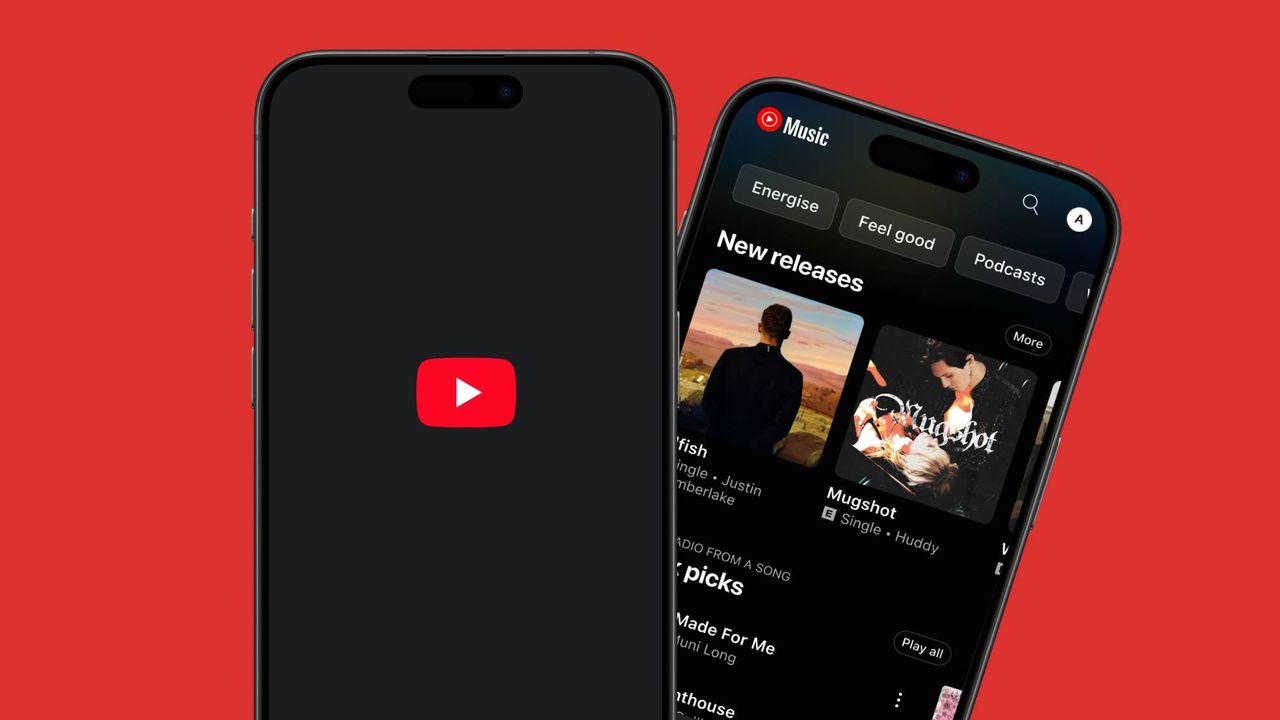
Rank 79281YouTube Music has brought out a new feature that allows you to resume music playback across different devices It's similar to Spotify Connect, which gives you more controls in addition to cross-device playback The 'Speed dial' carousel in the YouTube Music app also shows playback progress bars, which is another new addition YouTube Music isn’t just a handy way to go ads-free in its standard video player platform, it’s one of the most popular music streaming services out there – and its new playback feature marks a long-awaited addition to its interface. Unfortunately, it's one that Spotify has had for years.In the latest version of the YouTube Music app (version 8.26.51), you can now resume music playback on different devices, allowing you to smoothly move between your mobile device, tablet, and computer to pick up where you left off. This means that you can start streaming from YouTube Music on your phone, stop mid-listen, and resume on another device.As well as YouTube Music’s latest feature, those over at Android Authority spotted another small addition to the YouTube Music interface. In your ‘Speed dial’ carousel, (a section where you can pin songs, albums, and playlists you want to listen to frequently) you’ll see that there are new progress bars that represent your listening activity on other devices.When you tap on one a new ‘Resume’ option will appear, allowing you to pick up playback where you left off.(Image credit: Android Authority )A helpful feature, but it’s still early days While you’ve always been able to keep track of your listening habits as you move between devices, the ability to pick up from where you left off isn't as smooth as the likes of Spotify Connect, which is YouTube Music’s biggest rival. The new feature has definitely been a long time coming for YouTube Music, but it still has a long way to go.In the case of Spotify, not only can you resume playback between devices, but it gives you even more power by allowing you to control music playback on one device using another. For example, Spotify could be streaming music out of your smartphone, but you can still navigate its desktop version to control what comes out of your phone by tapping the ‘Connect’ icon in the playback bar, which will show all of the available devices.This feature applies to devices such as the best smart speakers, which you can also control from your smartphone or computer. I find this particularly helpful and use it constantly, and Spotify Connect makes it a lot easier to switch from my smart speaker back to my smartphone when I need to leave the house but still want to listen to music on the way.There’s no denying that the new Resume feature is a big upgrade to YouTube Music’s ecosystem, which will hopefully evolve over time to allow you to have more power over your playback. Right now, it’s still very fresh, so we’ll have to see what loyal YouTube Music users think of the change.You might also like...YouTube removing the Trending page looks out of touch – it needs to fix these 3 much bigger problems firstI used Google Gemini to analyze YouTube, and the results were seriously impressive - 4 ways you can use video integration to get the most from AISpotify HiFi: release date rumors, price predictions, and everything we know so far
-

Picture from ichef.bbci.co.uk
Rank 79282 -

Picture from ichef.bbci.co.uk
Rank 79283 -

Picture from ichef.bbci.co.uk
Rank 79284 -

Picture from static.independent.co.uk
Rank 79285 -

Picture from static.independent.co.uk
Rank 79286 -

Picture from image.cnbcfm.com
Rank 79287 -

Picture from static.independent.co.uk
Rank 79288 -

Picture from static.independent.co.uk
Rank 79289 -

Picture from static.independent.co.uk
Rank 79290 -

Picture from static.independent.co.uk
Rank 79291 -
Picture from cdn.mos.cms.futurecdn.net
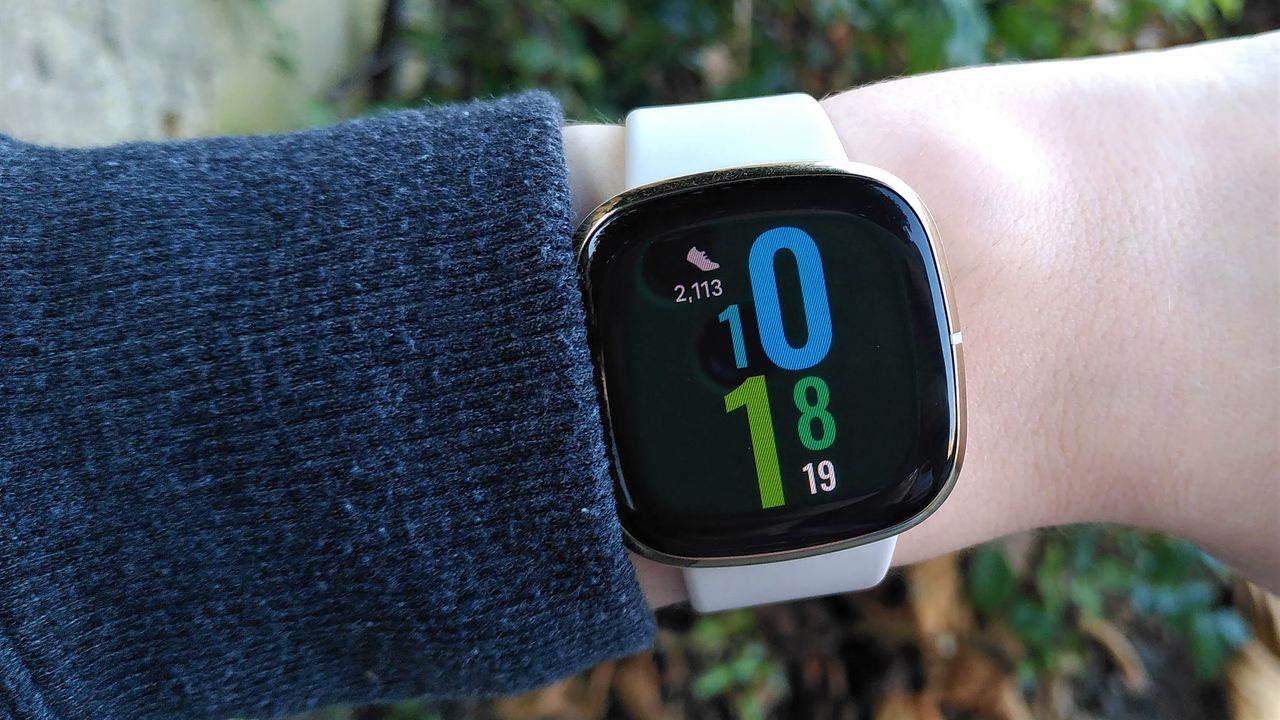
Rank 79292Last week, Fitbit users experienced an outage that prevented app logins and watch syncingThe issue was resolved quickly, but problems have persisted for a seemingly small percentage of usersWe've been getting more emails over the weekend, both about this persistent issue and other problems Fitbit users are havingLast week, starting on July 17, Fitbit users reported problems in droves, as the app was preventing users from syncing up their watches and fitness trackers – and when users followed Fitbit's recommended troubleshooting steps and logged out of the app, it wouldn't allow them to log in again.The issues cropped up regardless of whether users were rocking one of the best Fitbits, an older model, or a Google Pixel Watch, and I covered the outage extensively with a live blog. Google reached out to confirm that the issue was resolved later that same day, and Downdetector reports returned to normal.However, even after the blog ended, we've been getting emails from readers who say their devices that still won't sync with the Fitbit app.Wendy emailed on July 19, two days after the outage was reported to have ended, to say "I’ve been trying to sync all day. I have Covid so have been tracking my blood oxygen level... I don’t know what my number was last night as it won’t sync."Lloyd emailed to let us know his Fitbit wouldn't sync with the app on his iPhone 11, Ann was unable to set the correct time on her watch (also likely the result of a syncing issue, as this is done by pairing with your phone), and other users chimed in to say their best fitness trackers wouldn't sync properly either.In a thread on Reddit titled Anyone else still having sync issues? another eight people chimed in with their comments, all affirming that they're still having problems after the fix was rolled out. In another thread titled How are Fitbits now? the most-upvoted comment was this one:"The last few weeks have been horrible. Nonstop sync issues with the app and they had a major outage yesterday which they say is fixed but I'm still having issues... I'd honestly go Garmin at this point."Unrelated issues(Image credit: Future)It's important to put these issues in perspective: while it's very unfortunate that all the users mentioned above have devices they're temporarily unable to use (some of them likely with Fitbit Premium subscriptions they're paying for) it seems they're a relatively small minority of users, with Google appearing to have fixed the broader issue.However, that doesn't help you if your device can't sync, or is bricked. Quite a lot of people reached out to us in the end, many with ongoing issues that seem to be separate from the outage.Phil in Hong Kong wrote in to tell us: "My Fitbit has not been working for a week. It does strange things like after I wake up it says I’ve hit 10,000 steps or doesn’t read my sleep."It’s actually really annoying and this is the third time I’ve had issues with Fitbit and I keep thinking should I switch to an Apple Watch."Phil's response is echoed by Linda, stating: "I have tried every troubleshooting method with the same results. About two weeks ago, I ordered an Apple Watch SE 2nd generation."The reason people are so disappointed when their devices don't work is that people love using their Fitbits. It creates an engaged community of like-minded users looking to keep fit, track their sleep and health, and enjoy exercise.It's a great tool, and for most people it works very well. There are many reasons why, even in the face of some persistent issues, Fitbit remains synonymous with activity tracking.For those who are experiencing ongoing difficulties that can't be solved by the usual troubleshooting, the best thing to do is reach out via the Fitbit Help Center.You might also like... The latest Google Pixel Watch 4 leaks point to a price freezeThe Google Pixel Watch 4 is rumored to sport a bigger battery – but I'm hoping it's not just for a brighter screenHow to use heart rate zones on your smartwatch to smash your fitness goals, according to research
-

Picture from assets2.cbsnewsstatic.com
Rank 79293 -

Picture from static.independent.co.uk
Rank 79294 -
Picture from assets2.cbsnewsstatic.com
Rank 79295 -

Picture from image.cnbcfm.com
Rank 79296 -

Picture from static.independent.co.uk
Rank 79297 -

Picture from static.independent.co.uk
Rank 79298 -

Picture from static.independent.co.uk
Rank 79299 -

Picture from static.independent.co.uk
Rank 79300