News
This constantly updated list features the latest and most important news articles, ranked in order of significance. The top stories highlight major developments, breaking news, and critical updates across various topics, ensuring you stay informed about the most pressing issues. As new articles are added, the list adapts to reflect the latest priorities, keeping the most impactful stories at the forefront. Whether it’s global events, technology breakthroughs, or industry trends, this dynamic list ensures you always have access to the most relevant and timely information.
-

Picture from assets3.cbsnewsstatic.com
Rank 56701 -

Picture from static.independent.co.uk
Rank 56702 -

Picture from static.independent.co.uk
Rank 56703 -

Picture from image.cnbcfm.com
Rank 56704 -
Picture from o.aolcdn.com
Rank 56705After a six-year wait, Panasonic's S1 II is finally here and there's a lot to unpack. As you’d expect from this company, it’s creator-centric with up to 5.8K ProRes RAW internal video recording. At the same time, it’s Panasonic’s fastest full-frame photo camera ever with 70 fps burst speeds and reduced rolling shutter distortion thanks to the new partially stacked 24-megapixel sensor. And with an AI-powered hybrid phase detect system, autofocus is no longer a weak point as it was with the original S1.
There is one issue though, and a surprising one for Panasonic: the price. The $3,200 S1 II is similar to Nikon’s Z6 III, right down to the partially stacked sensor and internal RAW video. However, the latter is some $700 cheaper and can often be found on sale for even less. Since Panasonic often undercuts rivals, that puts the S1 II in the unusual position of being overpriced next to the competition. After testing it for the last month, I’ve found that whether it's worth it depends on your priorities.
Handling and design
The S1 II shares its excellent body design with the higher-resolution S1R II and the cheaper, non-stacked S1 IIe. It’s considerably lighter than the original S1 at 1.76 pounds and much smaller as well, both of which make it less burdensome. It’s also easy to hold thanks to the big ridged grip. However, it’s more angular and has a harder rubber skin than Canon’s rival EOS R6 II, so it’s not quite as comfortable over long shooting sessions.
The excellent control layout makes the S1 II a breeze to use. It has all the buttons and dials you need and they’re well located — particularly the joystick and control dials. There’s a dedicated switch for photos, video and slow and quick (S&Q) modes, and each has separate adjustments so you won’t mix them up. It also has a dedicated autofocus switch, two video record buttons (top and front), 10 other programmable buttons and a tally light.
I rarely needed to search for settings thanks to the logical color-coded tabs and easy-to-use quick menu, both accessible by touch or the joystick. Panasonic also made it simple to program buttons, dials and the quick menu to your personal preferences and it allows you to save them to a memory card as a backup.
The S1 II’s electronic viewfinder is bright and sharp, matching the Z6 III with a resolution of 5.76 million dots and 0.78x magnification. The rear display not only swivels out but also tilts up and down for overhead or hip-level photography. In comparison, Nikon’s Z6 III screen doesn’t tilt, so it’s not as versatile.
As with the S1R II, battery life isn’t a strong point here, with only 360 shots on a charge or 320 when using the EVF. To be fair, that matches the Z6 III exactly (and Panasonic’s non-stacked S1 II is only slightly better at 380 shots), but Canon’s cheaper R6 II has more than twice the battery life at 760 shots.
Steve Dent for Engadget
In order to capture RAW video, the S1 II has a CFexpress Type B card slot along with a slower SDXC UHS-II slot. Like the S5 IIx and GH7 (and several Fujifilm models), it also supports high-bandwidth RAW video capture to an SSD via the USB-C port.
The S1 II comes with a full-sized HDMI port that supports Blackmagic and ProRes RAW capture. You also get mic and headphone ports, and you can capture 32-bit float audio via the optional XLR2 accessory to reduce the possibility of clipping. Finally, the S1 II has a carbon fiber curtain that comes down to protect the sensor like recent Canon and Sony models.
Performance
The S1 II can fire bursts at a pedestrian 10 fps in mechanical shutter mode, but supports a superb 70 RAW images per second with the electronic shutter. And if you’re worried about skewed images, don’t fret. Distortion is minimal in electronic mode thanks to the partially-stacked sensor that has a rapid readout speed of around 12 milliseconds. That’s fast enough for sports or wildlife photography, unless the subject moves very rapidly.
Pre-burst capture, which starts when you half-press the shutter, is also available at the highest speeds. That lets you save up to 1.5 seconds of photos you might have otherwise missed once you fully press the shutter button. The buffer is a bit small, though, so you can only capture about three seconds (220 shots) at the 70 fps speed.
The hybrid phase-detect autofocus is the best of any Panasonic camera I’ve tested to date. However, it’s not yet up to Sony and Canon’s standards for speed and accuracy, and falls a bit short of Nikon’s Z6 III. If you’re shooting a fast-moving subject at the maximum burst rate of 70 fps, you may see more than a few out-of-focus photos.
Steve Dent for Engadget
The S1 II supports multiple AI modes — including animals, birds and vehicles — on top of human eye-tracking modes. I had mixed success with those as the camera had trouble locking onto the eyes of some birds and marine mammals I shot at the Vancouver Aquarium. However, it was better with more typical animal subjects like dogs, cats, horses and geese. Panasonic also introduced an AF mode called Urban Sports that improves tracking for breakdancing, skateboarding and parkour. I tested that mode with some skateboarders at the highest burst settings and saw a high percentage (90-plus) of in-focus shots.
One area where Panasonic tops its rivals is stabilization. That’s been boosted to eight stops (slightly short of the R6 II’s eight and a half stops), which allowed me to shoot at shutter speeds down to a half second and still get sharp shots. And as I’ll explain shortly, the S1 II is peerless when it comes to video stabilization.
Image quality
I’ve been impressed with Panasonic’s color science of late, finding that it matches Nikon in delivering some of the most color-accurate images of any system. By comparison, Canon’s images skew warmer, and I feel that Sony models like the A7 IV lack some accuracy, particularly with blue-green colors.
The S1 II delivers pleasing JPEGs with a nice balance between sharpness and noise reduction, though the latter can get overly aggressive at high ISO levels. RAW images offer plenty of detail in light and dark areas of the image, letting you tweak and correct to a fine degree. Keep in mind that using the electronic shutter in burst modes reduces RAW bit depth from 14 to 12.
The downside of any stacked sensor is additional noise, and the S1 II is no exception. This is most apparent at higher ISO levels where the camera exhibits a bit more grain than Panasonic’s S5, which has the same resolution but isn’t stacked. That said, the S1 II has about the same low-light prowess as the Z6 III and beats most fully stacked cameras.
If the native 24MP resolution isn’t enough, the S1 II offers a high-resolution mode that captures eight images with a slightly offset sensor position and composes them into a single 96-megapixel file (either RAW or JPEG). I was able to take sharp images in that mode without the use of a tripod thanks to the S1 II’s excellent in-body stabilization system.
Video
The S1 II doesn’t shoot 8K RAW like the 44MP S1R II due to its lower resolution. However, it does support 5.8K 30 fps ProRes RAW, open gate full sensor video and super slow-mo (4K 120p) — all with far less rolling shutter distortion. Because of that, I think this is a better camera overall for creators.
Of course, the S1 II offers 10-bit video in both MP4 and Quicktime formats on top of RAW. Panasonic’s V-Log is also on tap to boost dynamic range, and thanks to a recent firmware update, you can pay $200 to get ARRI LogC3 to match that company’s pro digital cinema cameras.
With that same firmware update, the S1 II now supports 17 frame aspect ratios (up from 10), and enables simultaneous display of up to three frames at once (unlike the LogC3 update, these are free). That will let you shoot open gate, for instance, while seeing how the image will look in both vertical and horizontal aspect ratios.
Overall, video quality is outstanding with sharp oversampling, excellent color accuracy and decent dynamic range. The latter can be increased using Panasonic’s dynamic range boost option, although that effectively doubles rolling shutter distortion. Without the setting enabled, skew from rolling shutter is only an issue with whip pans or very fast-moving subjects.
Video AF is solid, keeping subjects in focus as long as they don’t move too quickly. Face, eye, animal, urban sports and vehicle detection work well, though you’ll see a bit more accuracy and speed on Canon and Sony’s latest models.
Steve Dent for Engadget
The S1 II offers better video stabilization than its rivals, though. Optical stabilization provides good results for handheld video, while electronic stabilization (EIS) provides gimbal-like smoothness at the cost of a significant crop. As with other recent Panasonic models, the S1 II also offers “cropless” EIS that corrects corner distortion when using wide lenses, while also reducing rolling shutter.
Thanks to a built-in fan, overheating is rarely an issue with the S1 II. The only time I ever saw a problem was with 5.8K at 60 fps and 5.1K open gate recording, when the camera shut down after 50 minutes and 40 minutes respectively. That’s still excellent for a small mirrorless camera. Those limits are eliminated, by the way, if you record to an SSD via the USB-C port.
Creators may wonder how the S1 II compares to Nikon’s Z6 III. The latter offers more RAW options, with the choice of 5.8K Nikon RAW (N-RAW) at up to 60 fps rather than just 30 fps. Both offer similar video quality as they use the same sensor. The Z6 III has slightly better autofocus, but the S5 II has superior stabilization and handling. Finally, the S1 II has some nice pro features like timecode, waveform monitoring and pro audio. I’d say the S1 II is slightly better for video shooters, but the Z6 III is significantly cheaper.
Wrap-up
Panasonic’s S1 II is a powerful hybrid camera, and if it wasn’t so expensive, it would be a no-brainer for creators. However, Nikon’s Z6 III has nearly the same video capabilities, is a better camera for photography and costs at least $600 less, so I’m inclined to recommend that model for most users.
Another option at a lower price is Panasonic’s new $2,500 S1 IIe, which was announced at the same time as the S1 II. It has the same body and mostly the same feature set, but uses the non-stacked sensor from the S5 II, so rolling shutter is more of an issue.
If you favor photography, the higher-resolution S1R II is a better option and costs just $100 more. However, if you’re a video pro who needs features like time code, ARRI LogC3 and advanced monitoring or audio features, the S1 II is a solid choice. Those folks might want to wait for a sale though.This article originally appeared on Engadget at https://www.engadget.com/cameras/panasonic-s1-ii-review-a-near-perfect-creators-camera-if-money-is-no-object-174509182.html?src=rss
-

Picture from static.independent.co.uk
Rank 56706 -

Picture from static.independent.co.uk
Rank 56707 -

Picture from static.independent.co.uk
Rank 56708 -

Picture from assets3.cbsnewsstatic.com
Rank 56709 -

Picture from assets1.cbsnewsstatic.com
Rank 56710 -

Picture from assets3.cbsnewsstatic.com
Rank 56711 -

Picture from image.cnbcfm.com
Rank 56712 -

Picture from image.cnbcfm.com
Rank 56713 -

Picture from techcrunch.com
Rank 56714 -

Picture from techcrunch.com
Rank 56715 -

Picture from assets3.cbsnewsstatic.com
Rank 56716 -

Picture from assets1.cbsnewsstatic.com
Rank 56717 -

Picture from cdn.mos.cms.futurecdn.net
Rank 56718Xiaomi announced AI smart glassesThey share a lot of similarities with Meta's Ray-Bans, even priced similarlyXiaomi's specs have some unique features, like electrochromic dimmingChinese tech brand Xiaomi isn’t about to let Android XR, Meta, and others race ahead of it in the smart glasses world as it just announced its AI glasses – and while they’re awfully similiar to Meta’s specs, they offer a few upgrades including one I’ve been begging Meta to add since launch.Word of warning, however, while they’re set to cost about as much as Meta’s specs, many of us reading this won’t be snagging a pair, as right now it looks like they’ll be exclusive to Xiaomi’s home turf: China.At a glance, they look very similar to the Ray-Ban Meta smart glasses I use regularly. They offer a stylish frame in a handful of color options that’s thicker than normal but still fairly sleek.They boast similar hardware, such as a 12MP camera which can apparently capture 2K video at 30FPS, built-in microphones for capturing what you’re saying, and open ear speakers for audio playback.(Image credit: Xiaomi)You can also use the glasses hands-free, getting its AI assistant to snap photos for you or answer your queries – and again, just like Meta’s specs, these Xiaomi glasses capture an image to use as context for your questions like “identify this flower.”But right away, there are some key differences.At the end of one arm, you can find a USB-C port allowing you to charge the AI glasses while wearing them – Meta’s specs only charge in their case.They offer a bigger battery too, with Xiaomi promising “8.6 hours” or around eight hours, 36 minutes of use between charges.You can also use the glasses for paying vendors if they offer the ability to pay via scanning a QR code. It might not be something you see often, but it’s a very common payment method in China.Crucially, however, these glasses offer electrochromic dimming. This is the feature I think is coolest.Enjoying the shades(Image credit: Xiaomi)For smart glasses to be a success, they need to be something you can wear all the time.Imagine if your phone only worked in certain weather.Tech-wise, you can use smart glasses in all the same conditions, but the lenses you have will decide how practical that is.Clear lenses are perfect for cloudier days, while shaded lenses are a lot more suitable for bright sunny conditions, but a non-starter for darker weather or indoor use.Since swapping my Meta Ray-Bans, which were always shaded, for a pair with transition lenses, I use them much more frequently because I can rely on them in a broader range of weather conditions.Ray-Ban Meta smart glasses have a lot of lens options (Image credit: Meta)Electrochromic dimming offers this same practicality, but instead of being determined by the weather, Xiaomi’s smart glasses can be darkened or brightened manually by sliding your finger along their arm.In many ways, it’s about as useful as transition lenses, but for me, electrochromic dimming wins because you have more personal control over the shading, allowing you to alter your vision at will.Though it is a close race, especially because the features look to cost about the same.While the base Xiaomi glasses cost 1999¥ – similar to the $299 / £299 / AU$449 you’d pay for the base Ray-Ban Meta smart glasses – they don’t have electrochromic dimming. The cheapest pair with the feature are 2699¥, which is around the same price as the $379 / £379 / AU$539 transition lens equipped Meta Ray-Bans.So for now I’ll be sticking with my transition lens smart glasses, but I’ll be watching this space as color changing lens tech becomes such an essential feature, it needs to be included with even the base model – though for now both key options are inescapably pricey.You might also likeI adore my Meta Ray-Bans, but these new Oakley smart glasses are making me jealousMove over ROG Xbox Ally – the real first portable Xbox is here, and it’s a gorgeous VR headsetMeta hits back after US House staffers banned from using WhatsApp over security fears
-

Picture from static.independent.co.uk
Rank 56719 -

Picture from static.independent.co.uk
Rank 56720 -

Picture from static.independent.co.uk
Rank 56721 -

Picture from static.independent.co.uk
Rank 56722 -

Picture from assets3.cbsnewsstatic.com
Rank 56723 -

Picture from assets2.cbsnewsstatic.com
Rank 56724 -

Picture from image.cnbcfm.com
Rank 56725 -

Picture from assets1.cbsnewsstatic.com
Rank 56726 -

Picture from assets1.cbsnewsstatic.com
Rank 56727 -

Picture from assets2.cbsnewsstatic.com
Rank 56728 -

Picture from image.cnbcfm.com
Rank 56729 -

Picture from techcrunch.com
Rank 56730 -

Picture from image.cnbcfm.com
Rank 56731 -

Picture from image.cnbcfm.com
Rank 56732 -

Picture from static.independent.co.uk
Rank 56733 -

Picture from static.independent.co.uk
Rank 56734 -

Picture from static.independent.co.uk
Rank 56735 -
Rank 56736
-

Picture from static.independent.co.uk
Rank 56737 -

Picture from assets1.cbsnewsstatic.com
Rank 56738 -

Picture from ichef.bbci.co.uk
Rank 56739 -

Picture from static.independent.co.uk
Rank 56740 -

Picture from static.independent.co.uk
Rank 56741 -

Picture from image.cnbcfm.com
Rank 56742 -

Picture from static.independent.co.uk
Rank 56743 -

Picture from static.independent.co.uk
Rank 56744 -

Picture from assets1.cbsnewsstatic.com
Rank 56745 -

Picture from cdn.mos.cms.futurecdn.net
Rank 56746Anker EufyMake E1 prints up to 5mm thick textures using UV-curable ink, not filamentOver $45 million raised on Kickstarter makes the E1 the most funded project to dateEufyMake E1 supports over 300 materials, including metal, leather, and curved surfacesAnker’s latest foray into creative tools has unexpectedly taken Kickstarter by storm with its new device, the EufyMake E1, generating nearly $45 million in pledges with days still left in its campaign, making it the most funded Kickstarter project to date.Developed under Anker’s Eufy sub-brand, the E1 is being marketed as the world’s first personal 3D-texture UV printer.While excitement among backers is undeniable, the real question is whether this all-in-one 3D printer machine can live up to its extraordinary promise.A different take on home 3D printingUnlike a typical home 3D printer, the EufyMake E1 doesn’t work with filament to build objects - instead, it uses UV-curable ink and a process Anker calls Amass3D technology to layer ink into textured designs on flat or curved surfaces.The textures can reach up to 5 mm thick and can be printed on over 300 materials, including glass, leather, metal, and wood.It also supports cylindrical objects through rotary printing and direct-to-film output for making custom stickers.From a technical standpoint, the E1 is packed with features, including laser levelers, an 8 MP camera with AI positioning, and the ColorMaestro system that delivers vivid and lasting full-color prints.The company also promises a hands-off user experience, thanks to the JetClean self-cleaning system.These extras could appeal to hobbyists and small businesses alike, especially those producing custom merchandise like ornaments, tumblers, or vinyl stickers.Still, this isn’t just a clever crafting tool; it’s clearly being positioned as a major pitch to the DIY market.With the EufyMake E1 aiming for the consumer space, questions arise about long-term durability, ink costs, and real-world precision, factors that often separate a gadget from a reliable tool.Claims of low operating cost, such as, “a dollar’s worth of ink on a custom metal sign,” may sound compelling, but they’ll need to be tested outside of promotional videos.Ink consumption is a significant consideration for 3D printers. While the EufyMake E1 campaign claims 600 ml yields around 1,000 small prints, there is no detailed ml-per-print data for 3D output.Considering that an ink set reportedly costs about $299, this means an average user could spend around $0.50 per print, and possibly more depending on the application - and in the long run, it could prove too expensive for small business owners.Users looking for the best printer for everyday use or even the best laser engraver for material customization may need to compare carefully before committing.You might also likeThese are the best small business printers around todayAnd these are the best business card printing servicesAmazon reveals huge £40 billion UK investement in major cloud, AI and jobs boost
-
Picture from cdn.mos.cms.futurecdn.net
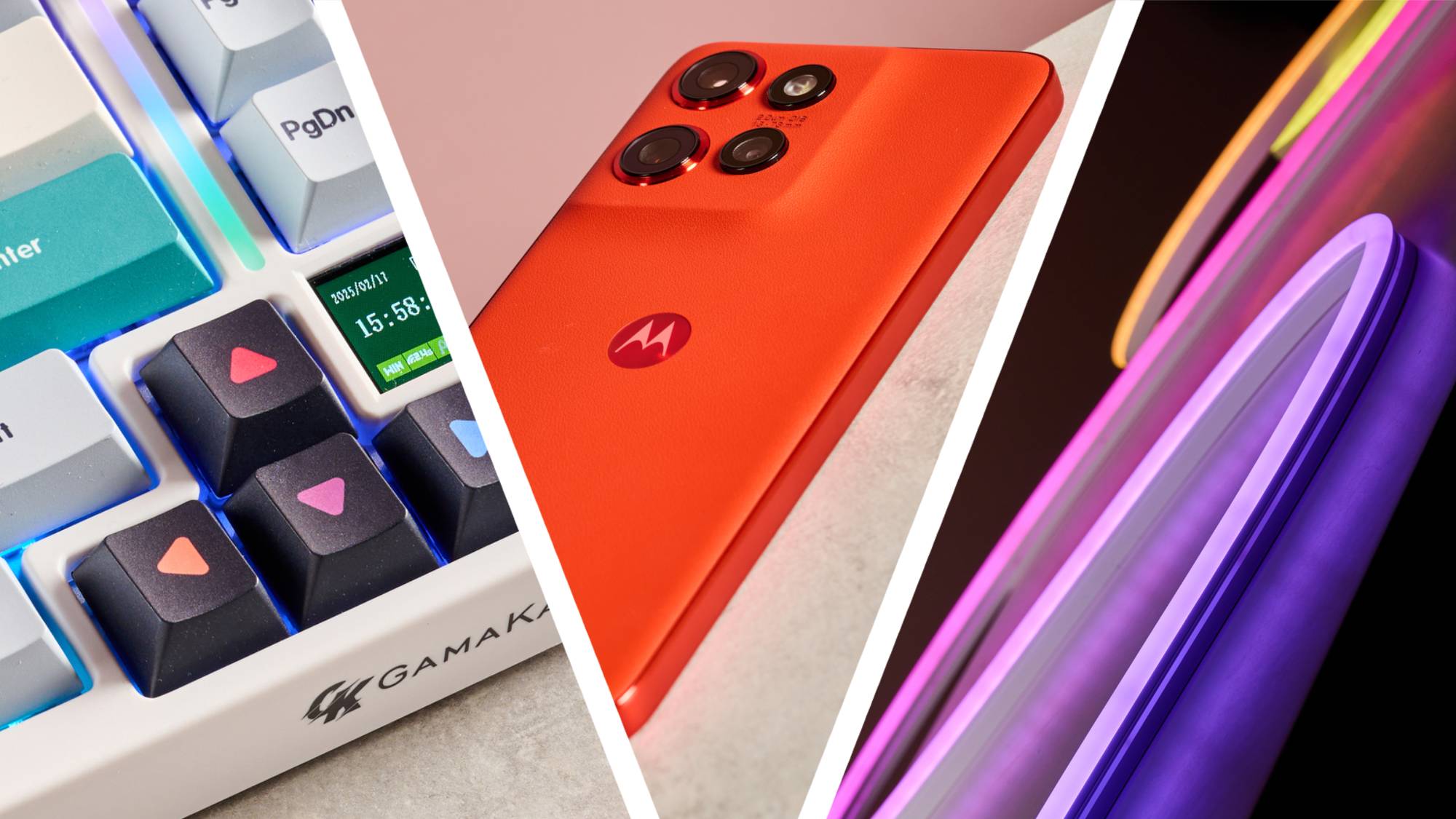
Rank 56747They say fortune favors the bold, so why not rebel from cookie-cutter colorways and mix things up with some eye-catching tech instead? As a self-confessed color addict, I often find myself drawn to products rocking vibrant hues. But, experience has taught me that looks aren't everything, and no matter how pretty something may be, I'll soon tire of it if it proves inefficient.To save others the trial and error, I've collated a list of six of our favorite products across a range of categories that not only performed well, but boast aesthetically pleasing colorways that'll satisfy those color cravings too.Gamakay TK75 V2(Image credit: Future)The Gamakay TK75 V2 keyboard is a well-built and well-performing mechanical keyboard that offers multiple wireless connectivity modes and a good level of customization for the $89.99 / £75 / $AU148 price tag.Our reviewer was impressed by the performance of the Pegasus switches, describing them as ultra-quiet and smooth, while still providing a good level of feedback. He also appreciated the silky-smooth feel of the PBT keycaps, which range in color from white, like the rest of the body, to pale blue, teal, and black.If I could have things my way, all of the best keyboards would have RGB lighting, so I appreciate the vivid RGB backlighting on the TK75 V2, and I’m loving that the extra vibrancy from the independently adjustable RGB light bar that lives toward the right-hand end of the keyboard.The Gamakay TK75 V2 also has a novel little feature similar to others I’ve seen appearing on the market, namely a teeny little screen that’s nestled between the up and right arrow buttons, which is capable of showing colorful little images or GIFs.For the down-low on this bright and beautiful keyboard, check out our Gamakay TK75 review.Bose QuietComfort headphones(Image credit: Future / Bose)The Bose QuietComfort headphones are a personal favorite of mine, and I wear my black pair almost every day. I was almost tempted away by a pale pink pair of Edifiers, but I quickly learned that the difference in fit and performance just wasn’t going to be enough for me to make the switch.Bose's QuietComfort Headphones have a list price of $349 / £349.95 / AU$549.95 and come in a wide range of colors, including black, white, sandstone, lilac, and three different blues, although the paler Moonstone Blue looks to only be available from Amazon US. There’s also a pretty Petal Pink model, but sadly for those of us in the UK, this color seems to only be available in the US and Australia.The button controls on the QuietComforts are simple but satisfying, so I’ve not encountered any issues when skipping tracks or switching between noise-cancelling modes when on the move. Speaking of the ANC, it was rated excellent by our reviewer, and I agree completely, as it serves me well whenever I need to focus in a busy office, and it effectively filters out ambient sounds from noisy public transport.Bose states that the QuietComforts have a battery life of 24 hours, though our reviewer managed to get closer to 26 hours during testing, and I’ve personally not needed to charge my pair up that often, considering the amount I use them.If you’re looking for a pair of headphones that are as well-performing as they are pretty, I strongly suggest you give these a try. I recommend checking out our full Bose QuietComfort headphones review for a more in-depth analysis.Govee Neon Rope Light 2(Image credit: Future)I review a lot of smart lights, and I have lots of them in my home. Some are set to white for practical use, but most are programmed to brighten my space as a colorful dopamine boost.The Govee Neon Rope Light 2 brings something a little different to the table, however. It isn’t a smart light one would buy just to add a bit of ambient color; it’s designed to make a statement, and it succeeds. It comes in white or black, and has a list price of $69.99 / £79.99 for the 9.8ft / 3m model, and $99.99 /£99.99 for the 16.4ft / 5m model.This isn’t the only smart light of this kind, but the incredible level of customization that’s on offer within the intuitive Govee Home app makes it a very good example. You can customize the Neon Rope Light 2 by picking your own color palette and applying it over the entire rope light or curating it in segments. Alternatively, you can make the most of the many pre-existing color palettes or explore the many colors and lighting effects on offer from the wide range of scenes.Though it’s perfect for creating a vibrant and eye-catching neon sign, the variable temperature and brightness levels mean it can also be used more subtly to highlight a particular feature or artwork. If you’d like to learn more about all the fun features on offer, why not have a read of my full Govee Neon Rope Light 2 review?Dyson Supersonic Nural(Image credit: Future)If someone had pitched the idea of a turquoise and orange hairdryer in the past, I’m fairly certain I would have raised an eyebrow, but I really can’t get enough of the Ceramic patina and topaz colorway, and the darker Vinca blue patina and topaz is pretty blimmin’ lovely too.The price tag may be hefty at $499.99 / £399.99 / AU$750, but we were blown away by the performance of the Dyson Supersonic Nural.It boasts several features, including an auto-pause mode, setting preference memory for each of its five attachments, and the innovative Scalp Protect mode. Our reviewer found this mode worked well, as it automatically adjusted the Dyson Supersonic Nural’s temperature based on how far it was away from her head, without noticeably lengthening the drying time compared to her usual just-blast-it-with-hot-air approach.Obviously, this is a big investment to make just for a colorful hairdryer, but if you have the cash to spare, then you won’t be disappointed by the performance the Dyson Supersonic Nural delivers.If you’d like to read more about how this eye-catching hairdryer performed, take a look at our full Dyson Supersonic Nural review.SanDisk Creator Phone SSD(Image credit: Alastair Jennings)Most external hard drives are bland, black rectangles, but not this boisterously blue SanDisk Creator Phone SSD, which has a list price of $99 / £99 for 1TB of storage, or $156 / £156 for 2TB.With USB-C connectivity and a handy lanyard loop, this MagSafe-compatible SSD makes a great portable hard drive for iPhone and Android users alike. Its slimline design makes it easy to pack away, and our reviewer found that this made it one of the few portable SSDs he’d tried that actually felt comfortable when on the back of his phone.Despite weighing just 2oz / 54g, the build quality felt solid and robust. This, combined with the rubberized edges and IP65 dust and water-proof rating, provides some added reassurance when taking it out and about, though it’s important to remember that this rating means it doesn’t qualify as fully waterproof.According to our reviewer, the performance of the USB 3.4 Gen 2 interface was spot-on, either exceeding or coming very close to the scores we wanted to see in the benchmarking tests. The Creator Phone SSD also had no problem keeping up with the demands of capturing over 12 minutes of ProRes video footage.While the color wasn’t to his taste, our reviewer was a fan of the Creator Phone SSD overall, and considers it to be one of the best portable SSDs, whether you’re capturing ProRes video footage or simply using it for extended storage. If you’d like to learn about this portable SSD’s performance in more detail, I recommend checking out our full SanDisk Creator Phone SSD review.Motorola Edge 50 Neo(Image credit: Future)If you’re looking for a smartphone that makes a statement, then I think you’ll like the Motorola Edge 50 Neo. It has a list price of £399 / AU$699 (about $500), and is currently only available in the UK; however, Motorola has other colorful models in their Razr, Edge 60, and Moto G Stylus ranges.All models of the Edge 50 feature a Pantone-curated colored case comprising pleasingly soft-to-the-touch vegan leather and a mixture of brushed and shiny-finished metallic edging. The model we reviewed was called Poinciana, which is a very eye-catching red-orange color.When it was reviewed, the Motorola Edge 50 Neo came with the Android 14 OS installed, with the option to upgrade to Android 15. Motorola promised five Android OS upgrades and five years of security upgrades, which is good going for a phone of this price.The 6.4-inch AMOLED display was satisfyingly bright for the price, and the colors on-screen were just as vibrant and eye-catching as its Pantone-colored casing. The Hello UI offered some useful security features and allowed for plenty of customization, too.The cameras on offer include a 32MP front camera, a 50MP main and a 13MP ultra-wide camera, as well as a 10MP telephoto sensor, which delivered a solid performance for a mid-range phone.If you’re looking for a lightweight mid-range phone with solid battery life that stands out from the crowd, I’d recommend taking a look at our full Motorola Edge 50 Neo review.You might also likeA summer essential for color fans: I tested this portable misting fan, and it immediately became my summer essentialThese computer speakers look perfect in pink: Edifier G2000 computer speakers review: mini yet mighty
-

Picture from static.independent.co.uk
Rank 56748 -
Picture from o.aolcdn.com
Rank 56749Threads and Instagram are continuing to decouple. Meta's social network has updated its Hidden Words setting to make it separate from Instagram. Prior to this update, users had one global Hidden Words setting that impacted both platforms.
For the uninitiated, the Hidden Words setting lets users filter out stuff they don't want to see. The setting can be applied to posts, feeds, searches, profiles and replies. The tool can filter out words, phrases and emojis.
Threads
Threads also offers the ability to snooze words and phrases for a period of 30 days. This is really useful for avoiding spoilers or just when you get tired of a certain discussion topic. Today's update even brings in the ability to filter out words and phrases in batches. Threads head Adam Mosseri says all of this was done so users could "shape the experience into one where they feel comfortable expressing themselves."
When Threads launched in 2023, it was basically an extension of Instagram. The two platforms have slowly been embracing independence the last couple of years. Threads has begun testing its own DM inbox that's not tied to Instagram and now lets people deactivate one account without impacting the other.This article originally appeared on Engadget at https://www.engadget.com/apps/threads-now-has-a-hidden-words-setting-thats-separate-from-instagram-184136934.html?src=rss
-

Picture from ichef.bbci.co.uk
Rank 56750

